搜尋套件、儲存庫與 APP 分類

ml_linalg 封面
套件詳情v13.12.9

ml_linalg

基於SIMD的線性代數與統計,高效操作數值資料

AndroidiOSWebmacOSWindowsLinux
近 30 天下載
2.1萬
喜歡數
88
Pub 分數
150

安裝套件

flutter pub add ml_linalg

套件介紹

根據套件公開資料產生的選型評估,僅供參考。

ml_linalg 是一個高性能、SIMD 優化的線性代數與統計運算庫,適用於 Dart。專為高效能數值資料處理而設計,可實現快速的矩陣與向量計算,是機器學習、科學計算與資料分析所必需的。該套件支援多種平台,包括 Android、iOS、Web、macOS、Windows 與 Linux,非常適合需要密集數學處理的跨平台應用。此套件以效能為核心建構,利用底層優化技術,提供高速度與高精度。

適用情境

  • 機器學習模型訓練
  • 科學模擬
  • 資料轉換管道
  • 即時分析
  • 統計建模
  • 數值優化

主要特色

  • SIMD加速計算
  • 跨平台相容性
  • 矩陣和向量運算
  • 統計函數
  • 在所有支援的平台皆有高表現
  • 高效記憶體使用

適合對象

  • 開發機器學習應用的開發者
  • 使用 Dart 的資料科學家
  • 需要快速數值處理的應用程式
  • 跨平台的數學密集型應用
  • 性能關鍵的數值代碼

使用建議

  • 需要理解線性代數
  • 最適合數值資料工作負載
  • 可能文件有限
  • 不適用於一般用途
  • 針對特定硬體功能進行了優化

原始 README

以下為關聯原始碼儲存庫的 README 原文快照,最新內容請造訪原始碼儲存庫。

Build Status pub package

SIMD-based linear algebra and statistics for data science with Dart

TABLE OF CONTENTS

Linear algebra

    In a few words, linear algebra is a branch of mathematics that works with vectors and matrices. Vectors and matrices are practical tools in real-life applications, such as machine learning algorithms. These significant mathematical entities are implemented in plenty of programming languages.

    As Dart offers developers good instrumentation, e.g. highly optimized virtual machine, specific data types and rich out-of-the-box library, Dart-based implementation of vectors and matrices has to be quite performant.

    Among numerous standard Dart tools, there are SIMD data types, and support of SIMD computational architecture served as inspiration for creating this library.

What is SIMD?

    SIMD stands for Single instruction, multiple data - it's a computer architecture that allows to perform uniform mathematical operations in parallel on a list-like data structure. For instance, one has two arrays:

final a = [10, 20, 30, 40];
final b = [50, 60, 70, 80];

and one needs to add these arrays element-wise. Using the regular architecture this operation could be done in the following manner:

final c = List(4);

c[0] = a[0] + b[0]; // operation 1
c[1] = a[1] + b[1]; // operation 2
c[2] = a[2] + b[2]; // operation 3
c[3] = a[3] + b[3]; // operation 4

    As you may have noticed, we need to do 4 operations one by one in a row using regular computational approach. But with help of SIMD architecture we may do one arithmetic operation on several operands in parallel, thus element-wise sum of two arrays can be done for just one step:

Vectors

A couple of words about the underlying architecture

    The library contains two high performant vector classes based on Float32x4 and Float64x2 data types - Float32x4Vector and Float64x2Vector (the second one is generated from the source code of the first vector's implementation)

    Most of element-wise operations in the first one are performed in four "threads" and in the second one - in two "threads".

    Implementation of both classes is hidden from the library's users. You can create a Float32x4Vector or a Float64x2Vector instance via Vector factory (see examples below).

One can create Float32x4-based vectors the following way:

import 'package:ml_linalg/linalg.dart';

void main() {
  final vector = Vector.fromList([1.0, 2.0, 3.0, 4.0, 5.0], dtype: DType.float32);
}

or simply

import 'package:ml_linalg/linalg.dart';

void main() {
  final vector = Vector.fromList([1.0, 2.0, 3.0, 4.0, 5.0]);
}

since dtype is set to DType.float32 by default.

One can create Float64x2-based vectors the following way:

import 'package:ml_linalg/linalg.dart';

void main() {
  final vector = Vector.fromList([1.0, 2.0, 3.0, 4.0, 5.0], dtype: DType.float64);
}

    Float32x4-based vectors are much faster than Float64x2-based ones, but Float64x2-based vectors are more precise since they use 64 bits to represent numbers in the memory versus 32 bits for Float32x4-based vectors.

    Nevertheless, Float32x4 representation uses by default since usually 32 bits is enough for number precision, and along with that, this representation is more performant.

    The vectors are immutable: once created, the vector cannot be changed. All the vector operations lead to creation of a new vector instance (of course, if the operation is supposed to return a Vector).

    Both classes implement Iterable<double> interface, so it's possible to use them as regular iterable collections.

    It's possible to use vector instances as keys for HashMap and similar data structures and to look up a value by the vector-key, since the hash code for equal vectors is the same:

import 'package:ml_linalg/vector.dart';

final map = HashMap<Vector, bool>();

map[Vector.fromList([1, 2, 3, 4, 5])] = true;

print(map[Vector.fromList([1, 2, 3, 4, 5])]); // true
print(Vector.fromList([1, 2, 3, 4, 5]).hashCode == Vector.fromList([1, 2, 3, 4, 5]).hashCode); // true
Vector benchmarks

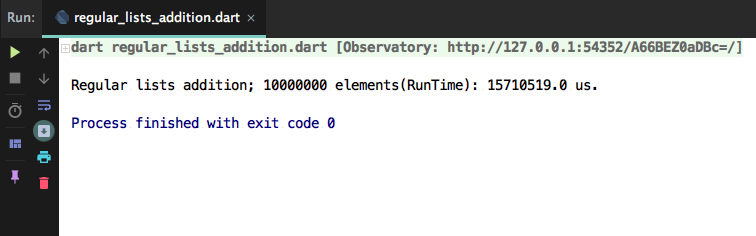
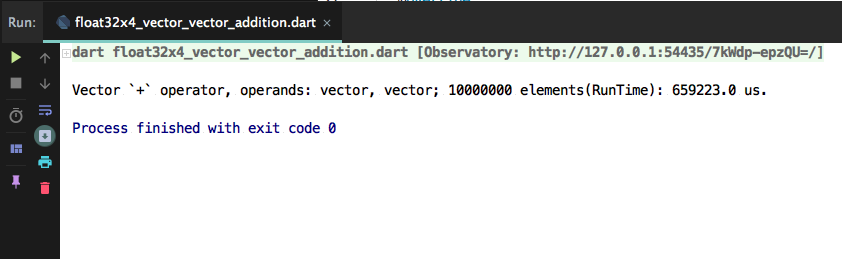
    To see the performance benefits provided by the library's vector classes, one may visit benchmark directory: one may find there a baseline benchmark - element-wise summation of two regular List instances and a benchmark of a similar operation, but performed on two Float32x4Vector instances on the same amount of elements and compare the timings:

  • Baseline benchmark (executed on Macbook Air mid 2017), 2 regular lists each with 10,000,000 elements:

  • Actual benchmark (executed on Macbook Air mid 2017), 2 vectors each with 10,000,000 elements:

It took 15 seconds to create a new regular list by summing the elements of two lists, and 0.7 second to sum two vectors - the difference is significant.

Vector operations examples
Vector summation
  import 'package:ml_linalg/linalg.dart';

  final vector1 = Vector.fromList([1.0, 2.0, 3.0, 4.0, 5.0]);
  final vector2 = Vector.fromList([2.0, 3.0, 4.0, 5.0, 6.0]);
  final result = vector1 + vector2;

  print(result.toList()); // [3.0, 5.0, 7.0, 9.0, 11.0]
Vector and List summation

This operation doesn't benefit from SIMD

  import 'package:ml_linalg/linalg.dart';

  final vector = Vector.fromList([1.0, 2.0, 3.0, 4.0, 5.0]);
  final result = vector + [2.0, 3.0, 4.0, 5.0, 6.0];

  print(result.toList()); // [3.0, 5.0, 7.0, 9.0, 11.0]
Summation of Vectors of different dtype

This operation doesn't benefit from SIMD

  import 'package:ml_linalg/linalg.dart';

  final vector1 = Vector.fromList([1.0, 2.0, 3.0, 4.0, 5.0], dtype: DType.float32);
  final vector2 = Vector.fromList([2.0, 3.0, 4.0, 5.0, 6.0], dtype: DType.float64);
  final result = vector1 + vector2;

  print(result.toList()); // [3.0, 5.0, 7.0, 9.0, 11.0]
Vector subtraction
  import 'package:ml_linalg/linalg.dart';

  final vector1 = Vector.fromList([4.0, 5.0, 6.0, 7.0, 8.0]);
  final vector2 = Vector.fromList([2.0, 3.0, 2.0, 3.0, 2.0]);
  final result = vector1 - vector2;

  print(result.toList()); // [2.0, 2.0, 4.0, 4.0, 6.0]
Vector and List subtraction

This operation doesn't benefit from SIMD

  import 'package:ml_linalg/linalg.dart';

  final vector = Vector.fromList([4.0, 5.0, 6.0, 7.0, 8.0]);
  final result = vector - [2.0, 3.0, 2.0, 3.0, 2.0];

  print(result.toList()); // [2.0, 2.0, 4.0, 4.0, 6.0]
Subtraction of vectors of different dtype

This operation doesn't benefit from SIMD

  import 'package:ml_linalg/linalg.dart';

  final vector1 = Vector.fromList([4.0, 5.0, 6.0, 7.0, 8.0], dtype: DType.float32);
  final vector2 = Vector.fromList([2.0, 3.0, 2.0, 3.0, 2.0], dtype: DType.float64);
  final result = vector1 - vector2;

  print(result.toList()); // [2.0, 2.0, 4.0, 4.0, 6.0]
Element wise Vector by Vector multiplication
  import 'package:ml_linalg/linalg.dart';

  final vector1 = Vector.fromList([1.0, 2.0, 3.0, 4.0, 5.0]);
  final vector2 = Vector.fromList([2.0, 3.0, 4.0, 5.0, 6.0]);
  final result = vector1 * vector2;

  print(result.toList()); // [2.0, 6.0, 12.0, 20.0, 30.0]
Element wise Vector and List multiplication

This operation doesn't benefit from SIMD

  import 'package:ml_linalg/linalg.dart';

  final vector = Vector.fromList([1.0, 2.0, 3.0, 4.0, 5.0]);
  final result = vector * [2.0, 3.0, 4.0, 5.0, 6.0];

  print(result.toList()); // [2.0, 6.0, 12.0, 20.0, 30.0]
Element wise multiplication of Vectors of different dtype

This operation doesn't benefit from SIMD

  import 'package:ml_linalg/linalg.dart';

  final vector1 = Vector.fromList([1.0, 2.0, 3.0, 4.0, 5.0], dtype: DType.float32);
  final vector2 = Vector.fromList([2.0, 3.0, 4.0, 5.0, 6.0], dtype: DType.float64);
  final result = vector1 * vector2;

  print(result.toList()); // [2.0, 6.0, 12.0, 20.0, 30.0]
Element wise Vector by Vector division
  import 'package:ml_linalg/linalg.dart';

  final vector1 = Vector.fromList([6.0, 12.0, 24.0, 48.0, 96.0]);
  final vector2 = Vector.fromList([3.0, 4.0, 6.0, 8.0, 12.0]);
  final result = vector1 / vector2;

  print(result.toList()); // [2.0, 3.0, 4.0, 6.0, 8.0]
Element-wise Vector and List division

This operation doesn't benefit from SIMD

  import 'package:ml_linalg/linalg.dart';

  final vector = Vector.fromList([6.0, 12.0, 24.0, 48.0, 96.0]);
  final result = vector / [3.0, 4.0, 6.0, 8.0, 12.0];

  print(result.toList()); // [2.0, 3.0, 4.0, 6.0, 8.0]
Element wise division of vectors of different dtype

This operation doesn't benefit from SIMD

  import 'package:ml_linalg/linalg.dart';

  final vector1 = Vector.fromList([6.0, 12.0, 24.0, 48.0, 96.0], dtype: DType.float32);
  final vector2 = Vector.fromList([3.0, 4.0, 6.0, 8.0, 12.0], dtype: DType.float64);
  final result = vector1 / vector2;

  print(result.toList()); // [2.0, 3.0, 4.0, 6.0, 8.0]
Euclidean norm
  import 'package:ml_linalg/linalg.dart';

  final vector = Vector.fromList([2.0, 3.0, 4.0, 5.0, 6.0]);
  final result = vector.norm();

  print(result); // sqrt(2^2 + 3^2 + 4^2 + 5^2 + 6^2) = sqrt(90) ~~ 9.48
Manhattan norm
  import 'package:ml_linalg/linalg.dart';

  final vector = Vector.fromList([2.0, 3.0, 4.0, 5.0, 6.0]);
  final result = vector.norm(Norm.manhattan);

  print(result); // 2 + 3 + 4 + 5 + 6 = 20.0
Mean value
  import 'package:ml_linalg/linalg.dart';

  final vector = Vector.fromList([2.0, 3.0, 4.0, 5.0, 6.0]);
  final result = vector.mean();

  print(result); // (2 + 3 + 4 + 5 + 6) / 5 = 4.0
Median value
Even length
  import 'package:ml_linalg/linalg.dart';

  final vector = Vector.fromList([10, 12, 4, 7, 9, 12]);
  final result = vector.median();

  print(result); // 9.5
Odd length
  import 'package:ml_linalg/linalg.dart';

  final vector = Vector.fromList([10, 12, 4, 7, 9, 12, 34]);
  final result = vector.median();

  print(result); // 10
Sum of all vector elements
  import 'package:ml_linalg/linalg.dart';

  final vector = Vector.fromList([2.0, 3.0, 4.0, 5.0, 6.0]);
  final result = vector.sum();

  print(result); // 2 + 3 + 4 + 5 + 6 = 20.0
Product of all vector elements
  import 'package:ml_linalg/linalg.dart';

  final vector = Vector.fromList([2.0, 3.0, 4.0, 5.0, 6.0]);
  final result = vector.prod();

  print(result); // 2 * 3 * 4 * 5 * 6 = 720
Element-wise power
  import 'package:ml_linalg/linalg.dart';

  final vector = Vector.fromList([2.0, 3.0, 4.0, 5.0, 6.0]);
  final result = vector.pow(3);
  
  print(result); // [2 ^ 3 = 8.0, 3 ^ 3 = 27.0, 4 ^ 3 = 64.0, 5 ^3 = 125.0, 6 ^ 3 = 216.0]
Element-wise exp
  import 'package:ml_linalg/linalg.dart';

  final vector = Vector.fromList([2.0, 3.0, 4.0, 5.0, 6.0]);
  final result = vector.exp();
  
  print(result); // [e ^ 2, e ^ 3, e ^ 4, e ^ 5, e ^ 6]
Dot product of two vectors
  import 'package:ml_linalg/linalg.dart';

  final vector1 = Vector.fromList([1.0, 2.0, 3.0, 4.0, 5.0]);
  final vector2 = Vector.fromList([2.0, 3.0, 4.0, 5.0, 6.0]);
  final result = vector1.dot(vector2);

  print(result); // 1.0 * 2.0 + 2.0 * 3.0 + 3.0 * 4.0 + 4.0 * 5.0 + 5.0 * 6.0 = 70.0
Sum of a vector and a scalar
  import 'package:ml_linalg/linalg.dart';

  final vector = Vector.fromList([1.0, 2.0, 3.0, 4.0, 5.0]);
  final scalar = 5.0;
  final result = vector + scalar;

  print(result.toList()); // [6.0, 7.0, 8.0, 9.0, 10.0]
Subtraction of a scalar from a vector
  import 'package:ml_linalg/linalg.dart';

  final vector = Vector.fromList([1.0, 2.0, 3.0, 4.0, 5.0]);
  final scalar = 5.0;
  final result = vector - scalar;

  print(result.toList()); // [-4.0, -3.0, -2.0, -1.0, 0.0]
Multiplication of a vector by a scalar
  import 'package:ml_linalg/linalg.dart';

  final vector = Vector.fromList([1.0, 2.0, 3.0, 4.0, 5.0]);
  final scalar = 5.0;
  final result = vector * scalar;

  print(result.toList()); // [5.0, 10.0, 15.0, 20.0, 25.0]
Division of a vector by a scalar
  import 'package:ml_linalg/linalg.dart';

  final vector = Vector.fromList([25.0, 50.0, 75.0, 100.0, 125.0]);
  final scalar = 5.0;
  final result = vector.scalarDiv(scalar);

  print(result.toList()); // [5.0, 10.0, 15.0, 20.0, 25.0]
Euclidean distance between two vectors
  import 'package:ml_linalg/linalg.dart';

  final vector1 = Vector.fromList([1.0, 2.0, 3.0, 4.0, 5.0]);
  final vector2 = Vector.fromList([2.0, 3.0, 4.0, 5.0, 6.0]);
  final result = vector1.distanceTo(vector2, distance: Distance.euclidean);

  print(result); // ~~2.23
Manhattan distance between two vectors
  import 'package:ml_linalg/linalg.dart';

  final vector1 = Vector.fromList([1.0, 2.0, 3.0, 4.0, 5.0]);
  final vector2 = Vector.fromList([2.0, 3.0, 4.0, 5.0, 6.0]);
  final result = vector1.distanceTo(vector2, distance: Distance.manhattan);

  print(result); // 5.0
Cosine distance between two vectors
  import 'package:ml_linalg/linalg.dart';

  final vector1 = Vector.fromList([1.0, 2.0, 3.0, 4.0, 5.0]);
  final vector2 = Vector.fromList([2.0, 3.0, 4.0, 5.0, 6.0]);
  final result = vector1.distanceTo(vector2, distance: Distance.cosine);

  print(result); // 0.00506
Vector normalization using Euclidean norm
  import 'package:ml_linalg/linalg.dart';

  final vector = Vector.fromList([1.0, 2.0, 3.0, 4.0, 5.0]);
  final result = vector.normalize(Norm.euclidean);

  print(result); // [0.134, 0.269, 0.404, 0.539, 0.674]
Vector normalization using Manhattan norm
  import 'package:ml_linalg/linalg.dart';

  final vector = Vector.fromList([1.0, -2.0, 3.0, -4.0, 5.0]);
  final result = vector.normalize(Norm.manhattan);

  print(result); // [0.066, -0.133, 0.200, -0.266, 0.333]
Vector rescaling (min-max normalization)
  import 'package:ml_linalg/linalg.dart';

  final vector = Vector.fromList([1.0, -2.0, 3.0, -4.0, 5.0, 0.0]);
  final result = vector.rescale();

  print(result); // [0.555, 0.222, 0.777, 0.0, 1.0, 0.444]
Vector serialization
  import 'package:ml_linalg/linalg.dart';

  final vector = Vector.fromList([1.0, -2.0, 3.0, -4.0, 5.0, 0.0]);
  final serialized = vector.toJson();
  print(serialized); // it yields a serializable representation of the vector

  final restoredVector = Vector.fromJson(serialized);
  print(restoredVector); // [1.0, -2.0, 3.0, -4.0, 5.0, 0.0]
Vector mapping
  import 'package:ml_linalg/linalg.dart';

  final vector = Vector.fromList([1.0, -2.0, 3.0, -4.0, 5.0, 0.0]);
  final mapped = vector.mapToVector((el) => el * 2);
  
  print(mapped); // [2.0, -4.0, 6.0, -8.0, 10.0, 0.0]
  print(mapped is Vector); // true
  print(identical(vector, mapped)); // false

Matrices

    Along with SIMD vectors, the library contains SIMD-based Matrices. One can use the matrices via Matrix factory. The matrices are immutable as well as vectors and also they implement Iterable interface (to be more precise, Iterable<Iterable<double>>), thus it's possible to use them as a regular iterable collection.

Matrices are serializable, and that means that one can easily convert a Matrix instance to a json-serializable map via toJson method, see the examples below.

Matrix operations examples
Creation of diagonal matrix
import 'package:ml_linalg/matrix.dart';

final matrix = Matrix.diagonal([1, 2, 3, 4, 5]);

print(matrix);

The output:

Matrix 5 x 5:
(1.0, 0.0, 0.0, 0.0, 0.0)
(0.0, 2.0, 0.0, 0.0, 0.0)
(0.0, 0.0, 3.0, 0.0, 0.0)
(0.0, 0.0, 0.0, 4.0, 0.0)
(0.0, 0.0, 0.0, 0.0, 5.0)
Creation of scalar matrix
import 'package:ml_linalg/matrix.dart';

final matrix = Matrix.scalar(3, 5);

print(matrix);

The output:

Matrix 5 x 5:
(3.0, 0.0, 0.0, 0.0, 0.0)
(0.0, 3.0, 0.0, 0.0, 0.0)
(0.0, 0.0, 3.0, 0.0, 0.0)
(0.0, 0.0, 0.0, 3.0, 0.0)
(0.0, 0.0, 0.0, 0.0, 3.0)
Creation of identity matrix
import 'package:ml_linalg/matrix.dart';

final matrix = Matrix.identity(5);

print(matrix);

The output:

Matrix 5 x 5:
(1.0, 0.0, 0.0, 0.0, 0.0)
(0.0, 1.0, 0.0, 0.0, 0.0)
(0.0, 0.0, 1.0, 0.0, 0.0)
(0.0, 0.0, 0.0, 1.0, 0.0)
(0.0, 0.0, 0.0, 0.0, 1.0)
Creation of column matrix
final matrix = Matrix.column([1, 2, 3, 4, 5]);

print(matrix);

The output:

Matrix 5 x 1:
(1.0)
(2.0)
(3.0)
(4.0)
(5.0)
Creation of row matrix
final matrix = Matrix.row([1, 2, 3, 4, 5]);

print(matrix);

The output:

Matrix 1 x 5:
(1.0, 2.0, 3.0, 4.0, 5.0)
Sum of a matrix and another matrix
import 'package:ml_linalg/linalg.dart';

final matrix1 = Matrix.fromList([
  [1.0, 2.0, 3.0, 4.0],
  [5.0, 6.0, 7.0, 8.0],
  [9.0, .0, -2.0, -3.0],
]);
final matrix2 = Matrix.fromList([
  [10.0, 20.0, 30.0, 40.0],
  [-5.0, 16.0, 2.0, 18.0],
  [2.0, -1.0, -2.0, -7.0],
]);
print(matrix1 + matrix2);
// [
//  [11.0, 22.0, 33.0, 44.0],
//  [0.0, 22.0, 9.0, 26.0],
//  [11.0, -1.0, -4.0, -10.0],
// ];
Sum of a matrix and a scalar
import 'package:ml_linalg/linalg.dart';

final matrix = Matrix.fromList([
  [1.0, 2.0, 3.0, 4.0],
  [5.0, 6.0, 7.0, 8.0],
  [9.0, .0, -2.0, -3.0],
]);
print(matrix + 7);
//  [
//    [8.0, 9.0, 10.0, 11.0],
//    [12.0, 13.0, 14.0, 15.0],
//    [16.0, 7.0, 5.0, 4.0],
//  ];
Multiplication of a matrix and a vector
  import 'package:ml_linalg/linalg.dart';

  final matrix = Matrix.fromList([
    [1.0, 2.0, 3.0, 4.0],
    [5.0, 6.0, 7.0, 8.0],
    [9.0, .0, -2.0, -3.0],
  ]);
  final vector = Vector.fromList([2.0, 3.0, 4.0, 5.0]);
  final result = matrix * vector;
  print(result); 
  // a vector-column [
  //  [40],
  //  [96],
  //  [-5],
  //]
Multiplication of a matrix and another matrix
  import 'package:ml_linalg/linalg.dart';

  final matrix1 = Matrix.fromList([
    [1.0, 2.0, 3.0, 4.0],
    [5.0, 6.0, 7.0, 8.0],
    [9.0, .0, -2.0, -3.0],
  ]);
  final matrix2 = Matrix.fromList([
    [1.0, 2.0],
    [5.0, 6.0],
    [9.0, .0],
    [-9.0, 1.0],
  ]);
  final result = matrix1 * matrix2;
  print(result);
  //[
  // [2.0, 18.0],
  // [26.0, 54.0],
  // [18.0, 15.0],
  //]
Multiplication of a matrix and a scalar
import 'package:ml_linalg/linalg.dart';

final matrix = Matrix.fromList([
  [1.0, 2.0, 3.0, 4.0],
  [5.0, 6.0, 7.0, 8.0],
  [9.0, .0, -2.0, -3.0],
]);
print(matrix * 3);
// [
//   [3.0, 6.0, 9.0, 12.0],
//   [15.0, 18.0, 21.0, 24.0],
//   [27.0, .0, -6.0, -9.0],
// ];
Hadamard product (element-wise matrices multiplication)
import 'package:ml_linalg/linalg.dart';

final matrix1 = Matrix.fromList([
  [1.0, 2.0,  3.0,  4.0],
  [5.0, 6.0,  7.0,  8.0],
  [9.0, 0.0, -2.0, -3.0],
]);
final matrix2 = Matrix.fromList([
  [7.0,   1.0,  9.0,  2.0],
  [2.0,   4.0,  3.0, -8.0],
  [0.0, -10.0, -2.0, -3.0],
]);
print(matrix1.multiply(matrix2));
// [
//   [ 7.0,  2.0, 27.0,   8.0],
//   [10.0, 24.0, 21.0, -64.0],
//   [ 0.0,  0.0,  4.0,   9.0],
// ];
Element wise matrices subtraction
import 'package:ml_linalg/linalg.dart';

final matrix1 = Matrix.fromList([
  [1.0, 2.0, 3.0, 4.0],
  [5.0, 6.0, 7.0, 8.0],
  [9.0, .0, -2.0, -3.0],
]);
final matrix2 = Matrix.fromList([
  [10.0, 20.0, 30.0, 40.0],
  [-5.0, 16.0, 2.0, 18.0],
  [2.0, -1.0, -2.0, -7.0],
]);
print(matrix1 - matrix2);
// [
//   [-9.0, -18.0, -27.0, -36.0],
//   [10.0, -10.0, 5.0, -10.0],
//   [7.0, 1.0, .0, 4.0],
// ];
Matrix transposition
  import 'package:ml_linalg/linalg.dart';
  
  final matrix = Matrix.fromList([
    [1.0, 2.0, 3.0, 4.0],
    [5.0, 6.0, 7.0, 8.0],
    [9.0, .0, -2.0, -3.0],
  ]);
  final result = matrix.transpose();
  print(result);
  //[
  // [1.0, 5.0, 9.0],
  // [2.0, 6.0, .0],
  // [3.0, 7.0, -2.0],
  // [4.0, 8.0, -3.0],
  //]
Matrix LU decomposition
  final matrix = Matrix.fromList([
    [4, 12, -16],
    [12, 37, -43],
    [-16, -43, 98],
  ], dtype: dtype);
  final decomposed = matrix.decompose(Decomposition.LU);
  
  // yields approximately the same matrix as the original one:
  print(decomposed.first * decomposed.last);
Matrix Cholesky decomposition
  final matrix = Matrix.fromList([
    [4, 12, -16],
    [12, 37, -43],
    [-16, -43, 98],
  ], dtype: dtype);
  final decomposed = matrix.decompose(Decomposition.cholesky);
  
  // yields approximately the same matrix as the original one:
  print(decomposed.first * decomposed.last);

Keep in mind that Cholesky decomposition is applicable only for positive definite and symmetric matrices

Matrix LU inversion
  final matrix = Matrix.fromList([
    [-16, -43, 98],
    [33, 12.4, 37],
    [12, -88.3, 4],
  ], dtype: dtype);
  final inverted = matrix.inverse(Inverse.LU);

  print(inverted * matrix);
  // The output (there can be some round-off errors):
  // [1, 0, 0],
  // [0, 1, 0],
  // [0, 0, 1],
Matrix Cholesky inversion
  final matrix = Matrix.fromList([
    [4, 12, -16],
    [12, 37, -43],
    [-16, -43, 98],
  ], dtype: dtype);
  final inverted = matrix.inverse(Inverse.cholesky);

  print(inverted * matrix);
  // The output (there can be some round-off errors):
  // [1, 0, 0],
  // [0, 1, 0],
  // [0, 0, 1],

Keep in mind that since this kind of inversion is based on Cholesky decomposition, the inversion is applicable only for positive definite and symmetric matrices

Lower triangular matrix inversion
  final matrix = Matrix.fromList([
    [  4,   0,  0],
    [ 12,  37,  0],
    [-16, -43, 98],
  ], dtype: dtype);
  final inverted = matrix.inverse(Inverse.forwardSubstitution);

  print(inverted * matrix);
  // The output (there can be some round-off errors):
  // [1, 0, 0],
  // [0, 1, 0],
  // [0, 0, 1],
Upper triangular matrix inversion
  final matrix = Matrix.fromList([
    [4, 12, -16],
    [0, 37, -43],
    [0,  0, -98],
  ], dtype: dtype);
  final inverted = matrix.inverse(Inverse.backwardSubstitution);

  print(inverted * matrix);
  // The output (there can be some round-off errors):
  // [1, 0, 0],
  // [0, 1, 0],
  // [0, 0, 1],
Solving a system of linear equations

A matrix notation for a system of linear equations:

AX=B

To solve the system and find X, one may use the solve method:

import 'package:ml_linalg/linalg.dart';

void main() {
  final A = Matrix.fromList([
    [1, 1, 1],
    [0, 2, 5],
    [2, 5, -1],
  ], dtype: dtype);
  final B = Matrix.fromList([
    [6],
    [-4],
    [27],
  ], dtype: dtype);
  final result = A.solve(B);
  
  print(result); // the output is close to [[5], [3], [-2]]
}
Obtaining Matrix eigenvectors and eigenvalues, Power Iteration method

The method returns a collection of pairs of an eigenvector and its corresponding eigenvalue. By default Power iteration method is used.

  final matrix = Matrix.fromList([
    [1, 0],
    [0, 2],
  ]);
  final eigen = matrix.eigen();
  
  print(eigen); // It prints the following: [Value: 1.999, Vector: (0.001, 0.999);]
Matrix row-wise reduce
  import 'package:ml_linalg/linalg.dart';

  final matrix = Matrix.fromList([
    [1.0, 2.0, 3.0, 4.0],
    [5.0, 6.0, 7.0, 8.0],
  ]); 
  final reduced = matrix.reduceRows((combine, row) => combine + row);
  print(reduced); // [6.0, 8.0, 10.0, 12.0]
Matrix column-wise reduce
  import 'package:ml_linalg/linalg.dart';

  final matrix = Matrix.fromList([
    [11.0, 12.0, 13.0, 14.0],
    [15.0, 16.0, 17.0, 18.0],
    [21.0, 22.0, 23.0, 24.0],
  ]);
  final result = matrix.reduceColumns((combine, vector) => combine + vector);
  print(result); // [50, 66, 90]
Matrix row-wise mapping
  import 'package:ml_linalg/linalg.dart';

  final matrix = Matrix.fromList([
    [1.0, 2.0, 3.0, 4.0],
    [5.0, 6.0, 7.0, 8.0],
  ]); 
  final modifier = Vector.filled(4, 2.0);
  final newMatrix = matrix.rowsMap((row) => row + modifier);
  print(newMatrix); 
  // [
  //  [3.0, 4.0, 5.0, 6.0],
  //  [7.0, 8.0, 9.0, 10.0],
  // ]
Matrix column-wise mapping
  import 'package:ml_linalg/linalg.dart';

  final matrix = Matrix.fromList([
    [1.0, 2.0, 3.0, 4.0],
    [5.0, 6.0, 7.0, 8.0],
  ]); 
  final modifier = Vector.filled(2, 2.0);
  final newMatrix = matrix.columnsMap((column) => column + modifier);
  print(newMatrix); 
  // [
  //  [3.0, 4.0, 5.0, 6.0],
  //  [7.0, 8.0, 9.0, 10.0],
  // ]
Matrix element-wise mapping
import 'package:ml_linalg/linalg.dart';

final matrix = Matrix.fromList([
  [11.0, 12.0, 13.0, 14.0],
  [15.0, 16.0, 0.0, 18.0],
  [21.0, 22.0, -23.0, 24.0],
], dtype: DType.float32);
final result = matrix.mapElements((element) => element * 2);

print(result);
// [
//  [22.0, 24.0,  26.0, 28.0],
//  [30.0, 32.0,   0.0, 36.0],
//  [42.0, 44.0, -46.0, 48.0],
// ]
Matrix' columns filtering (by column index)
import 'package:ml_linalg/linalg.dart';

final matrix = Matrix.fromList([
  [11.0, 12.0, 13.0, 14.0],
  [15.0, 16.0, 17.0, 18.0],
  [21.0, 22.0, 23.0, 24.0],
], dtype: dtype);

final indicesToExclude = [0, 3];
final result = matrix.filterColumns((column, idx) => !indicesToExclude.contains(idx));

print(result);
// [
//   [12.0, 13.0],
//   [16.0, 17.0],
//   [22.0, 23.0],
// ]
Matrix' columns filtering (by column)
import 'package:ml_linalg/linalg.dart';

final matrix = Matrix.fromList([
  [11.0, 33.0, 13.0, 14.0],
  [15.0, 92.0, 17.0, 18.0],
  [21.0, 22.0, 23.0, 24.0],
], dtype: dtype);

final result = matrix.filterColumns((column, _) => column.sum() > 100);

print(result);
// [
//   [33.0],
//   [92.0],
//   [22.0],
// ];
Getting max value of the matrix
  import 'package:ml_linalg/linalg.dart';

  final matrix = Matrix.fromList([
    [11.0, 12.0, 13.0, 14.0],
    [15.0, 16.0, 17.0, 18.0],
    [21.0, 22.0, 23.0, 24.0],
    [24.0, 32.0, 53.0, 74.0],
  ]);
  final maxValue = matrix.max();
  print(maxValue);
  // 74.0
Getting min value of the matrix
  import 'package:ml_linalg/linalg.dart';

  final matrix = Matrix.fromList([
    [11.0, 12.0, 13.0, 14.0],
    [15.0, 16.0, 0.0, 18.0],
    [21.0, 22.0, -23.0, 24.0],
    [24.0, 32.0, 53.0, 74.0],
  ]);
  final minValue = matrix.min();
  print(minValue);
  // -23.0
Matrix element-wise power
  import 'package:ml_linalg/linalg.dart';

  final matrix = Matrix.fromList([
    [1.0, 2.0, 3.0],
    [4.0, 5.0, 6.0],
    [7.0, 8.0, 9.0],
  ]);
  final result = matrix.pow(3.0);
  
  print(result);
  // [1 ^ 3 = 1,   2 ^ 3 = 8,   3 ^ 3 = 27 ]
  // [4 ^ 3 = 64,  5 ^ 3 = 125, 6 ^ 3 = 216]
  // [7 ^ 3 = 343, 8 ^ 3 = 512, 9 ^ 3 = 729]
Matrix element-wise exp
  import 'package:ml_linalg/linalg.dart';

  final matrix = Matrix.fromList([
    [1.0, 2.0, 3.0],
    [4.0, 5.0, 6.0],
    [7.0, 8.0, 9.0],
  ]);
  final result = matrix.exp();
  
  print(result);
  // [e ^ 1, e ^ 2, e ^ 3]
  // [e ^ 4, e ^ 5, e ^ 6]
  // [e ^ 7, e ^ 8, e ^ 9]
Sum of all matrix elements
  import 'package:ml_linalg/linalg.dart';

  final matrix = Matrix.fromList([
    [1.0, 2.0, 3.0],
    [4.0, 5.0, 6.0],
    [7.0, 8.0, 9.0],
  ]);
  final result = matrix.sum();
  
  print(result); // 1.0 + 2.0 + 3.0 + 4.0 + 5.0 + 6.0 + 7.0 + 8.0 + 9.0
Product of all matrix elements
  import 'package:ml_linalg/linalg.dart';

  final matrix = Matrix.fromList([
    [1.0, 2.0, 3.0],
    [4.0, 5.0, 6.0],
    [7.0, 8.0, 9.0],
  ]);
  final result = matrix.product();
  
  print(result); // 1.0 * 2.0 * 3.0 * 4.0 * 5.0 * 6.0 * 7.0 * 8.0 * 9.0
Matrix indexing and sampling

    To access a certain row vector of the matrix one may use [] operator:

import 'package:ml_linalg/linalg.dart';

final matrix = Matrix.fromList([
    [11.0, 12.0, 13.0, 14.0],
    [15.0, 16.0, 0.0, 18.0],
    [21.0, 22.0, -23.0, 24.0],
    [24.0, 32.0, 53.0, 74.0],
  ]);

final row = matrix[2];

print(row); // [21.0, 22.0, -23.0, 24.0]

    The library's matrix interface offers sample method that is supposed to return a new matrix, consisting of different segments of a source matrix. It's possible to build a new matrix from certain columns and vectors and they should not be necessarily subsequent.

    For example, one needs to create a matrix from rows 1, 3, 5 and columns 1 and 3. To do so, it's needed to perform the following:

import 'package:ml_linalg/linalg.dart';

final matrix = Matrix.fromList([
//| 1 |         | 3 |                
  [4.0,   8.0,   12.0,   16.0,  34.0], // 1 Range(0, 1)
  [20.0,  24.0,  28.0,   32.0,  23.0],
  [36.0,  .0,   -8.0,   -12.0,  12.0], // 3 Range(2, 3)
  [16.0,  1.0,  -18.0,   3.0,   11.0],
  [112.0, 10.0,  34.0,   2.0,   10.0], // 5 Range(4, 5)
]);
final result = matrix.sample(
  rowIndices: [0, 2, 4],
  columnIndices: [0, 2],
);
print(result);
/*
  [4.0,   12.0],
  [36.0,  -8.0],
  [112.0, 34.0]
*/
Add new columns to a matrix
import 'package:ml_linalg/linalg.dart';

final matrix = Matrix.fromList([
  [11.0, 12.0, 13.0, 14.0],
  [15.0, 16.0, 0.0, 18.0],
  [21.0, 22.0, -23.0, 24.0],
  [24.0, 32.0, 53.0, 74.0],
], dtype: DType.float32);

final updatedMatrix = matrix.insertColumns(0, [
  Vector.fromList([1.0, 2.0, 3.0, 4.0]),
  Vector.fromList([-1.0, -2.0, -3.0, -4.0]),
]);

print(updatedMatrix);
// [
//  [1.0, -1.0, 11.0, 12.0, 13.0, 14.0],
//  [2.0, -2.0, 15.0, 16.0, 0.0, 18.0],
//  [3.0, -3.0, 21.0, 22.0, -23.0, 24.0],
//  [4.0, -4.0, 24.0, 32.0, 53.0, 74.0],
// ]

print(updatedMatrix == matrix); // false
Matrix serialization/deserialization

    To convert a matrix to a json-serializable map one may use toJson method:

import 'package:ml_linalg/linalg.dart';

final matrix = Matrix.fromList([
    [11.0, 12.0, 13.0, 14.0],
    [15.0, 16.0, 0.0, 18.0],
    [21.0, 22.0, -23.0, 24.0],
    [24.0, 32.0, 53.0, 74.0],
  ]);

final serialized = matrix.toJson();

To restore a serialized matrix one may use Matrix.fromJson constructor:

import 'package:ml_linalg/linalg.dart';

final matrix = Matrix.fromJson(serialized);

Differences between vector math and ml linalg

There are similar solutions on the internet, the most famous of which is vector_math by the Google team. At first glance, vector_math and ml_linalg look similar - both of them are based on SIMD, but in fact, these are two completely different libraries:

vector_math supports only four dimensions for vectors and matrices at max; ml_linalg can handle vectors and matrices of potentially infinite length, keeping SIMD nature.

Contacts

If you have questions, feel free to write me on

所屬分類

依賴

依賴清單 1 項

原始碼儲存庫

使用此套件的專案