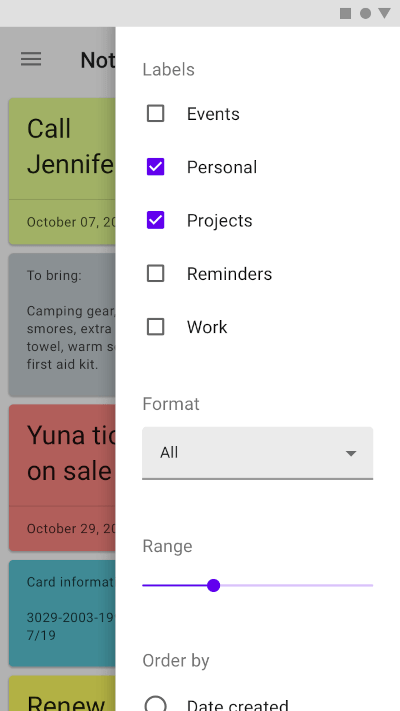
一個 Flutter 套件,可將 Material Design 邊欄整合至跨平台應用程式中。它提供一個可自訂且具響應性的邊欄組件,相容於 Android、iOS、Web、macOS、Windows 與 Linux。邊欄可用於以模式方式呈現補充內容或操作,進而提升使用者互動體驗,同時無需離開目前畫面。此組件依 Material 設計原則打造,確保與原生平台行為的一致性。
適用情境
在模態覆蓋層中顯示詳細資訊
顯示操作菜單或選項
暫時顯示表單或輸入欄位
透過滑入面板增強導航
在不進行全螢幕切換的情況下提供上下文控制
主要特色
符合 Material Design 的側邊抽屜
跨平台支援(Android、iOS、Web、macOS、Windows、Linux)
可自訂的外觀與行為
透過 pub add 命令輕鬆整合
支援持續性和可消除模式
適合對象
使用一致的 UI 建構跨平台應用的開發人員
使用 Material Design 指南的團隊
需要臨時內容疊加的App
需要輕量級模態框的項目
以使用者體驗為導向的介面,具有滑動面板
使用建議
可能需要為非 Material 主題添加額外的樣式
大型內容列表上的效能影響
與完全自定義小部件相比,自訂選項有限
不適合複雜的導航結構
需要仔細處理觸控設備上的手勢
原始 README
以下為關聯原始碼儲存庫的 README 原文快照,最新內容請造訪原始碼儲存庫。
Side Sheet
A package to use Material side sheet into your Flutter project.
Learn more about side sheet at Material.io
Platform Support
Android
iOS
MacOS
Web
Linux
Windows
✔️
✔️
✔️
✔️
✔️
✔️
Getting Started
This package comes with two types of side sheets, Standard side sheet and Modal side sheet.
Modal Side Sheet
Modal side sheets present content while blocking interaction with the rest of the screen.
This side sheet generally used in mobile devices as per recommended by Material Design by Google.
See also : Modal Side Sheet
You can use it by calling showModalSideSheet() function into your Flutter project.
Standard side sheets co-exist with the screen’s primary UI region, which allows viewing and interaction with both surfaces. They are used only on tablet and desktop.
See also: Standard Side Sheet
This side sheet can be used with BodyWithSideSheet widget.
Just place this widget into your Scaffold's body property.