搜尋套件、儲存庫與 APP 分類

套件詳情v0.8.1

model_viewer

一個用於渲染 glTF 和 GLB 格式互動式 3D 模型的 Flutter 小部件。

近 30 天下載
32
喜歡數
142
Pub 分數
30

安裝套件

flutter pub add model_viewer

套件介紹

根據套件公開資料產生的選型評估,僅供參考。

一個 Flutter 小部件,可啟用 glTF 和 GLB 格式的 3D 模型的渲染與互動。它提供了一種簡單的方法,可在 Flutter 應用中嵌入和操作 3D 內容,支援旋轉、縮放和拖曳等功能。非常適合需要沉浸式視覺體驗的應用程式,例如產品展示或教育工具。該小部件利用原生平台功能以實現最佳效能和流暢的互動。

適用情境

  • 電子商務應用中的產品可視化
  • 互動3D教育內容
  • 虛擬試穿服裝或配件
  • 增強現實整合
  • 設計工具中的3D模型預覽

主要特色

  • 支援 glTF 和 GLB 3D 模型格式
  • 內建的觸控手勢用於旋轉和縮放
  • 使用原生後端的高效能渲染
  • 與 Flutter 小部件輕鬆整合
  • 輕量級且專注於核心3D檢視

適合對象

  • 開發支援3D的Flutter應用的開發者
  • 展示產品的電子商務平台
  • 教育或訓練應用程式
  • 帶有3D資產的AR/VR體驗

使用建議

  • 僅支援 glTF/GLB 格式
  • 無內建動畫或物理處理
  • 需要對3D模型進行優化以獲得最佳性能
  • 平台特定的渲染行為可能會有所不同

原始 README

以下為關聯原始碼儲存庫的 README 原文快照,最新內容請造訪原始碼儲存庫。

3D Model Viewer for Flutter

Project license Dart compatibility Pub package Dartdoc reference

This is a Flutter widget for rendering interactive 3D models in the glTF and GLB formats.

The widget embeds Google's <model-viewer> web component in a WebView.

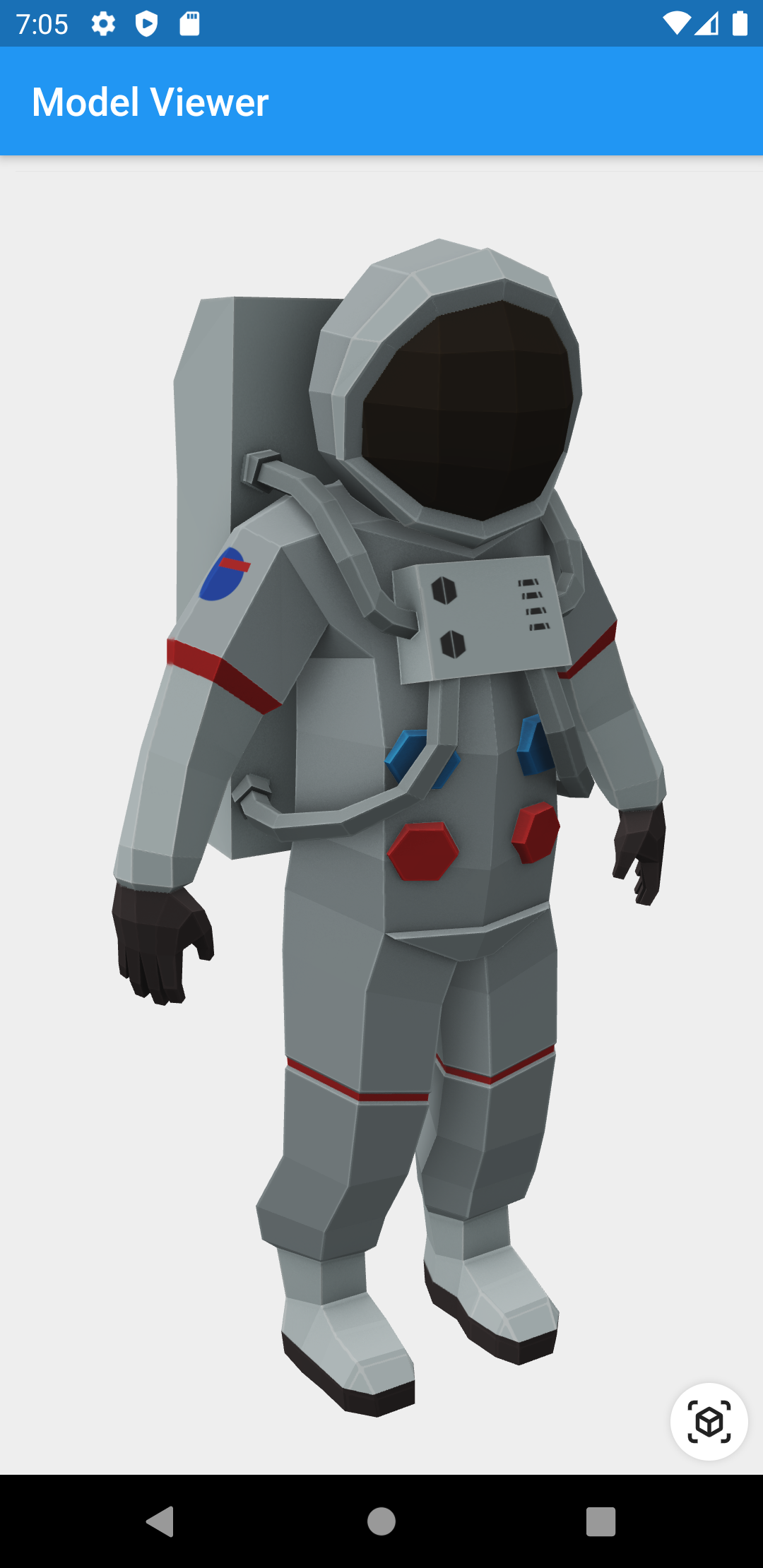
Screenshot

Screenshot of astronaut model

Prerequisites

Compatibility

Android and iOS, with a recent system browser version.

Installation

pubspec.yaml
dependencies:
  model_viewer: ^0.8.1
AndroidManifest.xml (Android 9+ only)

To use this widget on Android 9+ devices, your app must be permitted to make an HTTP connection to http://localhost:XXXXX. Android 9 (API level 28) changed the default for android:usesCleartextTraffic from true to false, so you will need to configure your app's android/app/src/main/AndroidManifest.xml as follows:

--- a/example/android/app/src/main/AndroidManifest.xml
+++ b/example/android/app/src/main/AndroidManifest.xml
@@ -8,7 +8,8 @@
     <application
         android:name="io.flutter.app.FlutterApplication"
         android:label="model_viewer_example"
-        android:icon="@mipmap/ic_launcher">
+        android:icon="@mipmap/ic_launcher"
+        android:usesCleartextTraffic="true">
         <activity
             android:name=".MainActivity"
             android:launchMode="singleTop"

This does not affect Android 8 and earlier. See #7 for more information.

Info.plist (iOS only)

To use this widget on iOS, you need to opt-in to the embedded views preview by adding a boolean property to your app's ios/Runner/Info.plist file, with the key io.flutter.embedded_views_preview and the value YES:

<key>io.flutter.embedded_views_preview</key>
<true/>

Features

  • Renders glTF and GLB models. (Also, USDZ models on iOS 12+.)

  • Supports animated models, with a configurable auto-play setting.

  • Optionally supports launching the model into an AR viewer.

  • Optionally auto-rotates the model, with a configurable delay.

  • Supports a configurable background color for the widget.

Examples

Importing the library
import 'package:model_viewer/model_viewer.dart';
Creating a ModelViewer widget
class MyApp extends StatelessWidget {
  @override
  Widget build(BuildContext context) {
    return MaterialApp(
      home: Scaffold(
        appBar: AppBar(title: Text("Model Viewer")),
        body: ModelViewer(
          src: 'https://modelviewer.dev/shared-assets/models/Astronaut.glb',
          alt: "A 3D model of an astronaut",
          ar: true,
          autoRotate: true,
          cameraControls: true,
        ),
      ),
    );
  }
}
Loading a bundled Flutter asset
class MyApp extends StatelessWidget {
// ...
          src: 'assets/MyModel.glb',
// ...
}
Loading a model from the file system
class MyApp extends StatelessWidget {
// ...
          src: 'file:///path/to/MyModel.glb',
// ...
}
Loading a model from the web
class MyApp extends StatelessWidget {
// ...
          src: 'https://modelviewer.dev/shared-assets/models/Astronaut.glb',
// ...
}

Note that due to browsers' CORS security restrictions, the model file must be served with a Access-Control-Allow-Origin: * HTTP header.

Frequently Asked Questions

Q: Why do I get the error net::ERR_CLEARTEXT_NOT_PERMITTED?

You didn't configure your AndroidManifest.xml as per the installation instructions earlier in this document. See also #7.

Q: Why does the example app just show a blank screen?

A: Most likely, the platform browser version on your device or emulator is too old and does not support the features that Model Viewer needs.

For example, the stock Chrome version on the Android 10 emulator is too old and will display a blank screen; it must be upgraded from the Play Store in order to use this package. (The stock Chrome version on the Android 11 emulator works fine, however.) See google/model-viewer#1109.

Q: Why doesn't my 3D model load and/or render?

A: There are several reasons why your model URL could fail to load and render:

  1. It might not be possible to load the model URL due to CORS security restrictions. The server hosting the model file must send appropriate CORS response headers for Model Viewer to be able to load the file. See google/model-viewer#1015.

  2. It might not be possible to parse the provided glTF or GLB file. Some tools can produce invalid files when exporting glTF. Always run your model files through the glTF Validator to check for this.

  3. The platform browser might not support the features that Model Viewer needs. See google/model-viewer#1109.

所屬分類

依賴

依賴清單 3 項

原始碼儲存庫

使用此套件的專案