MultiLevel Drawer
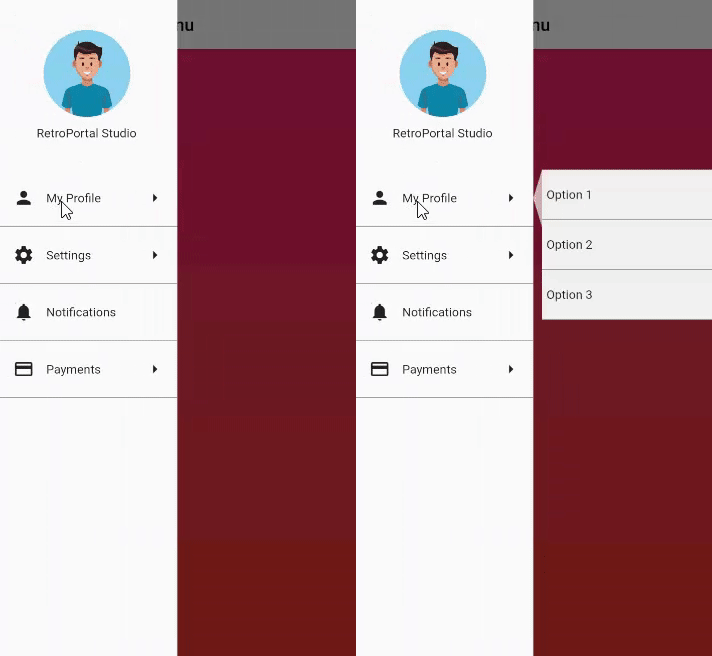
An easy to implement Multi Level Drawer for Flutter Applications. Just use this in place of regular Scaffold Drawer and you are ready to go.
Current Features
- Add MultiLevel Drawer to Selected Items
- Change Color of Main and Sub menu According to your Application Needs.
Demo

Usage
To Use, simply add MultiLevelDrawer to your Scaffold's drawer property:
child: Scaffold(
drawer: MultiLevelDrawer(
backgroundColor: Colors.white,
rippleColor: Colors.white,
subMenuBackgroundColor: Colors.grey.shade100,
header: Container(
height: size.height * 0.25,
child: Center(child: Column(
mainAxisAlignment: MainAxisAlignment.center,
children: <Widget>[
Image.asset("assets/dp_default.png",width: 100,height: 100,),
SizedBox(height: 10,),
Text("RetroPortal Studio")
],
)),
),
children: [
MLMenuItem(
leading: Icon(Icons.person),
trailing: Icon(Icons.arrow_right),
content: Text(
"My Profile",
),
subMenuItems: [
MLSubmenu(onClick: () {}, submenuContent: Text("Option 1")),
MLSubmenu(onClick: () {}, submenuContent: Text("Option 2")),
MLSubmenu(onClick: () {}, submenuContent: Text("Option 3")),
],
onClick: () {}),
MLMenuItem(
leading: Icon(Icons.settings),
trailing: Icon(Icons.arrow_right),
content: Text("Settings"),
onClick: () {},
subMenuItems: [
MLSubmenu(onClick: () {}, submenuContent: Text("Option 1")),
MLSubmenu(onClick: () {}, submenuContent: Text("Option 2"))
]),
MLMenuItem(
leading: Icon(Icons.notifications),
content: Text("Notifications"),
onClick: () {},
),
MLMenuItem(
leading: Icon(Icons.payment),
trailing: Icon(Icons.arrow_right),
content: Text(
"Payments",
),
subMenuItems: [
MLSubmenu(onClick: () {}, submenuContent: Text("Option 1")),
MLSubmenu(onClick: () {}, submenuContent: Text("Option 2")),
MLSubmenu(onClick: () {}, submenuContent: Text("Option 3")),
MLSubmenu(onClick: () {}, submenuContent: Text("Option 4")),
],
onClick: () {}),
],
),
appBar: AppBar(
backgroundColor: Colors.white,
iconTheme: IconThemeData(color: Colors.black),
title: Text(
"Multi Level Menu",
style: TextStyle(color: Colors.black),
),
),
body: Container(
decoration: BoxDecoration(
gradient:
LinearGradient(begin: Alignment.topCenter, end: Alignment.bottomCenter, colors: [
Color.fromRGBO(255, 65, 108, 1.0),
Color.fromRGBO(255, 75, 43, 1.0),
]),
),
child: Center()),
),
Important Classes:
MLMenuItem
MLSubmenu
Roadmap
Plans to add more customizations.
License
MIT