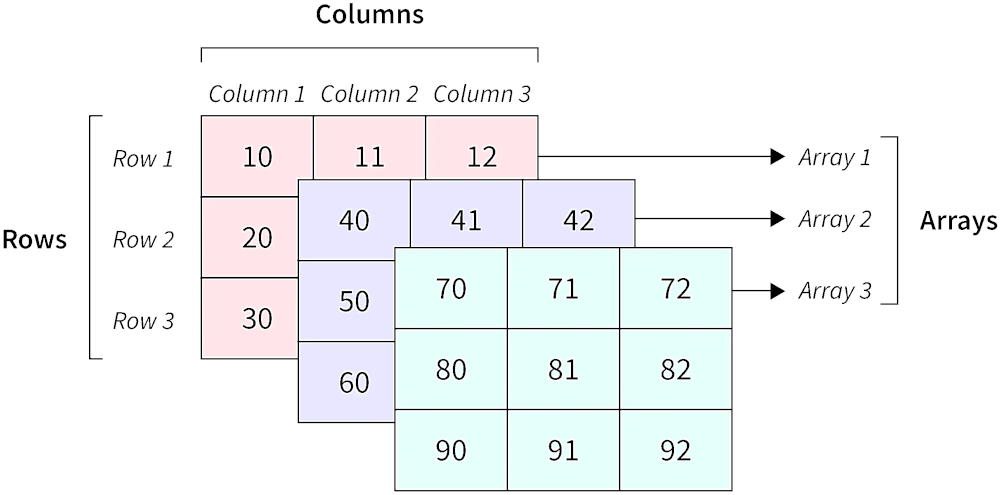
The n-Dimensional Array package is a powerful tool that empowers Flutter developers to create and work with multi-dimensional arrays. With this package, developers can easily define and manipulate n-dimensional arrays in their applications. This package offers a simple and intuitive interface to handle arrays of various dimensions efficiently.
Installation
In the pubspec.yaml of your flutter project, add the following dependency:
Just like with a normal list in Dart, you cannot add elements beyond the length of the list. For a list, you would use the add() method. Expanding a multi-dimensional list is a bit more complicated; so, the reshape method was created.
// The list from Example 1List myList = [[[1, 2], [3, 4]], [[5, 6], [7, 8]], [[9, 10], [11, 12]]];
NdArray ndArray = NdArray.fromList(myList);
// The current shape is [3, 2, 2]List<int> shape = ndArray.shape;
// Add one more element to the 3rd dimension
ndArray.reshape([3, 2, 3]);
// Note: Since we are only changing the third// dimension, we could alternatively call:// ndArray.reshape([-1, -1, 3]);// The `-1` counts as a placeholder, and the// original shape value is used.// The list now looks like:// [[[1, 2, null], [3, 4, null]], [[5, 6, null], [7, 8, null]], [[9, 10, null], [11, 12, null]]];// Shrink the array down.
ndArray.reshape([1, 1, 2]);
// The list now looks like:// [[[1, 2]]]// Note: The truncated data is lost. Be careful// when shrinking your arrays. Make sure that is// really what you want to do.
Example 3 - Getting and Setting values
You can get or set a value very much like a normal list, where you would call myList[i].
// 2D list is easier to followList myList = [[1, 2], [3, 4]];
NdArray ndArray = NdArray.fromList(myList);
// Some current valuesint value1 = ndArray[0][1]; // 2int value2 = ndArray[1][1]; // 4// Set a value
ndArray[0][1] = 8;
value1 = ndArray[0][1]; // 8// The list now looks like:// [[1, 8], [3, 4]]
Example 4 - Copy
When you use the copy() method, you create a new NdArray that is identical to the original. Any modifications to one does not affect the other.
Note: Any non-primitive data types that use references (like custom objects) might not create new versions of themselves when copied. If this is the case, changes to one of those objects will appear in both NdArrays.
// 2D list is easier to followList myList = [[1, 2], [3, 4]];
NdArray ndArray = NdArray.fromList(myList);
NdArray ndArrayCopy = ndArray.copy();
// Change only the copy
ndArrayCopy[0][0] = 99;
// The lists now look like:// ndArray.data == [[1, 2], [3, 4]]// ndArrayCopy.data == [[99, 2], [3, 4]]
If you found this helpful, please consider donating. Thanks!