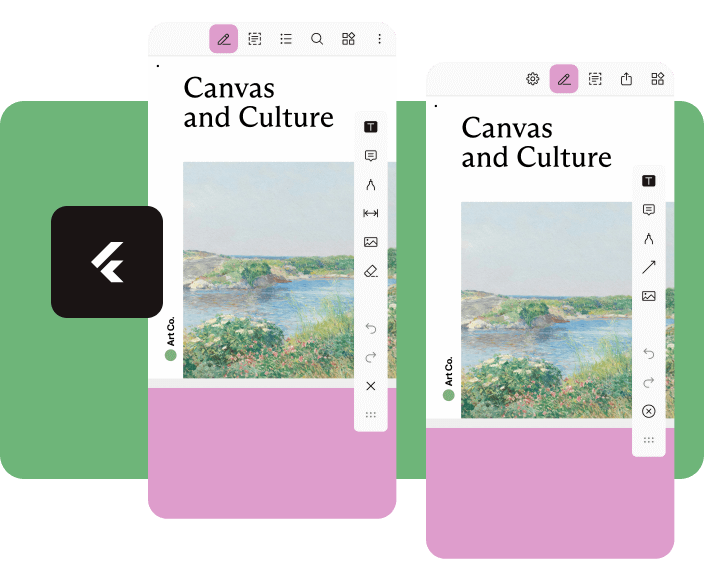
Nutrient Flutter 是一個強大的外掛程式,可將 Nutrient PDF SDK 整合至 Flutter 應用程式中,進而實現豐富的 PDF 查看與編輯功能。它支援在 Android 與 iOS 平台上以高效率進行 PDF 的呈現、註解、簽名與操作。專為尋求無縫且功能完整的 PDF 使用體驗之開發者設計,提供類原生介面,具備可自訂工具與強大的文件處理能力。此外掛程式簡化複雜的 PDF 工作流程,非常適合需要進階文件互動功能的應用。
適用情境
文件管理應用
電子簽名工作流程
教育平台
PDF註釋工具
協作編輯環境
主要特色
高性能PDF渲染
互動式註釋
數位簽章支援
可自定義的 UI 組件
跨平台相容性
適合對象
開發以文件為中心的應用程式之開發者
需要安全PDF處理的團隊
需要使用者協作處理文件的應用程式
企業級PDF整合
使用建議
需要從 nutrient.io 取得授權
由於包含 SDK,可能會增加應用大小
有限的自定選項,需進階設定
依賴外部 SDK 更新
新使用者可能需要一定的學習曲線
原始 README
以下為關聯原始碼儲存庫的 README 原文快照,最新內容請造訪原始碼儲存庫。
Flutter Document SDK by Nutrient
Add powerful PDF functionality to your Flutter apps with the Nutrient Flutter SDK. View, annotate, and edit PDFs seamlessly across Android, iOS, and Web platforms.
Requirements
Flutter SDK (latest stable version)
For Android:
Android Studio (latest stable version)
Android NDK
Android Virtual Device or physical device
For iOS:
Xcode 16 or later
iOS 17.0 or later
For Web:
Modern web browser with WebAssembly support
Installation
Add the Nutrient Flutter SDK to your pubspec.yaml:
dependencies:nutrient_flutter:any
Run the following command:
flutter pub get
Platform Setup
Android Setup
Update your Android configuration in android/app/build.gradle:
Note: Replace 1.13.0 with the latest version of Nutrient Web SDK. Check the latest releases for the current version.
Option 2: Local Installation
Download Nutrient Web SDK. The download will start immediately and save a .tar.gz archive like PSPDFKit-Web-binary-<version>.tar.gz to your computer.
Once downloaded, extract the archive and copy the entire contents of its dist folder to your project's web/assets folder.
Verify your assets folder contains:
nutrient-viewer.js file
nutrient-viewer-lib directory with library assets
Add the Nutrient library to your web/index.html:
<scriptsrc="assets/nutrient-viewer.js"></script>
Note: Your server must have the Content-Type: application/wasm MIME type configured for WebAssembly files.
Sample Document Setup
Create a PDFs directory in your project root:
mkdir PDFs
Download our sample PDF document and save it as Document.pdf in the PDFs directory.
Add the assets directory to your pubspec.yaml:
flutter:assets:-PDFs/
Usage
Create a new file lib/main.dart with the following content:
import'package:flutter/material.dart';
import'package:nutrient_flutter/nutrient_flutter.dart';
import'dart:io';
import'package:flutter/foundation.dart';
constString documentPath = 'PDFs/Document.pdf';
voidmain() async {
WidgetsFlutterBinding.ensureInitialized();
// Initialize the Nutrient SDK with your license keyawaitNutrient.initialize(
androidLicenseKey: 'YOUR_ANDROID_LICENSE_KEY',
iosLicenseKey: 'YOUR_IOS_LICENSE_KEY',
webLicenseKey: 'YOUR_WEB_LICENSE_KEY',
);
runApp(constMaterialApp(
home: MyApp(),
));
}
classMyAppextendsStatelessWidget{
constMyApp({super.key});
Future<String> extractAsset(BuildContext context, String assetPath) async {
if (kIsWeb) {
return assetPath;
}
final bytes = awaitDefaultAssetBundle.of(context).load(assetPath);
final list = bytes.buffer.asUint8List();
final tempDir = awaitNutrient.getTemporaryDirectory();
final tempDocumentPath = '${tempDir.path}/$assetPath';
final file = File(tempDocumentPath);
await file.create(recursive: true);
file.writeAsBytesSync(list);
return file.path;
}
@overrideWidgetbuild(BuildContext context) {
returnScaffold(
body: FutureBuilder<String>(
future: extractAsset(context, documentPath),
builder: (context, snapshot) {
if (snapshot.hasData) {
/// NutrientView is a widget that displays a PDF document.returnNutrientView(
documentPath: snapshot.data!,
);
} elseif (snapshot.hasError) {
returnCenter(
child: Text('${snapshot.error}'),
);
} else {
returnconstCenter(
child: CircularProgressIndicator(),
);
}
}),
);
}
}
Note: Replace 'YOUR_ANDROID_LICENSE_KEY', 'YOUR_IOS_LICENSE_KEY', and 'YOUR_WEB_LICENSE_KEY' with your actual license keys. Do not pass any license keys if you want to run the SDK in demo mode, the SDK will run in demo mode with a watermark.