搜尋套件、儲存庫與 APP 分類

observe_internet_connectivity 封面
套件詳情v1.0.3

observe_internet_connectivity

一個 Flutter 套件,透過可自訂的觀察策略協助您監控網路連接。

AndroidiOSmacOSWindowsLinux
近 30 天下載
6410
喜歡數
33
Pub 分數
160

安裝套件

flutter pub add observe_internet_connectivity

套件介紹

根據套件公開資料產生的選型評估,僅供參考。

一個專為監控網路連接而設計的 Flutter 套件,具備可自訂的觀察策略。它提供跨多個平台(包括 Android、iOS、macOS、Windows 和 Linux)的即時網路狀態更新。開發者可自訂連接變化的偵測與回應方式,以靈活整合至需要可靠網路感知的應用程式中。此套件簡化了線上/離線狀態的處理,無需依賴外部元件即可實現基本功能。

適用情境

  • 即時網路狀態監控
  • 應用程式中的離線模式處理
  • 基於連接性的動態UI更新
  • 背景網絡狀態追蹤
  • 應用行為在連接性變更期間的適應
  • 失敗請求的自動重試邏輯

主要特色

  • 可自定義的觀測策略
  • 跨平台支援
  • 即時連接更新
  • 輕量且依賴極少
  • 簡單的整合API
  • 可設定的輪詢間隔

適合對象

  • 需要響應式網絡反饋的應用程式
  • 開發離線功能的開發者
  • 需要跨平台連接性檢查的項目
  • 注重程式碼潔淨性與可維護性的團隊
  • 頻繁網路操作的應用程式

使用建議

  • 某些平台可能需要額外的權限
  • 自定策略需要仔細實施
  • 電池使用情況取決於輪詢頻率
  • 不適用於高頻率、低延遲網路檢查
  • 僅限基本連接檢測(無速度或品質指標)

原始 README

以下為關聯原始碼儲存庫的 README 原文快照,最新內容請造訪原始碼儲存庫。

A flutter package that helps to observe internet connection via a customizable observing strategy

Problem Statement

I found that just using the connectivity package was not enough to tell if the internet was available or not. It only checks if there is WIFI or if mobile data is turned on, it does not check for an actual internet connection...

Read more about the issue here

Available Features

  1. Check to know if a device has an internet connection
  final hasInternet = await InternetConnectivity().hasInternetConnection;
  if (hasInternet) {
    //You are connected to the internet
  } else {
    //"No internet connection
  }
  1. Listen to internet connection changes via stream
  final subscription =
      InternetConnectivity().observeInternetConnection.listen((bool hasInternetAccess) {
        if(!hasInternetAccess){
          showToast('No Internet Connection');
        }
      });

   await Future.delayed(const Duration(seconds: 10 ));
   subscription.cancel();

Note:bell:: This example uses the DefaultObServingStrategy therefore you need to remember to cancel the subscription manually, Other available strategies have a mechanism in which the subscription is automatically cancelled.

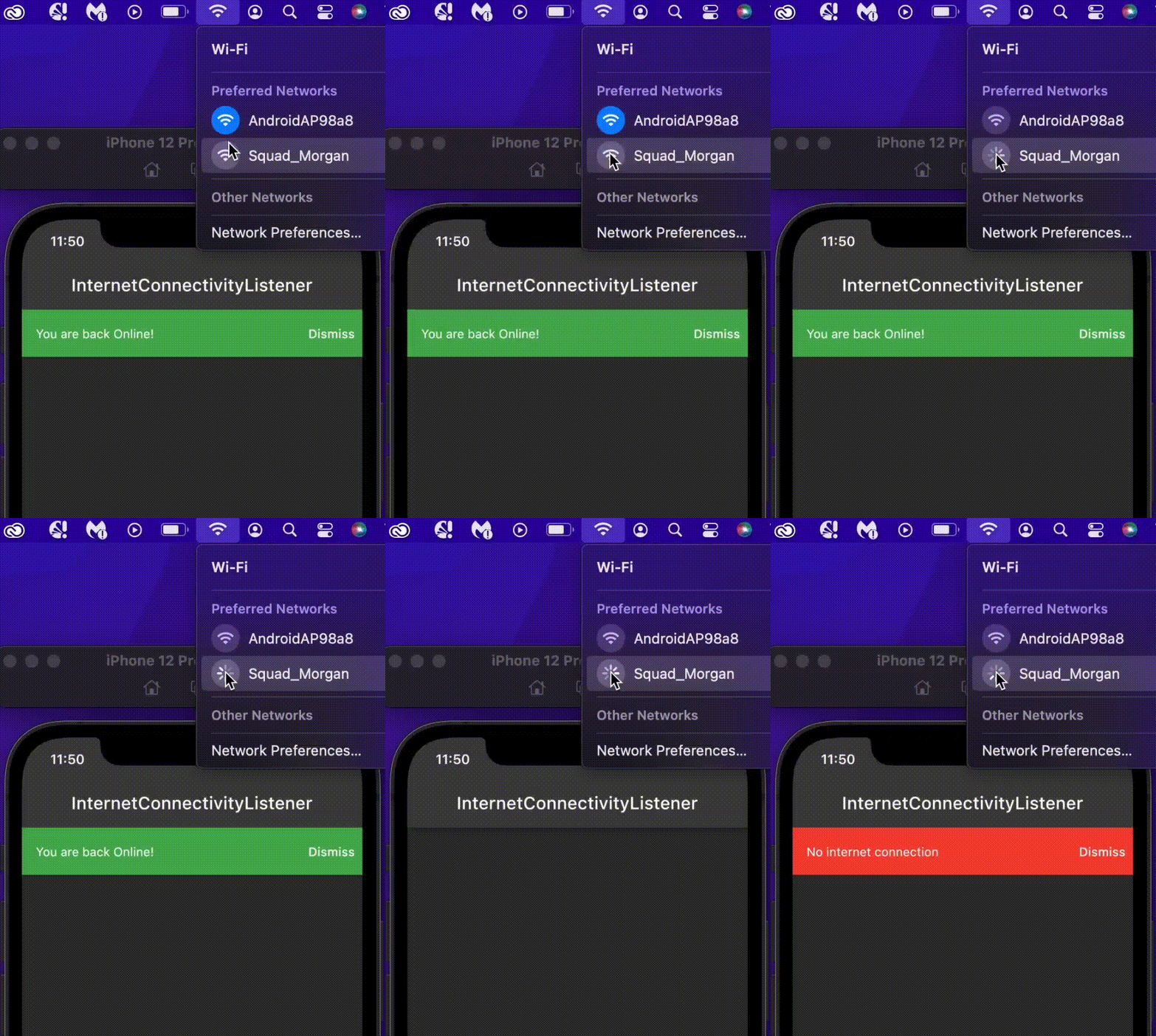
  1. Use InternetConnectivityListener to listen to internet connectivity changes inside a flutter widget
    return InternetConnectivityListener(
      connectivityListener: (BuildContext context, bool hasInternetAccess) {
        if (hasInternetAccess) {
          context.showBanner('You are back Online!', color: Colors.green);
        } else {
          context.showBanner('No internet connection', color: Colors.red);
        }
      },
      child: Scaffold(
        body: Container(),
      ),
    );

This is mostly useful if you want to get notified of internet connection changes in the widget class, either to retry a failed request or to give the user some feedback about their network state.

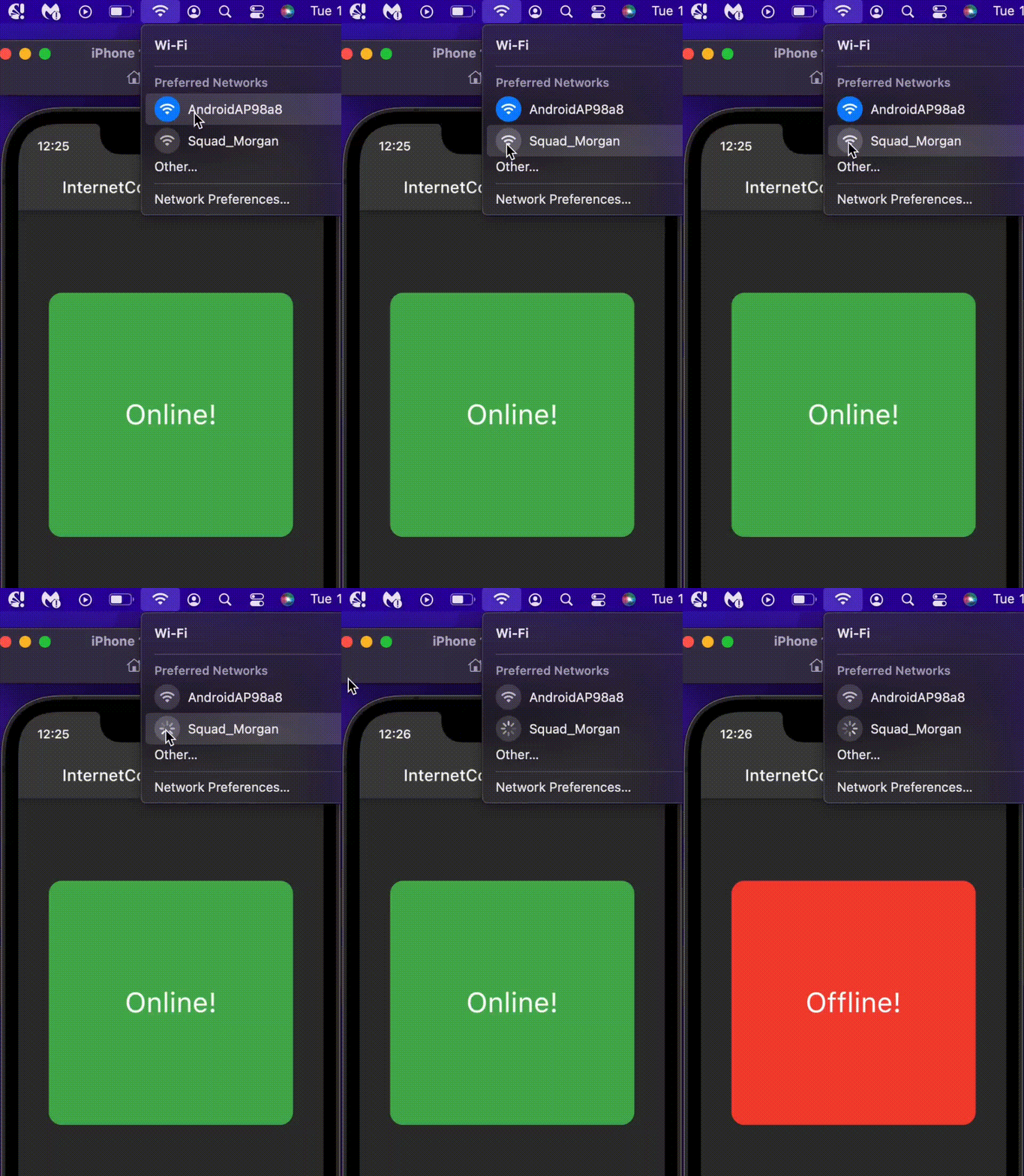
  1. Use InternetConnectivityBuilder to build internet connection aware widgets
    return InternetConnectivityBuilder(
      connectivityBuilder: (BuildContext context, bool hasInternetAccess, Widget? child) { 
        if(hasInternetAccess) {
          return OnlineWidget();
        } else {
          return OfflineWidget();
        }
      },
      child: ChildWidget(),
    );

This returns the OnlineWidget when the user has an internet connection and returns the OfflineWidget widget when the user is disconnected

Deep Dive

The InternetConnectivity class is responsible for observing the internet connectivity using the InternetObservingStrategy and a StreamController to emit internet connection changes. If no strategy is supplied when creating InternetConnectivity, the DefaultObServingStrategy will be used.

  InternetConnectivity({InternetObservingStrategy? internetObservingStrategy}) {
    _internetObservingStrategy =
        internetObservingStrategy ?? DefaultObServingStrategy();
    _internetAccessCheckController = StreamController<bool>.broadcast(
        onCancel: _onCancelStream, onListen: _emitInitialInternetAccess);
  }

The package checks for active internet connection by opening a socket to a list of specified addresses, each with an individual port and timeout using SocketObservingStrategy. If you'd like to implement a different type of observing strategy, you can create a new strategy by extending InternetObservingStrategy. All observing strategies are a sub-class of InternetObservingStrategy

SocketObservingStrategy
abstract class SocketObservingStrategy extends InternetObservingStrategy {
  /// The initial duration to wait before observing internet access
  ///
  /// Defaults to [kDefaultInitialDuration] (0 seconds)
  @override
  final Duration? initialDuration;

  /// The interval between periodic observing.
  ///
  /// Defaults to [kDefaultInterval] (5 seconds).
  @override
  final Duration interval;

  /// The timeout period before a check request is dropped and an address is
  /// considered unreachable.
  ///
  /// If not null, it is set to the [timeOut] for each of the [internetAddresses].
  ///  if (timeOut != null) {
  ///       internetAddresses = internetAddresses
  ///           .map((e) => e.copyWith(timeOut: timeOut))
  ///           .toList(growable: false);
  ///     }
  final Duration? timeOut;

  /// A list of internet addresses (with port and timeout) to ping.
  ///
  /// These should be globally available destinations.
  ///
  /// Default is [kDefaultInternetAddresses].
  List<InternetAddress> internetAddresses;

  SocketObservingStrategy(
      {this.initialDuration,
      required this.interval,
      this.timeOut,
      required this.internetAddresses}) {
    if (timeOut != null) {
      internetAddresses = internetAddresses
          .map((e) => e.copyWith(timeOut: timeOut))
          .toList(growable: false);
    }
  }

  /// The observing strategy is to ping each of the [internetAddresses] supplied,
  /// Using [stream.any] to check for the first address to connect.
  /// Once an address connects, it is assumed that there is internet access and the process stops
  ///
  @override
  Future<bool> get hasInternetConnection async {
    final futures = internetAddresses
        .map((internetAddress) => _hasInternet(internetAddress));
    final stream = Stream.fromFutures(futures);
    return stream.any((element) => element);
  }

  Future<bool> _hasInternet(InternetAddress internetAddress) async {
    Socket? sock;
    try {
      sock = await Socket.connect(
        internetAddress.host,
        internetAddress.port,
        timeout: internetAddress.timeOut,
      )
        ..destroy();
      return true;
    } catch (_) {
      sock?.destroy();
      return false;
    }
  }
}

The library comes with 4 different strategies that extend SocketObservingStrategy for a different use cases, namely;

  1. DefaultObServingStrategy: This is the strategy used if you don't supply any strategy to the InternetConnectivity class, you will have to cancel the subscription manually.

  2. DisposeOnFirstConnectedStrategy: This strategy cancels the subscription automatically after the first connected event, i.e once the device has an internet connection, the stream subscription will be automatically closed.

  3. DisposeOnFirstDisconnectedStrategy: This strategy cancels the subscription automatically after the first disconnected event, i.e once the device is offline, the stream subscription will be automatically closed.

  4. DisposeAfterDurationStrategy: This strategy set the duration to listen for the internet connection events, the subscription will be closed once the duration elapses

class DisposeAfterDurationStrategy extends SocketObservingStrategy {
  @override
  final Duration duration;
  
  DisposeAfterDurationStrategy(
      {required this.duration,
      super.timeOut,
      super.interval = kDefaultInterval,
      super.initialDuration = kDefaultInitialDuration,
      super.internetAddresses = kDefaultInternetAddresses});
}

each of the strategies is initiated with default values for convenience, you can override any of the default values. e.g creating a DefaultObServingStrategy with a timeOut of 5 sec and initialDuration of 2 mins.

    DefaultObServingStrategy(
      timeOut: const Duration(seconds: 5),
      initialDuration: const Duration(minutes: 2)
    )
The Default values

const kDefaultInternetAddresses = [
 InternetAddress(
     host: _googleHost, port: _defaultPort, timeOut: _defaultTimeOut),
 InternetAddress(
     host: _cloudFlareHost, port: _defaultPort, timeOut: _defaultTimeOut),
];

const kDefaultInterval = Duration(seconds: 5);
const kDefaultInitialDuration = Duration(seconds: 0);
const _googleHost = '8.8.8.8';
const _cloudFlareHost = '1.1.1.1';
const _defaultPort = 53;
const _defaultTimeOut = Duration(seconds: 3);

Implementing your own InternetObservingStrategy

For example, you can implement a fake observing strategy for testing as follows;

class FakeObservingStrategy extends InternetObservingStrategy{
  @override
  Future<bool> get hasInternetConnection async=> true;

  @override
  Duration? get initialDuration => const Duration(seconds: 0);

  @override
  Duration get interval => const Duration(seconds: 5);
}

You can also implement an HttpsObservingStrategy as follows;

class HttpsObservingStrategy extends InternetObservingStrategy {
  final String lookUpAddress;

  HttpsObservingStrategy({this.lookUpAddress = 'www.google.com'});

  @override
  Duration? get initialDuration => const Duration(seconds: 0);

  @override
  Duration get interval => const Duration(seconds: 10);

  @override
  Future<bool> get hasInternetConnection async {
    try {
      var url = Uri.https(lookUpAddress, '',);
     await http.get(url);
     return true;
    } catch (_) {
      return false;
    }
  }
}

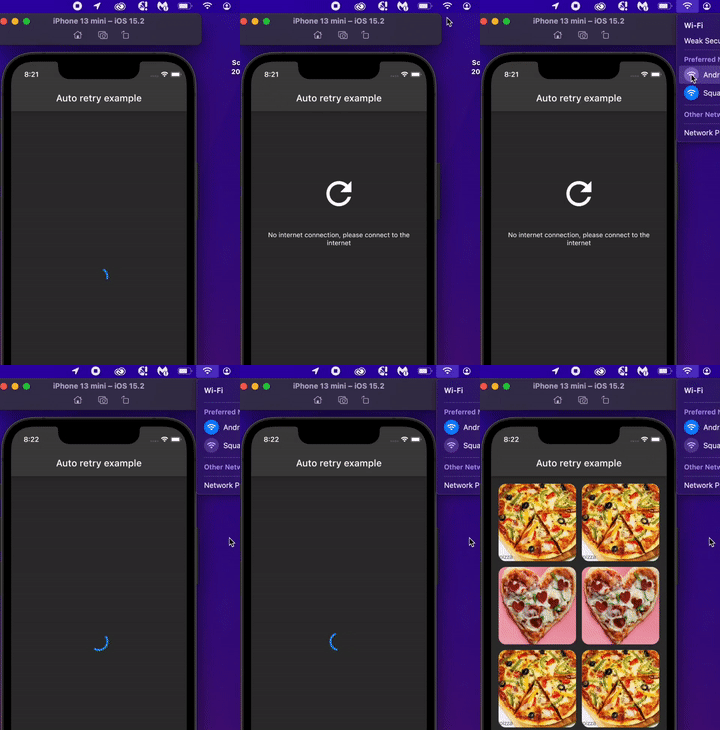
Auto retry example

This example showcase how you can use the InternetConnectivityListener and the DisposeOnFirstConnectedStrategy to automaticaly retry a failed network request once the device is back online.

class _RetryWidget extends ConsumerWidget {
  const _RetryWidget({Key? key}) : super(key: key);

  @override
  Widget build(BuildContext context, WidgetRef ref) {
    return InternetConnectivityListener(
      internetConnectivity: ref.read(disposeOnFirstConnectedProvider),
      connectivityListener: (BuildContext context, bool hasInternetAccess) {
        if (hasInternetAccess) {
          ref.read(dataProvider.notifier).fetchData();
        }
      },
      child: Column(
        crossAxisAlignment: CrossAxisAlignment.center,
        children: const [
          Spacer(flex: 3,),
          Icon(Icons.refresh_outlined, size: 80,),
          Spacer(),
          Text('No internet connection, please connect to the internet', textAlign: TextAlign.center,),
          Spacer(flex: 10,),
        ],
      ),
    );
  }
}

Please check auto_retry_widget.dart for the complete code.

Additional information

Note:bell:: The InternetConnectivity is not a singleton, for the ease of testing. If you would like to maintain a single instance throughout the app lifecycle, you can:

  1. provide a global instance (not recommended)
final globalInstance = InternetConnectivity(
  internetObservingStrategy:   DefaultObServingStrategy(
      timeOut: const Duration(seconds: 5),
      initialDuration: const Duration(minutes: 2)
  )
);
  1. Register it with any dependency injection framework e.g GetIt
  GetIt.instance.registerSingleton<InternetConnectivity>(
      InternetConnectivity(
          internetObservingStrategy:   DefaultObServingStrategy(
              timeOut: const Duration(seconds: 5),
              initialDuration: const Duration(minutes: 2)
          )
      )
  );
  1. Use Riverpod Provider (recommended)
final observingStrategyProvider = Provider<InternetObservingStrategy>((ref)=> 
    DefaultObServingStrategy(
    timeOut: const Duration(seconds: 5),
    initialDuration: const Duration(minutes: 2)
));

final internetConnectivityProvider = Provider<InternetConnectivity>((ref) {
  return InternetConnectivity(internetObservingStrategy: ref.watch(observingStrategyProvider));
});

Check more examples in the example folder. If you like the project, don't forget to star ⭐️

License

This package is licensed under the MIT license. See LICENSE for details.

所屬分類

原始碼儲存庫

使用此套件的專案

暫無相關資料。