OCR Scan Text 是一個 Flutter 套件,封裝了 Google ML Kit 文字辨識庫,讓開發者能夠從透過相機拍攝或從裝置相簿中選擇的影像中提取文字。它提供準確且快速的文字檢測功能,支援多種語言與手寫體辨識。此套件簡化了將進階 OCR 功能整合至行動應用程式中的過程,無需深入了解底層機器學習框架。專為 Android 與 iOS 打造,確保跨平台文字掃描功能的一致性。
適用情境
從文件中提取文字
掃描名片
閱讀手寫筆記
從截圖中擷取文字
自動化資料輸入
主要特色
即時文字識別
對多種語言的支援
手寫檢測
相機整合
離線操作
適合對象
文件掃描應用
記事工具
資料輸入自動化
無障礙功能
移動庫存系統
使用建議
需要相機權限
性能因設備而異
使用清晰的圖像效果最佳
僅限文字識別
可能需要對低品質輸入進行圖像預處理
原始 README
以下為關聯原始碼儲存庫的 README 原文快照,最新內容請造訪原始碼儲存庫。
Flutter OCR Scan Text
OCR Flutter
v1.3.1
Flutter OCR Scan Text is a wrapper around the "Google ML kit Text Recognition" library.
It helps to facilitate accurate text search and display of results from the camera. It also allows to manage text searches from an image or a pdf.
Features
Allows you to easily scan text from the camera, extract accurate results and display them to the user.
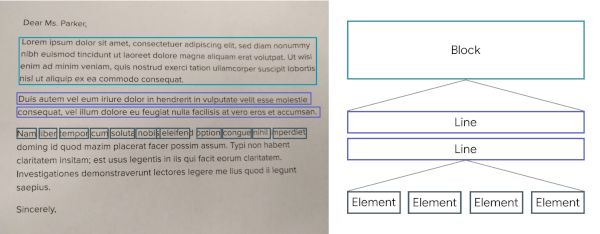
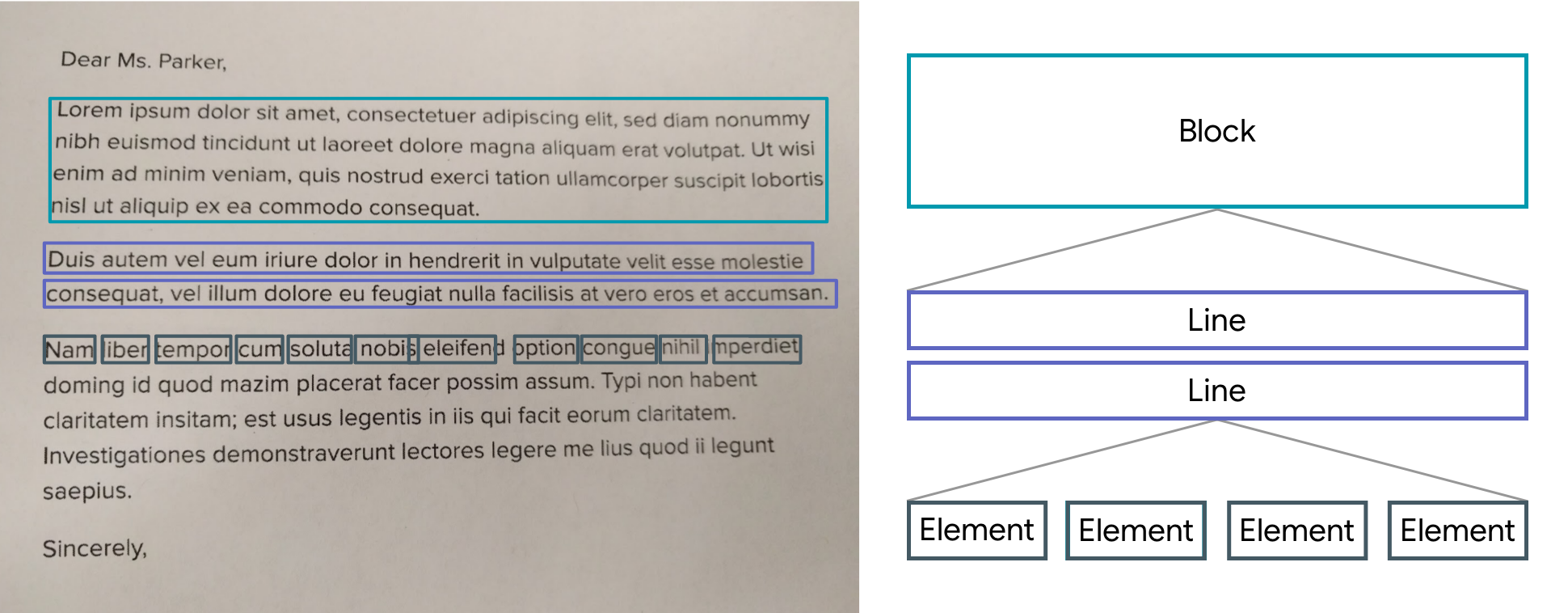
The results are returned by list of Block.
A Block contains: the global text of the block, a list of Lines and the position.
A Line contains: the global text of the line, a list of Elements and the position.
An Element contains: a word and the position.
Note: The library uses the Camera package, be sure to ask for permission.
A LiveScanWidget needs a module list to start detection.
Validated results will be returned to the "matchedResult" method.
Create a scan module :
In this example (see the /example folder), we consider all Elements to be results.
Create a scan module :
classScanAllModuleextendsScanModule
The constructor of a module:
label: A label (optional) that will be displayed to the user during rendering
color: A color (optional) that will be used for rendering
validateCountCorrelation: The number of times the same result must be found in the same place for it to be valid. (As the camera moves certain numbers / letters may be misinterpreted over several frames).
The purpose of a module is to search among the Blocks for a list of results (ScanResult) and to return it using the "matchedResult" method.
@overrideFuture<List<ScanResult>> matchedResult(List<TextBlock> textBlock, String text) async {
List<ScanResult> list = [];
for (var block in textBlock) {
for (var line in block.lines) {
for (var element in line.elements) {
list.add(ScanResult(cleanedText: element.text, scannedElementList: [element]));
}
}
}
return list;
}
Start a module :
module.start();
Stop a module :
module.stop();
Scan file with Widget (Supported extension : png, jpg and pdf )
You can use TextBlockHelper methods to help find results.
TextBlockHelper.extractTextElementsWithRegex :
Find the list of elements that match with the regex
TextBlockHelper.nextTextElement :
Find the next TextElement a right or left of TextElement
TextBlockHelper.combineRecreateTextLine :
When texts are on the same line but distant, MLKit can create two different TextBlock. The "combineRecreateTextLine" method will create a TextLine, from a starting TextElement, taking into account the Elements of each TextBlock
TextBlockHelper.combineLeftTextElement :
Return a List of TextElement with all TextElement to the left of startElement including startElement.
TextBlockHelper.combineRightTextElement :
Return a List of TextElement with all TextElement to the right of startElement including startElement.
TextBlockHelper.combineBetweenTextElement :
Return a List of TextElement between startElement and endElement