搜尋套件、儲存庫與 APP 分類

overlapping_panels 封面
套件詳情v0.0.3

overlapping_panels

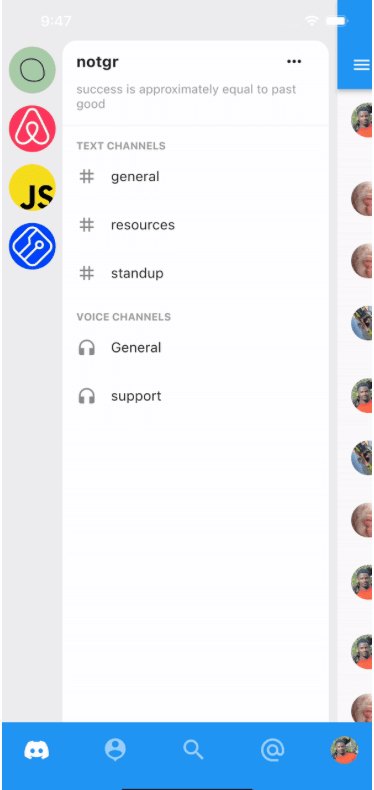
受到 Discord 移動應用導航的啟發。為您的應用添加左右面板,透過手勢顯示面板,並提供回呼以監聽面板的顯示。

AndroidiOSWebmacOSWindowsLinux
近 30 天下載
27
喜歡數
56
Pub 分數
150

安裝套件

flutter pub add overlapping_panels

套件介紹

根據套件公開資料產生的選型評估,僅供參考。

OverlappingPanels 是一個 Flutter 套件,讓開發者能夠實作受到 Discord 移動介面啟發的左右導航面板。它支援基於手勢的面板揭露動畫,並提供回呼函數來監控面板狀態變更。適用於需要直覺、可滑動側邊導航,並在 Android、iOS、Web、macOS、Windows 與 Linux 等多個平台實現順暢過渡的應用程式。

適用情境

  • 移動應用導航
  • 聊天應用介面
  • 可滑動的側邊菜單
  • 多面板佈局
  • 手勢驅動的使用者介面

主要特色

  • 手勢觸發的面板顯示
  • 面板狀態的回調支援
  • 左右面板支援
  • 跨平台相容性
  • 流暢的動畫過渡
  • 受 Discord 啟發的設計

適合對象

  • 開發聊天應用的開發者
  • 尋求現代導航的UI設計師
  • 需要可滑動側邊面板的應用
  • 跨平台 Flutter 項目
  • 互動式移動介面

使用建議

  • 可能需要自訂樣式以實現獨特設計
  • 性能取決於面板內容的複雜性
  • 限制為兩個面板(左/右)
  • 不適合複雜的嵌套導航
  • 需要仔細處理重疊的觸控事件

原始 README

以下為關聯原始碼儲存庫的 README 原文快照,最新內容請造訪原始碼儲存庫。

Overlapping Panels Pub

Add Discord-like navigation to your app. Demo project here: overlapping_panels_demo

Demo
TODO

This widget does not support navigation events yet. So pressing the back button, does not slide the main panel back into view. This feature will be implemented in the nearest future.

Usage

Simple and straight to the point. Just provide usual widgets for all panels:

class _MyHomePageState extends StatelessWidget {

  @override
  Widget build(BuildContext context) {
    return Stack(
      children: [
        OverlappingPanels(
          // Using the Builder widget is not required. You can pass your widget directly. 
          // But to use `OverlappingPanels.of(context)` you need to wrap your widget in a Builder
          left: Builder(builder: (context) {
            return const LeftPage();
          }),
          right: Builder(
            builder: (context) => const RightPage(),
          ),
          main: Builder(
            builder: (context) {
              return const MainPage();
            },
          ),
          onSideChange: (side) {
            setState(() {
              if (side == RevealSide.main) {
                // hide something
              } else if (side == RevealSide.left) {
                // show something
              }
            });
          },
        ),
      ],
    );
  }
}

To be able to reveal a panel with the tap of a button, for example, do:

IconButton(
  icon: const Icon(Icons.menu),
  onPressed: () {
    // This is the main point
    OverlappingPanels.of(context)?.reveal(RevealSide.left);
  },
)

所屬分類

原始碼儲存庫

使用此套件的專案