搜尋套件、儲存庫與 APP 分類

套件詳情v0.0.2

page_slider

一個簡單的 Flutter 小部件,可水平滑動瀏覽頁面。適用於向導或類似 Material Stepper 小部件的引導流程,但沒有特定的 UI - 任何小部件都可以作為要滑動的頁面。

近 30 天下載
22
喜歡數
36
Pub 分數
30

安裝套件

flutter pub add page_slider

套件介紹

根據套件公開資料產生的選型評估,僅供參考。

PageSlider 是一個輕量級的 Flutter 小部件,旨在實現水平頁面導航,非常適合引導流程或向導式介面。它允許任何自訂小部件作為可滑動頁面,提供彈性且不強制特定的 UI 風格。受到 Material Stepper 的啟發,但更具通用性,支援流暢的過渡效果和直覺的滑動手勢。非常適合在最少設定的情況下建立引導式使用者體驗。

適用情境

  • 入門教程
  • 向導式表單
  • 產品導覽
  • 互動式指南
  • 自定義輪播圖顯示

主要特色

  • 橫向滑動導航
  • 支援任何小工具作為頁面
  • 最小樣式約束
  • 平滑過渡動畫
  • 與現有小部件的簡單整合

適合對象

  • 簡單的入門流程
  • 靈活的 UI 導覽
  • 自定義互動式內容
  • 輕量級輪播圖需要
  • 快速原型使用者介面序列

使用建議

  • 無內建指示器或分頁
  • 滾動物理效果的自定義選項有限
  • 未針對大量頁面進行優化
  • 需要手動處理狀態管理
  • 最適合小型到中型內容集

原始 README

以下為關聯原始碼儲存庫的 README 原文快照,最新內容請造訪原始碼儲存庫。

flutter_page_slider

Pub

A simple Flutter widget that slides through pages horizontally. Use-cases could be wizards or onboarding flows similar to the Material Stepper widget, but without a particular UI - any widget can be a page to slide through.

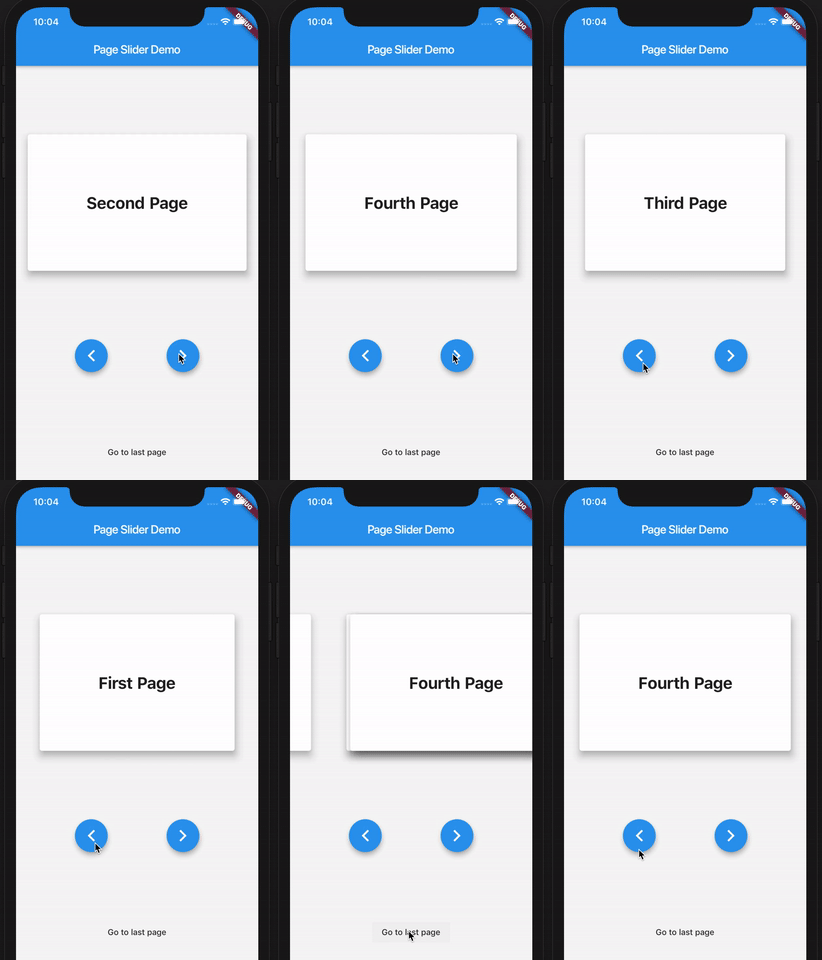
Here's a demo of the example app:

PageSlider demo app

How to use

First, create the PageSlider widget with a GlobalKey<PageSliderState> and the child widgets which you want to slide through. Then, control the active page using the global key to address the page slider state like so:

class Demo extends StatefulWidget {
  Demo({Key key}) : super(key: key);
  _DemoState createState() => _DemoState();
}

class _DemoState extends State<Demo> {
  GlobalKey<PageSliderState> _sliderKey = GlobalKey();

  @override
  Widget build(BuildContext context) {
    return Column(
      children: [
        PageSlider(
          key: _sliderKey,
          pages: [
            Text('Page 0'),
            Text('Page 1'),
            Text('Page 2'),
          ]
        ),
        RaisedButton(
          onPressed: _sliderKey.currentState.next,
          child: Text('Next')
        ),
        RaisedButton(
          onPressed: _sliderKey.currentState.previous,
          child: Text('Previous')
        ),
      ]
    );
  }
}

所屬分類

原始碼儲存庫

使用此套件的專案

暫無相關資料。