搜尋套件、儲存庫與 APP 分類

patterns_canvas 封面
套件詳情v0.6.0

patterns_canvas

在畫布元素或小部件上繪製條紋或點狀圖案。

AndroidiOSWebmacOSWindowsLinux
近 30 天下載
2.3萬
喜歡數
116
Pub 分數
160

安裝套件

flutter pub add patterns_canvas

套件介紹

根據套件公開資料產生的選型評估,僅供參考。

一個 Flutter 套件,可讓您在畫布元素或小部件上建立可自訂的圖案,例如條紋、圓點和網格。非常適合用於強調設計與美學之應用程式中,增添裝飾性背景、紋理或視覺效果。此套件支援多個平台,包括 Android、iOS、Web、macOS、Windows 與 Linux,適用於跨平台開發。透過簡單的 API,開發者可輕鬆將圖案渲染整合至其 UI 元件中。

適用情境

  • 建立紋理背景
  • 設計自定義 UI 元素
  • 添加裝飾性疊加層
  • 生成重複圖案
  • 透過著色器增強應用視覺效果
  • 建構藝術介面

主要特色

  • 支援條紋、點狀和網格圖案
  • 跨平台相容性
  • 與 Canvas 和 Widgets 的輕鬆整合
  • 可自定的圖案大小和顏色
  • 高效能渲染
  • 可擴充的模式定義

適合對象

  • 尋求視覺多樣性的UI設計師
  • 開發藝術或創意應用的開發者
  • 需要動態背景效果的應用
  • 專注於繪畫與塗鴉的專案
  • 致力於多平台設計的團隊

使用建議

  • 可能影響複雜模式的效能
  • 需要了解 Canvas 繪製
  • 僅限基於模式的圖形
  • 不適合高精度的向量圖形
  • 最佳搭配優化渲染策略使用

原始 README

以下為關聯原始碼儲存庫的 README 原文快照,最新內容請造訪原始碼儲存庫。

Patterns

Flutter library to draw patterns like stripes or dots on Canvas elements or widgets.

patterns_canvas Pub Version

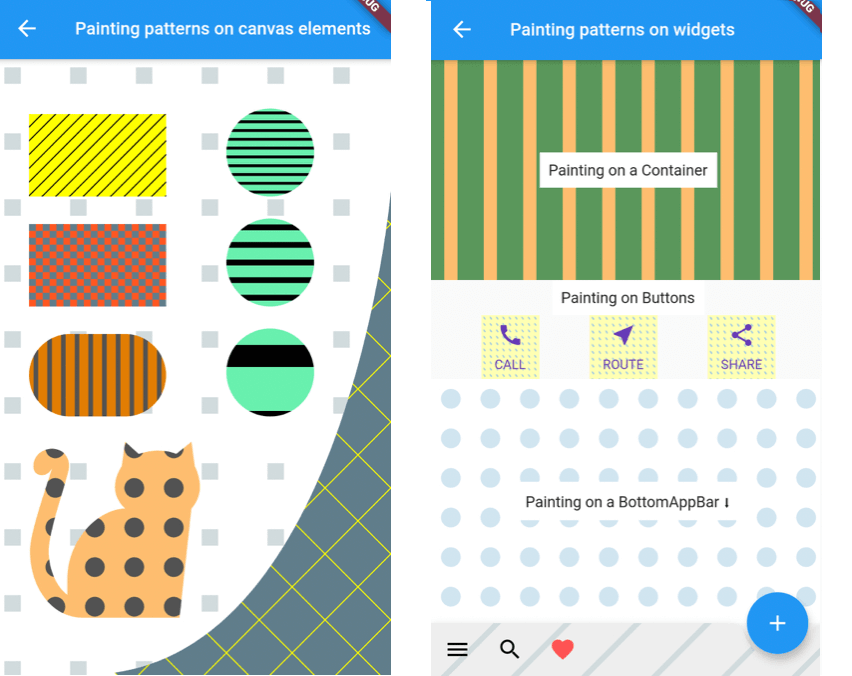
A utility library that lets you paint Canvas shapes or widgets with patterns like dots, stripes, squares, etc.:


Simple Example

Inside your CustomPainter class's paint method, create a Pattern class with background (bgColor) and foreground (fgColor) colors and use one of its paintOn methods:

class MyPainter extends CustomPainter {
  @override
  void paint(Canvas canvas, Size size) {
  
    // Prepare a rectangle shape to draw the pattern on.
    final rect = Rect.fromLTWH(80, 50, 200, 100);
    
    // Create a Pattern object of diagonal stripes with the colors we want.
    final Pattern pattern = DiagonalStripesThick(bgColor: Colors.lightGreenAccent, fgColor: Colors.black);
    
    // Paint the pattern on the rectangle. 
    pattern.paintOnRect(canvas, size, rect);
    
  }
}

Results in this pattern drawn:

Pattern constructors and types:

You can construct a Pattern with three different ways:

  1. Directly with a Pattern type constructor:
final Pattern p1 = DiagonalStripesLight(bgColor: Colors.yellowAccent, fgColor: Colors.black);
  1. With the Pattern.fromValues factory constructor:
final Pattern p2 = Pattern.fromValues(patternType: PatternType.diagonalLight, bgColor: Colors.yellowAccent, fgColor: Colors.black);
  1. From a String representation in the form of patternType_backgroundHex_foregroundHex:
final Pattern p3 = Pattern.fromString("diagonalLight_ffff00_000000");

Usage

Painting patterns on a Canvas shape:
  • Create your Canvas element inside the paint function of your CustomPaint.
  • Create a Pattern object with the desired type and colors.
  • Use the corresponding paint method to draw the pattern on the object.
// In the build method of your screen:
...
body: Center(
    child: CustomPaint(
      size: const Size(double.infinity, double.infinity),
      painter: MyPainter(),
    ),
  ),
...

// In your CustomPainter:
class MyPainter extends CustomPainter {
  @override
  void paint(Canvas canvas, Size size) {
  
    final rect = Rect.fromLTWH(80, 50, 200, 100);
    DiagonalStripesLight(bgColor: Colors.lightGreenAccent, fgColor: Colors.black).paintOnRect(canvas, size, rect);
    
    final path = Path();
    path.moveTo(120, 200);
    path.lineTo(300, 280);
    path.quadraticBezierTo(20, 400, 40, 300);
    path.close();
    Crosshatch(bgColor: Colors.yellow, fgColor: Colors.black).paintOnPath(canvas, size, path);
    
  }
}

You can use the below methods to draw on Canvas shapes:

pattern.paintOnPath(canvas, size, path);
pattern.paintOnRect(canvas, size, rect);
pattern.paintOnRRect(canvas, size, rRect);
pattern.paintOnCircle(canvas, size, center, radius);

Check the Scale behavior setting section for more info on how the Pattern can be drawn.

Painting patterns on the whole Canvas:

As above, but you can use the paintOnCanvas method to draw the pattern on the whole Canvas:

TexturePattern(bgColor: Colors.white, fgColor: Colors.blueGrey).paintOnCanvas(canvas, size);

The result of the above paints:

Painting patterns on a Widget:

To draw patterns on a Widget, you need to:

  • Wrap the Widget with a CustomPaint:
CustomPaint(
  painter: ContainerPatternPainter(),
  child: Container(
    width: 600,
    height: 200,
    child: Center(
      child: Text("Painting on a Container"),
    ),
  ),
),
  • Inside your CustomPainter, create a Pattern and use its paintOnWidget method to paint with it:
class ContainerPatternPainter extends CustomPainter {
  @override
  void paint(Canvas canvas, Size size) {
    VerticalStripesThick(bgColor: Color(0xff0509050), fgColor: Color(0xfffdbf6f)).paintOnWidget(canvas, size);
  }

  @override
  bool shouldRepaint(CustomPainter oldDelegate) => true;
}

Rectangular widgets, like Containers, Rows, Columns, IconButtons, etc. can be painted directly with the above method. For widgets that have a custom shape, like a BottomAppbar, you need to provide a different clipBehavior property, e.g. Clip.antiAlias, to make sure the pattern is clipped to the special shape. Check the second screen in the example app for more.

Patterns and settings

Available patterns

All Patterns require a background and foreground color on instantiation. The currently available patterns are:

Description Class PatternType enum
Horizontal Stripes Light HorizontalStripesLight(Color bgColor, Color fgColor) PatternType.horizontalLight
Horizontal Stripes Thick HorizontalStripesThick(Color bgColor, Color fgColor) PatternType.horizontalThick
Vertical Stripes Light VerticalStripesLight(Color bgColor, Color fgColor) PatternType.verticalLight
Vertical Stripes Thick VerticalStripesThick(Color bgColor, Color fgColor) PatternType.verticalThick
Diagonal Stripes Light DiagonalStripesLight(Color bgColor, Color fgColor) PatternType.diagonalLight
Diagonal Stripes Thick DiagonalStripesThick(Color bgColor, Color fgColor) PatternType.diagonalThick
Checkers Checkers(Color bgColor, Color fgColor) PatternType.checkers
Crosshatch Crosshatch(Color bgColor, Color fgColor) PatternType.crosshatch
Dots Dots(Color bgColor, Color fgColor) PatternType.dots
Raindrops Raindrops(Color bgColor, Color fgColor) PatternType.raindrops
Subtle Patch SubtlePatch(Color bgColor, Color fgColor) PatternType.subtlepatch
Texture TexturePattern(Color bgColor, Color fgColor) PatternType.texture
Setting the number of pattern features to draw

You can pass a featuresCount argument when creating a Pattern, to set how many features, e.g. how many stripes, you want to be drawn.

DiagonalStripesThick(bgColor: bgColor, fgColor: fgColor, featuresCount: 40).paintOnRect(canvas, size, rect1);
Dots(bgColor: bgColor, fgColor: fgColor, featuresCount: 5).paintOnRect(canvas, size, rect2);
Scale behavior setting

All patterns are by default scaled to their container (patternScaleBehavior = PatternScaleBehavior.container). This means that, regardless of its size, a Rectangle will contain 15 diagonal stripes or 10 dots.

DiagonalStripesThick(bgColor: bgColor, fgColor: fgColor).paintOnRect(canvas, size, rect1);
Dots(bgColor: bgColor, fgColor: fgColor).paintOnRect(canvas, size, rect2);

You can change this behavior by providing a different argument to the paintOn method:

Pass patternScaleBehavior: PatternScaleBehavior.canvas to scale the pattern to the whole Canvas area. Now the Canvas will contain 15 diagonal stripes or 10 dots, so, a Rectangle will contain as many dots or stripes as it can fit:

DiagonalStripesThick(bgColor: bgColor, fgColor: fgColor).paintOnRect(canvas, size, rect1, patternScaleBehavior: PatternScaleBehavior.canvas);
Dots(bgColor: bgColor, fgColor: fgColor).paintOnRect(canvas, size, rect2, patternScaleBehavior: PatternScaleBehavior.canvas);

Pass patternScaleBehavior: PatternScaleBehavior.customRect and a customRect (e.g. a Rectangle with half the Canvas height) to further customize the Pattern size:

final Rect halfCanvas = Rect.fromLTWH(0, size.height / 2, size.width, size.height / 2); // a Rectangle with half the Canvas height.
DiagonalStripesThick(bgColor: bgColor, fgColor: fgColor).paintOnRect(canvas, size, rect1, patternScaleBehavior: PatternScaleBehavior.customRect, customRect: halfCanvas );
Dots(bgColor: bgColor, fgColor: fgColor).paintOnRect(canvas, size, rect2, patternScaleBehavior: PatternScaleBehavior.customRect, customRect: halfCanvas );

所屬分類

原始碼儲存庫

使用此套件的專案

所在榜單
