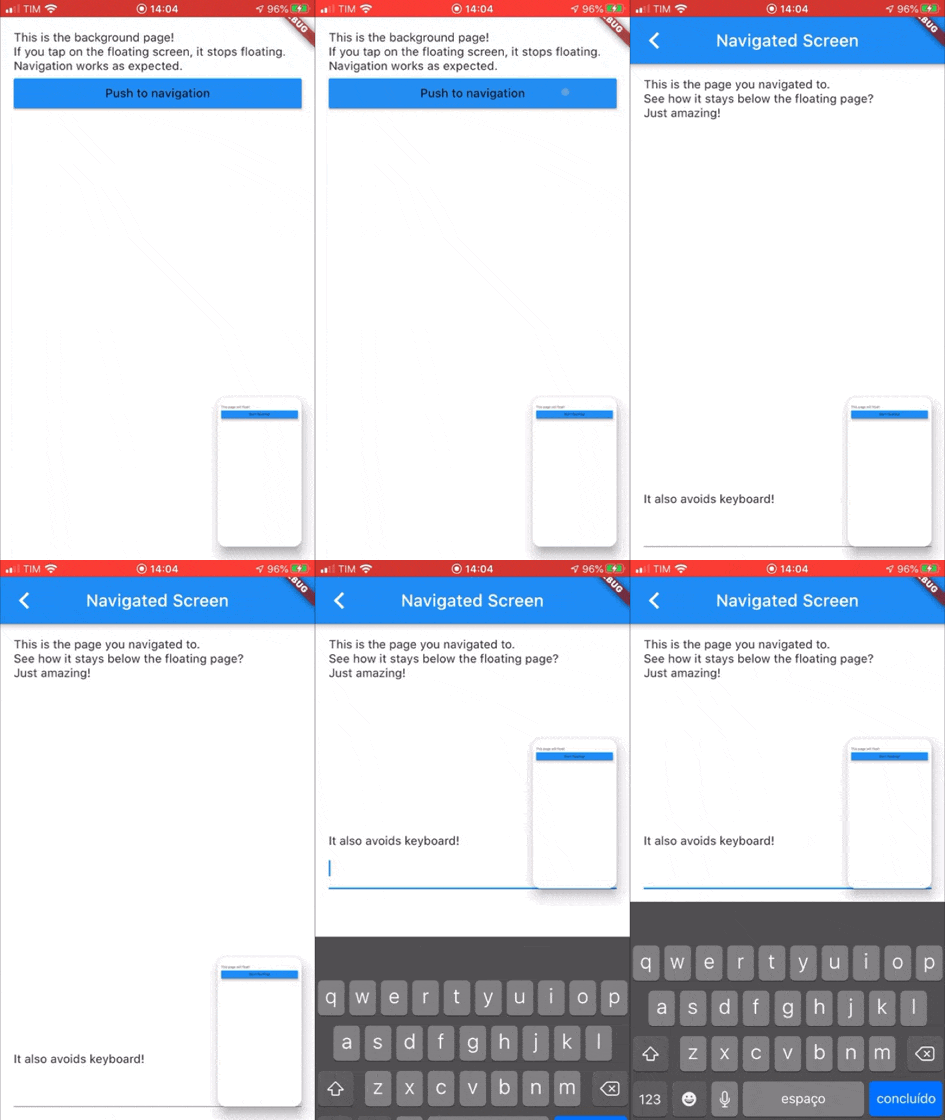
pip_view 套件讓開發者能在浮動覆蓋層下方顯示一個元件,通常用於畫中畫功能。它允許在較大的應用介面中無縫整合一個較小的、可拖曳的內容區域,非常適合影片播放或即時串流。此套件支援 Android、iOS、Web、macOS、Windows 與 Linux 多個平台,確保跨平台的一致性。它輕量級且設計簡單,只需最少設定即可輕鬆實作。這使其適用於需要動態、互動式覆蓋層,卻又不干擾主要 UI 流程的應用。
適用情境
畫中畫模式下的影片播放
即時攝像頭畫面疊加
互動式浮動控制
多任務應用介面
即時數據監控顯示
主要特色
帶拖曳支援的浮動小工具
疊加層渲染在主內容下方
跨平台相容性
所需設定最少
可自定大小和位置
適合對象
媒體應用
具有雙螢幕版面的教育工具
協作工作應用
即時監控儀表板
需要持久浮動UI元素的應用程式
使用建議
可能需要額外處理複雜手勢
對低階設備的效能影響
進階動畫的自訂功能有限
不適用於全螢幕取代
在複雜的使用者介面中需要適當的版面管理
原始 README
以下為關聯原始碼儲存庫的 README 原文快照,最新內容請造訪原始碼儲存庫。
pip_view
Widget to allow the presentation of a widget below a floating one. It supports moving the floating widget around which sticks to the corners.
Usage
Create a PIPView widget, the prop builder will be the view rendered floating when requested. To present a view below the floating view use PIPView.of(context).presentBelow(MyWidget()).
Props:
avoidKeyboard: whether the floating view should avoid the keyboard;
builder: a builder for the widget to float, the second parameter indicates if the view is floating;
initialCorner: the corner in which the floating view will be sticked initially
Possible values are: PIPViewCorner.topLeft, PIPViewCorner.topRight, PIPViewCorner.bottomLeft, PIPViewCorner.bottomRight;
floatingHeight: the height of the foreground view when floating. If not set is calculated from the floatingWidth to keep aspect ratio of the screen;
floatingWidth: the width of the foreground view when floating. If not set and floatingHeight is set, it is calculated from the floatingHeight value to keep aspect ratio of the screen. If not set and floatingHeight is not set, defaults to 100.0;
Example:
classMyScreenextendsStatelessWidget{
@overrideWidgetbuild(BuildContext context) {
returnPIPView(
builder: (context, isFloating) {
returnScaffold(
body: Column(
children: [
Text('This is the screen that will float!');
MaterialButton(
child: Text('Start floating');
onPressed: () {
PIPView.of(context).presentBelow(MyBackgroundScreen());
},
),
],
);
);
},
);
}
}
classMyBackgroundScreenextendsStatelessWidget{
@overrideWidgetbuild(BuildContext context) {
returnScaffold(
body: Text('This is my background screen!');
);
}
}
NOTE: If you want a more declarative way of using the PIPView, you can use RawPIPView instead.