搜尋套件、儲存庫與 APP 分類

place_picker 封面
套件詳情v0.10.0

place_picker

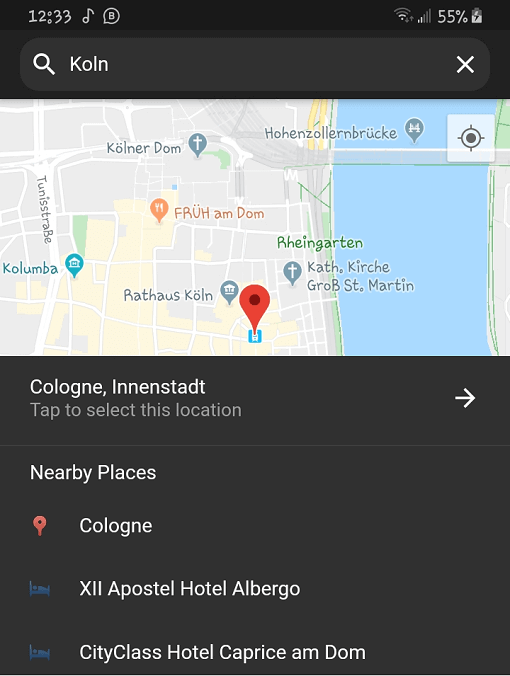
完全以 Dart 編寫的適用於 Flutter 的地點選擇器。內含自動補全建議與附近地點清單。也支援本地化。

近 30 天下載
322
喜歡數
147
Pub 分數
60

安裝套件

flutter pub add place_picker

套件介紹

根據套件公開資料產生的選型評估,僅供參考。

位置選擇器是一個完全以 Dart 寫成的 Flutter 套件,用於選擇地點,提供自動完成建議與附近的地點清單。它支援本地化,能實現多語言使用者體驗。專為無縫整合至 Flutter 應用而設計,透過直覺的 UI 元件簡化地址與地點輸入。該套件利用 Google Maps 後台取得精確的地理由定位資料,並透過智慧建議與即時回饋提升使用者體驗。非常適合需要精確地點選擇的應用。

適用情境

  • 表單中的地址輸入
  • 配送服務的位置選擇
  • 旅行和地圖應用
  • 使用者檔案位置設定
  • 事件或場地註冊

主要特色

  • 自動補全建議
  • 附近位置列表
  • 內建本地化
  • Google 地圖整合
  • 完全可自定義的使用者介面
  • 純 Dart 實現

適合對象

  • 需要位置輸入的移動應用
  • 面向國際用戶的應用
  • 使用純 Dart 解決方案的開發者
  • 需要輕量級位置選擇器的項目
  • 具有地圖功能的Flutter應用

使用建議

  • 需要 Google Maps API 金鑰
  • 僅限 Google 地圖後端
  • 可能需要額外的樣式來支援自定主題
  • 依賴網路連接
  • 不適用於離線位置選擇

原始 README

以下為關聯原始碼儲存庫的 README 原文快照,最新內容請造訪原始碼儲存庫。

Flutter Place Picker Pub

The missing location picker made in Flutter for Flutter. With dark theme and custom localization support.

⚠️ Please note: This library will NOT be affected by the deprecation of Place Picker as indicated here.

🍭 Remember to enable Places API, Maps SDK for Android, Maps SDK for iOS and Geocoding API for your API key.

Usage

To use this plugin, add place_picker as a dependency in your pubspec.yaml file.

Getting Started

This package relies on google_maps_flutter to display the map. Follow these guidelines to add your API key to the Android and iOS packages.

Get an API key at https://cloud.google.com/maps-platform/ if you haven't already.

Android

Specify your API key in the application manifest android/app/src/main/AndroidManifest.xml and add ACCESS_FINE_LOCATION permission:

<manifest ...

  <!-- Add this permission -->
  <uses-permission android:name="android.permission.ACCESS_FINE_LOCATION" />

  <application ...
    <!-- Add your api key here -->
    <meta-data android:name="com.google.android.geo.API_KEY"
               android:value="YOUR KEY HERE"/>
    <activity ..../>
  </application>
</manifest>

Update your gradle.properties file with this:

android.enableJetifier=true
android.useAndroidX=true
org.gradle.jvmargs=-Xmx1536M

Please also make sure that you have those dependencies in your build.gradle:

  // parent level build.gradle (android/build.gradle)
  dependencies {
      classpath 'com.android.tools.build:gradle:3.3.0'
      classpath 'com.google.gms:google-services:4.2.0'
  }
  ...

  // app level build.gradle (android/app/build.gradle)
  compileSdkVersion 28
iOS

Specify your API key in the application delegate ios/Runner/AppDelegate.m:

#include "AppDelegate.h"
#include "GeneratedPluginRegistrant.h"
#import "GoogleMaps/GoogleMaps.h"

@implementation AppDelegate

- (BOOL)application:(UIApplication *)application
    didFinishLaunchingWithOptions:(NSDictionary *)launchOptions {
  [GMSServices provideAPIKey:@"YOUR KEY HERE"];
  [GeneratedPluginRegistrant registerWithRegistry:self];
  return [super application:application didFinishLaunchingWithOptions:launchOptions];
}
@end

Or in your swift code, specify your API key in the application delegate ios/Runner/AppDelegate.swift:

import UIKit
import Flutter
import GoogleMaps

@UIApplicationMain
@objc class AppDelegate: FlutterAppDelegate {
  override func application(
    _ application: UIApplication,
    didFinishLaunchingWithOptions launchOptions: [UIApplicationLaunchOptionsKey: Any]?
  ) -> Bool {
    GMSServices.provideAPIKey("YOUR KEY HERE")
    GeneratedPluginRegistrant.register(with: self)
    return super.application(application, didFinishLaunchingWithOptions: launchOptions)
  }
}

Opt-in to the embedded views preview by adding a boolean property to the app's Info.plist file with the key io.flutter.embedded_views_preview and the value YES.

info.plist

Also add these to the dict values in Info.plist for location request to work on iOS info.plist

Sample Usage

Import the package into your code

import 'package:place_picker/place_picker.dart';

Create a method like below, and call it in onTap of a button or InkWell. A LocationResult will be returned with the name and lat/lng of the selected place. You can then handle the result in any way you want. Pass in an optional LatLng displayLocation to display that location instead. This is useful when you want the map to display the previously selected location.

void showPlacePicker() async {
    LocationResult result = await Navigator.of(context).push(MaterialPageRoute(
        builder: (context) =>
            PlacePicker("YOUR API KEY",
                        displayLocation: customLocation,
                        )));

    // Handle the result in your way
    print(result);
}

所屬分類

依賴

依賴清單 3 項

原始碼儲存庫

使用此套件的專案

暫無相關資料。