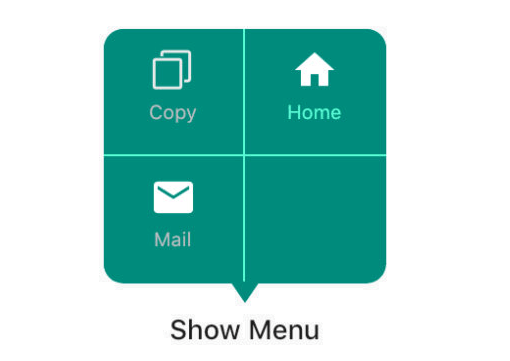
This project was written completely in dart, and it supports both iOS and Android.
Screenshots


Todo
Usage
You can find the demo at the 'example' folder.
First, you should set the context at somewhere in you code. Like below:
PopupMenu.context = context;
PopupMenu menu = PopupMenu(
      items: [
        MenuItem(title: 'Copy', image: Image.asset('assets/copy.png')),
        MenuItem(title: 'Home', image: Icon(Icons.home, color: Colors.white,)),
        MenuItem(title: 'Mail', image: Icon(Icons.mail, color: Colors.white,)),
        MenuItem(title: 'Power', image: Icon(Icons.power, color: Colors.white,)),
        MenuItem(title: 'Setting', image: Icon(Icons.settings, color: Colors.white,)),
        MenuItem(title: 'Traffic', image: Icon(Icons.traffic, color: Colors.white,))],
      onClickMenu: onClickMenu,
      onShow: onShow,
      onDismiss: onDismiss);

menu.show(rect: rect);
or
PopupMenu menu = PopupMenu(
        backgroundColor: Colors.teal,
        lineColor: Colors.tealAccent,
        maxColumn: 3,
        items: [
          MenuItem(title: 'Copy', image: Image.asset('assets/copy.png')),
          MenuItem(
              title: 'Home',
              textStyle: TextStyle(fontSize: 10.0, color: Colors.tealAccent),
              image: Icon(
                Icons.home,
                color: Colors.white,
              )),
          MenuItem(
              title: 'Mail',
              image: Icon(
                Icons.mail,
                color: Colors.white,
              )),
          MenuItem(
              title: 'Power',
              image: Icon(
                Icons.power,
                color: Colors.white,
              )),
          MenuItem(
              title: 'Setting',
              image: Icon(
                Icons.settings,
                color: Colors.white,
              )),
          MenuItem(
              title: 'PopupMenu',
              image: Icon(
                Icons.menu,
                color: Colors.white,
              ))
        ],
        onClickMenu: onClickMenu,
        onDismiss: onDismiss);
    menu.show(widgetKey: btnKey2);