搜尋套件、儲存庫與 APP 分類

套件詳情v2.3.0

rx_notifier

透過透明應用函數式響應式程式設計(TFRP)擴展 ValueNotifier

AndroidiOSWebmacOSWindowsLinux
近 30 天下載
2780
喜歡數
82
Pub 分數
140

安裝套件

flutter pub add rx_notifier

套件介紹

根據套件公開資料產生的選型評估,僅供參考。

RxNotifier 是一個 Flutter/Dart 套件,擴展了 ValueNotifier,實現了透明的函數式響應式程式設計(TFRP)。它透過允許開發者使用函數式運算子組合與轉換狀態變更,實現響應式狀態管理,同時維持 ValueNotifier 的簡潔性。該套件可無縫整合至現有的 Flutter 應用中,提供一種輕量級的狀態管理替代方案,支援響應式模式且無需樣板程式碼。它支援所有主要平台,並透過不可變更新與類似串流的轉換,促進撰寫乾淨、可測試的程式碼。

適用情境

  • 反應式 UI 狀態更新
  • 組合複雜的狀態邏輯
  • 取代多個 ValueNotifiers
  • 簡化狀態轉換
  • 建構響應式表單
  • 管理異步狀態

主要特色

  • 函數式響應式程式設計
  • 透明的 TFRP 結合
  • 不可變狀態更新
  • 串流類操作符
  • 最小化樣板程式碼
  • 跨平台支援

適合對象

  • 尋求反應式狀態管理的開發者
  • 需要可組合狀態邏輯的應用程式
  • 偏好函數式程式設計的團隊
  • 避免使用重型狀態管理的專案
  • Flutter 初學者學習反應式模式
  • 需要輕量級狀態解決方案的應用程式

使用建議

  • 需要理解函數式程式設計概念
  • 可能為初學者帶來學習曲線
  • 僅限基於 ValueNotifier 的反應式模式
  • 不適合非常大型的狀態管理
  • 最適合中等複雜度的狀態需求
  • 不會取代完整的反應式框架(例如 RxDart)

原始 README

以下為關聯原始碼儲存庫的 README 原文快照,最新內容請造訪原始碼儲存庫。

rx_notifier

The ValueNotifier is a simple, native form of Flutter reactivity. This extension aims to transparently apply functional reactive programming (TFRP).

Implementing the Atomic State.

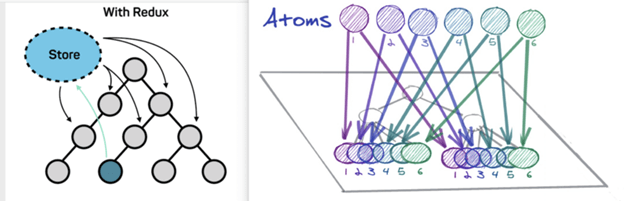
It is possible to implement Recoil Atoms pattern using RxNotifier. This pattern consists of the state being an object with its own reactivity.

atom

Motivation

Developers still have trouble understanding state management in Flutter. We had this conclusion after several research in the community fluttering and also in partner companies. Atomic State is a noob-friendly state management approuch at the same time that maintains a reliable structure thinking of scalability and maintenance.

More details, read this Medium article on the subject.

Rules

We must take into account some architectural limits to execute this Approach:

  1. All states must be an atom(RxNotifier instance).
  2. All actions must be an atom(RxNotifier instance).
  3. Business rules must be created in the Reducer and not in the Atom.

Layers

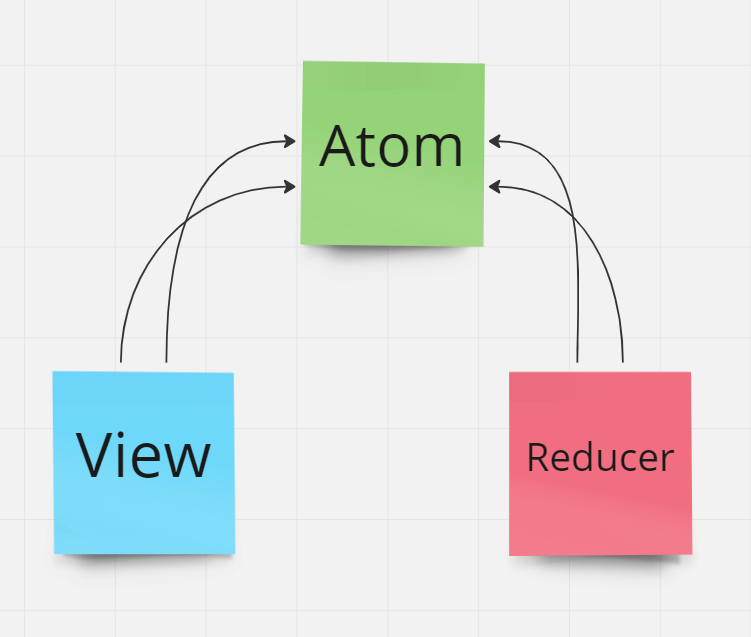
We will have 3 main layers, they are: Atoms, Reducers and Views;

atom

Note that the View (which is the presentation layer) does not know about the Reducer (which is the business rule execution layer). These two layers share atoms that in turn represent the state and the dispatch of state actions.

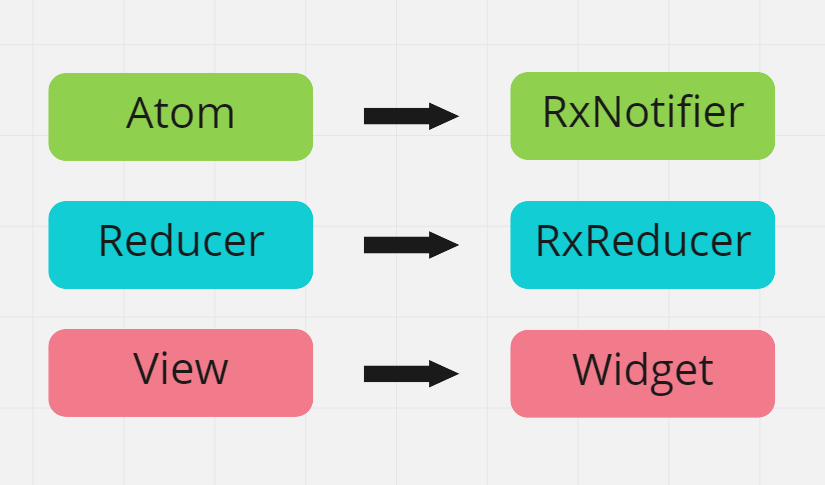
In Flutter these layers translate to Atom(RxNotifier), Reducer(RxReducer) and View(Widget):

atom

Atoms (RxNotifier)

Atom represent the reactive state of an application. Each atom has its own reactivity.

// atoms
final productsState = <Product>[].asRx();
final productTextFilterState = RxNotifier<String>('');

// computed
List<Product> get filteredProductsState {
     if(productTextFilterState.value.isEmpty()){
         return productsState.value;
     }

     return productsState.where(
         (p) => p.title.contains(productTextFilterState.value),
     );
}

// actions
final selectedProductState = RxNotifier<Product?>(null);
final fetchProductsState = RxNotifier(null);

Reducer (RxReducer)

In this architecture you are forced to split state management of business rules, which may seem strange at first when seen that we are always managing and reducing state in the same layer as BLoC and ChangeNotifier for example.
However, dividing state management and business rule execution will help us distribute multiple states to the same widget, and these multiple states will not need to be concatenated beforehand through a facade or proxy.

The layer responsible for making business decisions will be called Reducer:

class ProductReducer extends RxReducer {

    ProductReducer(){
        on(() => [fetchProductsState.action], _fetchProducts);
        on(() => [selectedProductState.value], _selectProduct);
    }

    void _fetchProducts(){
        ...
    }

    void _selectProduct(){
        ...
    }
}

Reducers can register methods/functions that listen to the reactivity of an Atom(RxNotifier).

View (Widget)

Any widget can listen to changes of one or many atoms, provided they have the RxRoot widget as their ancestor. For more details about RxRoot, Read the documentation.

The context.select() method is added via Extension to BuildContext and can be called on any type of Widget, StatefulWidget and StatelessWidget.

...
Widget build(BuildContext context){
     final products = context.select(
                 () => filteredProductsState.value
              );
     ...
}

Examples

Flutter projects using RxNotifier

Trivial Counter.

Shop Cart.

所屬分類

依賴

依賴清單 2 項

  • collection^1.17.0
  • rx_notifier_annotation>=1.0.0 <2.0.0

原始碼儲存庫

使用此套件的專案

暫無相關資料。