搜尋套件、儲存庫與 APP 分類

套件詳情v1.0.4

search_autocomplete

一個帶有自定義下拉選單和 Cubit/BLoC 支援的 Flutter 自動完成搜尋小部件。

AndroidiOSWebmacOSWindowsLinux
近 30 天下載
1280
喜歡數
3
Pub 分數
150

安裝套件

flutter pub add search_autocomplete

套件介紹

根據套件公開資料產生的選型評估,僅供參考。

一個用於實現自動完成搜尋功能的 Flutter 小組件,支援可自訂的下拉選單,並與 Cubit 或 BLoC 狀態管理無縫整合。它讓使用者能夠輸入文字並即時獲得建議,從而提升搜尋密集型應用的使用者體驗。此套件支援多個平台,包括 Android、iOS、Web、macOS、Windows 和 Linux,適用於跨平台開發。以乾淨、模組化的設計,簡化了響應式與互動式搜尋介面的建立。

適用情境

  • 應用中的即時搜尋
  • 篩選大型數據集
  • 增強使用者輸入體驗
  • 可自訂的建議下拉選單
  • 跨平台搜尋 UI

主要特色

  • 可自定義的下拉選單 UI
  • Cubit/BLoC 集成
  • 即時過濾
  • 多平台支援
  • 快速設定的簡單 API

適合對象

  • 電商應用中的搜尋功能
  • 儀表板中的資料過濾
  • 使用者友善的輸入欄位
  • 使用 BLoC/Cubit 的開發者
  • 跨平台 Flutter 項目

使用建議

  • 需要具備狀態管理知識
  • 可能需要樣式自訂
  • 效能取決於資料大小
  • 有限的內建主題
  • 最適合中等大小的資料集

原始 README

以下為關聯原始碼儲存庫的 README 原文快照,最新內容請造訪原始碼儲存庫。

Search Autocomplete Flutter Package

Video

Buy Me A Pizza

Overview

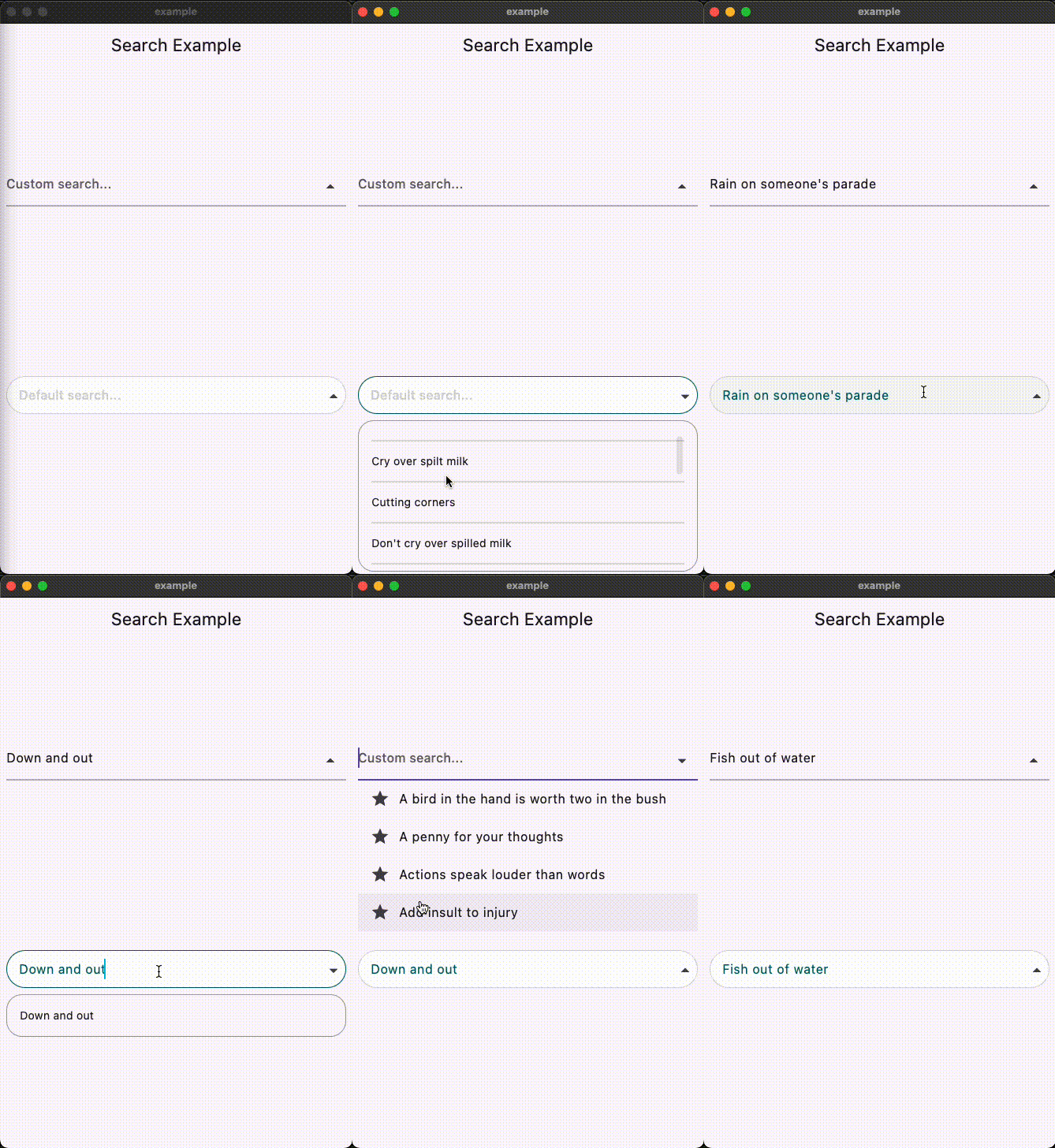
This Flutter package provides a SearchAutocomplete widget for implementing autocomplete functionality with a dropdown menu. The package offers extensive customization options for the search field, dropdown items, and includes hooks for search logic.

Installation

To use this package, add search_autocomplete as a dependency in your pubspec.yaml file:

dependencies:
  search_autocomplete: ^1.0.3

Features

  • Customizable search field
  • Customizable dropdown items
  • Hooks for search logic
  • Initial value support
  • Placeholder text support
  • Widget to display when the dropdown is empty
State Management Compatibility
  • Designed to work seamlessly with Cubit/Bloc and other orthodox state managers. Since the list updating logic resides higher up in the widget tree, it allows for a clean separation between UI and logic.

Usage

Here's a simple example demonstrating how to use the SearchAutocomplete widget:

Basic example:
SearchAutocomplete<String>(
  options: state.filteredItems, // Like: ['Apple', 'Banana', 'Orange'],
  initValue: state.currentItem, // Like: 'Apple',
  getString: (item) => item,
  onSearch: (query) {
    // Call your Bloc/Cubit/Provider method to filter options based on the query
    context.read<SearchCubit>().search(query);
  },
  onSelected: (item) {
    // Update your Bloc/Cubit/Provider state when an item is selected
    context.read<SearchCubit>().select(item);
  },
  hintText: 'Search fruits...',
)
Customization example:

You can customize both the search field and dropdown items appearance using provided builders:

SearchAutocomplete<String>(
  options: state.filteredItems,
  initValue: state.currentItem,
  getString: (item) => item,

  onSearch: (query) {
    context.read<SearchCubit>().search(query);
  },

  onSelected: (item) {
    context.read<SearchCubit>().select(item);
  },

  fieldBuilder: (controller, onFieldTap, showDropdown, onPressed) {
    return TextFormField(
      controller: controller,
      onTap: onFieldTap,
      decoration: InputDecoration(
        hintText: 'Custom search...',
        suffixIcon: IconButton(
          icon: Icon(
            showDropdown ? Icons.arrow_drop_up : Icons.arrow_drop_down,
          ),
          onPressed: () => onPressed(showDropdown),
        ),
      ),
    );
  },

  dropDownBuilder: (options, onSelected, controller) {
    return ListView.builder(
      itemCount: options.length,
      itemBuilder: (context, index) {
        final option = options[index];
        return ListTile(
          leading: Icon(Icons.star),
          title: Text(option),
          onTap: () => onSelected(option),
        );
      },
    );
  },

  emptyDropDown: (controller, close) {
    return Center(child: Text('No results found.'));
  },
)

License

This package is licensed under the MIT License. See the LICENSE.md file for details.

所屬分類

原始碼儲存庫

使用此套件的專案

暫無相關資料。