搜尋套件、儲存庫與 APP 分類

selectable_list 封面
套件詳情v0.1.1

selectable_list

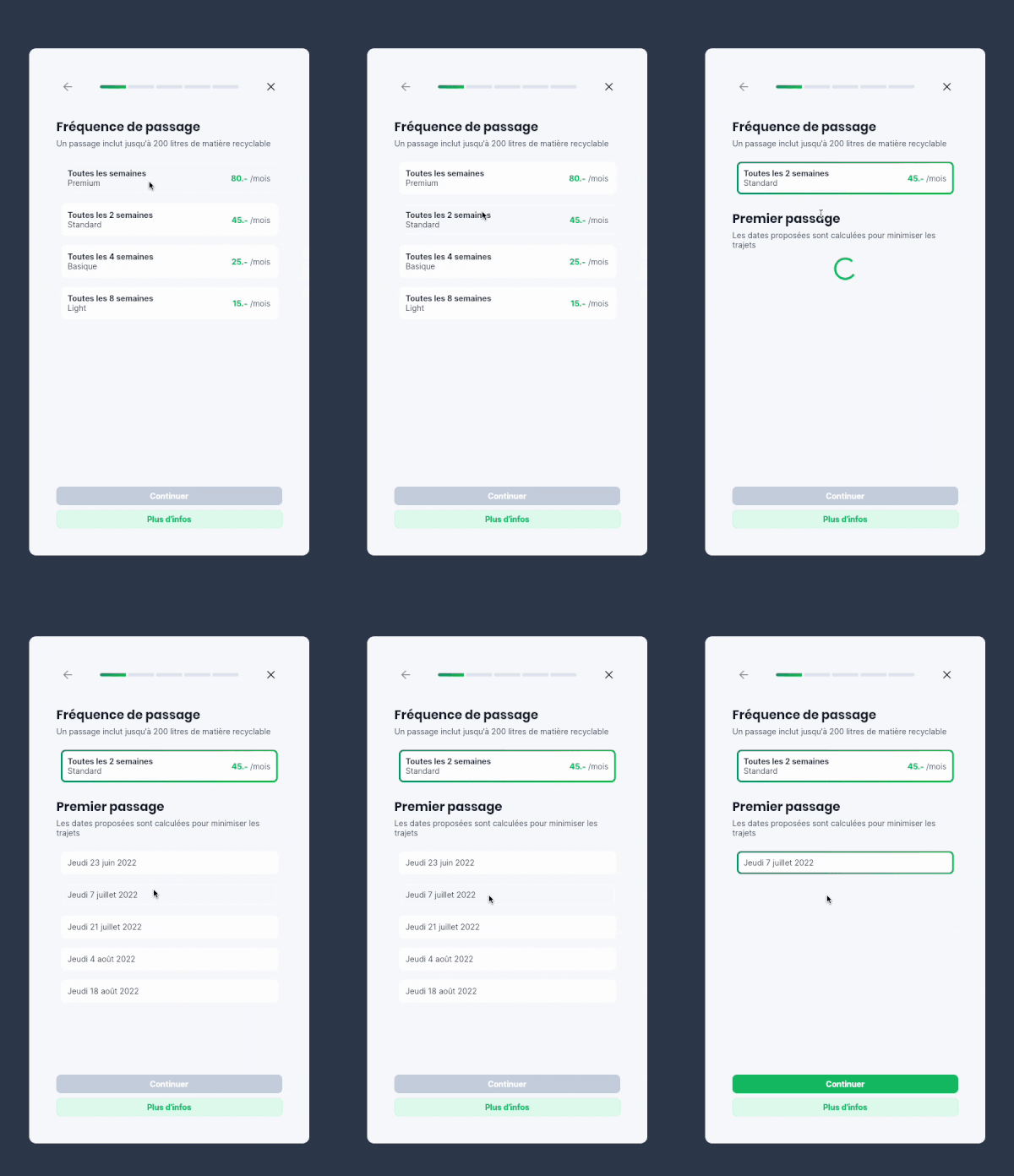
顯示可選擇項目清單的組件。當選取其中一項時,清單中的其他元素會動畫隱藏,僅保留所選項目。

AndroidiOSWebmacOSWindowsLinux
近 30 天下載
16
喜歡數
55
Pub 分數
150

安裝套件

flutter pub add selectable_list

套件介紹

根據套件公開資料產生的選型評估,僅供參考。

selectable_list 套件提供了一個 Flutter 小組件,用於顯示一個項目清單,每個項目都可以被選擇。選取後,清單中的其他項目會動畫淡出,僅留下所選項目可見。這創造出一種乾淨、專注的使用者體驗,非常適合單一選擇情境。動畫順暢且可自訂,提升了互動時的視覺反饋。它支援多個平台,包括 Android、iOS、Web、macOS、Windows 與 Linux,讓跨平台應用更具彈性。

適用情境

  • 單選介面
  • 具有有限選項的表單輸入
  • 互動式清單導航
  • 引導頁
  • 動態內容過濾
  • 極簡用戶介面設計

主要特色

  • 選擇時動畫收起項目
  • 單選模式
  • 跨平台相容性
  • 可自訂的動畫
  • 與 Flutter 的簡單整合
  • 響應式佈局支援

適合對象

  • 開發直覺的選取器小部件的開發者
  • 尋求極簡互動模式的設計師
  • 需要專注用戶輸入的應用
  • 具有動態列表工作流的專案
  • 優先考慮流暢的使用者體驗過渡

使用建議

  • 最適合項目較少的清單
  • 可能需要額外的樣式來適應複雜佈局
  • 動畫行為可能不適合所有使用案例
  • 僅限單選
  • 不適合大型資料集
  • 需要仔細處理狀態管理

原始 README

以下為關聯原始碼儲存庫的 README 原文快照,最新內容請造訪原始碼儲存庫。

Selectable List

A widget displaying a list of selectable items

When one of the items is selected, the other elements of the list are animated out, leaving the selected value. When tapping on the value again, the other values are animated back into the list.

Example app

Features

  • Use this package when you want to allow the user to choose one element in a list, and only show this element when selected.

  • Based on the Flutter AnimatedList widget

Usage

Import the package

import 'package:selectable_list/selectable_list.dart';

Use the widget

class _ScrollableListExampleState extends State<_ScrollableListExample> {
  final persons = [
    Person("Ella", 3),
    Person("James", 25),
    Person("Gertrude", 99)
  ];

  String? selectedName;

  @override
  Widget build(BuildContext context) {
    return SelectableList<Person, String?>(
        items: persons,
        itemBuilder: (context, person, selected, onTap) => ListTile(
            title: Text(person.name),
            subtitle: Text('${person.age.toString()} years old'),
            selected: selected,
            onTap: onTap),
        valueSelector: (person) => person.name,
        selectedValue: selectedName,
        onItemSelected: (person) =>
            setState(() => selectedName = person.name),
        onItemDeselected: (person) => setState(() => selectedName = null),
    ),
  }
}

Examples of use

Forms

Useful to make forms cleaner and more compact on mobile

Example in a form

所屬分類

原始碼儲存庫

使用此套件的專案

暫無相關資料。