搜尋套件、儲存庫與 APP 分類

shaky_animated_listview 封面
套件詳情v0.0.5

shaky_animated_listview

列出動畫以追蹤螢幕上的捲動變更,或在清單首次出現時對清單項目進行動畫處理,使用不同的過渡規則。

AndroidiOSWebmacOSWindowsLinux
近 30 天下載
98
喜歡數
73
Pub 分數
140

安裝套件

flutter pub add shaky_animated_listview

套件介紹

根據套件公開資料產生的選型評估,僅供參考。

ShakyAnimatedListView 是一個 Flutter 套件,提供動態清單項目動畫,以視覺方式追蹤捲動變更或清單項目初始出現。透過在項目進入視口或滾動過程中應用可自訂的過渡效果,提升使用者體驗。適合用於建立具有流暢進場與移動動畫的吸引人、回應迅速的清單,支援 Android、iOS、Web、macOS、Windows 與 Linux 等多個平台。此套件輕量且可順暢整合至現有的 Flutter 項目中。

適用情境

  • 增強列表項目進入動畫
  • 滾動時的視覺反饋
  • 使用動態過渡創建互動式 UI
  • 改進可滾動列表中的使用者參與度
  • 在多平台應用中動畫列表

主要特色

  • 可自定義的過渡規則
  • 列表項的平滑進入動畫
  • 滾動感知動畫追蹤
  • 支援所有主要的 Flutter 平台
  • 輕量且易於整合

適合對象

  • 開發互動式清單的開發者
  • 尋求視覺精緻的UI設計師
  • 需要動畫清單項目之應用程式
  • 跨平台 Flutter 應用
  • 專注於使用者體驗提升的專案

使用建議

  • 在非常大的清單上可能會影響效能
  • 需要仔細調整動畫參數
  • 可用文件有限
  • 最適合中等大小的清單
  • 不適合靜態或簡單的清單

原始 README

以下為關聯原始碼儲存庫的 README 原文快照,最新內容請造訪原始碼儲存庫。

Shaky_animated_list

pub

Shaky_animated_list can be used for three main things:

  1. Animate List view scroll.
  2. Animate grid view first view.
  3. Animate grid view scroll.

1. Library over view

All these animations track your scroll changes on screen or your list first attachment to animated your list items with different transition rules.

Shaking Grid Scroll list Scroll Grid
shaking_grid scroll_list scroll_grid

You can define these animation directions Axis by channing your list ScrollDirection.

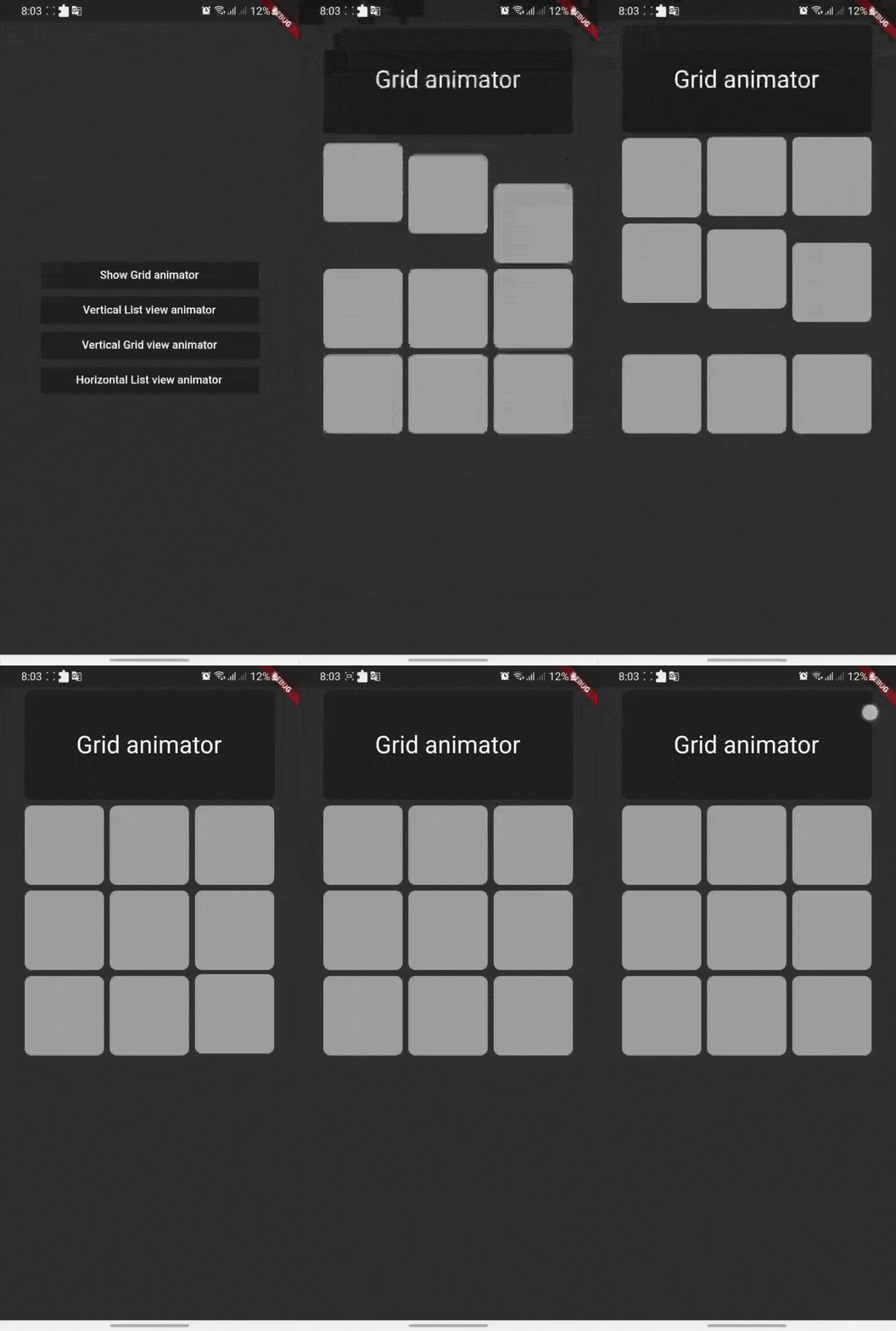
Shaking Grid

Shaking grid can be simply implemented by wrapping your grid child by GridAnimatorWidget and that's it we will take it from here ^^

for example you can simply do this to show shaking grey color cards

    GridView.count(
    crossAxisCount: 3,
    // shrinkWrap: true,
    children: List.generate(9, (i) => GridAnimatorWidget(
        child: Padding(
        padding: const EdgeInsets.all(4),
            child: ClipRRect(
            borderRadius: const BorderRadius.all(Radius.circular(10)),
                child: Container(
                color: Colors.grey,
                ),
        ),
    ),
    ),).toList()
    )

shaking_grid

ListView Scroll animations

ListView Scroll animations will enable your to implement the scroll animations with full control on animations space and duration please don't add vertical margins to your elements, you can use the spaceBetween to give a space between elements and extendedSpaceBetween to control the scroll animations space. Also you can use duration to control the reverse animations duration based on your needs

for example you can simply do this to show ListView vertical Scroll animations

    AnimatedListView(
    duration: 100,
    extendedSpaceBetween: 30,
    spaceBetween:10,
    children: List.generate(
    21,
    (index) => Card(
    elevation: 50,
    margin: const EdgeInsets.symmetric(horizontal: 20),
    shadowColor: Colors.black,
    color: Colors.grey,
        child: SizedBox(
        height: 300,
            child: Padding(
            padding: const EdgeInsets.all(20.0),
            child: Column(
                children: [
                    CircleAvatar(
                    backgroundColor: Colors.blue[500],
                    radius: 60,
                    child: const CircleAvatar(
                        backgroundImage: NetworkImage(
                        "https://avatars.githubusercontent.com/u/30810111?v=4"),
                        //NetworkImage
                        radius: 50,
                        ),
                    ),
                    const SizedBox(
                    height: 10,
                    ),
                    Text(
                    'Scroll to start',
                        style: TextStyle(
                        fontSize: 30,
                        color: Colors.blue[900],
                        fontWeight: FontWeight.w500,
                        ),
                    ),
                    const SizedBox(
                    height: 10,
                    ),
                    const Text(
                    'Animated list demo',
                        style: TextStyle(
                        fontSize: 15,
                        color: Colors.white,
                        ),
                    ),
                    const SizedBox(
                    height: 10,
                    ),
                ],
            ),
            ),
        ),
    )
))

scroll_list

Grid Scroll animations

Grid Scroll animations will enable your to implement the scroll animations on a grid view, one little change here is that we will implement the delegate, this is a design issue that we run into so you will have to to specify your crossAxisCount, crossAxisSpacing, mainAxisSpacing, and duration and we will take it from here,you can use any other default supported parameters in GridView.

for example you can simply do this to show Grid vertical Scroll animations

    AnimatedGridView(
          duration: 100,
          crossAxisCount: 2,
          mainAxisExtent: 256,
          crossAxisSpacing: 8,
          mainAxisSpacing: 8,
          children: List.generate(
              21,
              (index) => Card(
                    elevation: 50,
                    shadowColor: Colors.black,
                    color: Colors.grey[700],
                    child: SizedBox(
                      width: double.infinity,
                      child: Padding(
                        padding: const EdgeInsets.all(20.0),
                        child: Column(
                          children: const [
                            CircleAvatar(
                              backgroundColor: Colors.black,
                              radius: 60,
                              child: CircleAvatar(
                                backgroundImage: NetworkImage(
                                    "https://avatars.githubusercontent.com/u/30810111?v=4"),
                                //NetworkImage
                                radius: 50,
                              ),
                            ),
                          ],
                        ),
                      ),
                    ),
                  )
             )
       ),

scroll_grid

ListView horizontal Scroll animations

if you want to add a horizontal animations, all what you have to do is to add a scroll direction to the widget and that's it for example you can simply do this to show ListView horizontal Scroll animations

  AnimatedListView(
        duration: 100,
        scrollDirection: Axis.horizontal,
        children: List.generate(
        21,
            (index) => const Card(
            elevation: 50,
            margin: EdgeInsets.symmetric(horizontal: 10),
            shadowColor: Colors.black,
            color: Colors.grey,
                child: SizedBox(
                height: 300,
                width: 200,
                ),
            ),
        ),
  ),

horz_list

Sample source code

Example for all cases

Contribute

Let's develop with collaborations. We would love to have contributions by raising issues and opening PRs. Filing an issue before PR is must.

License

Project is published under the Apache 2.0 license. Feel free to clone and modify repo as you want, but don't forget to add reference to authors :)

所屬分類

原始碼儲存庫

使用此套件的專案

暫無相關資料。