simple_url_preview


Flutter package to show url preview
Getting Started
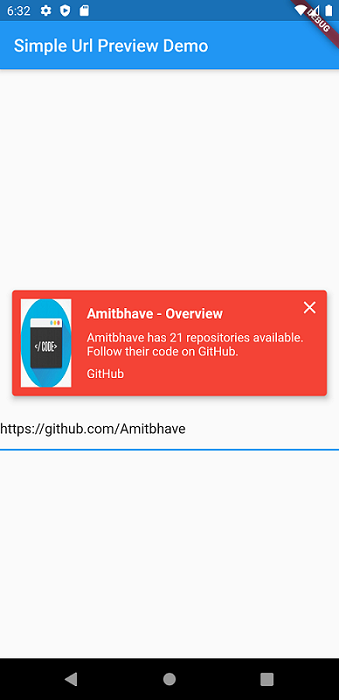
This shows url preview of a URL. (Now migrated to null-safety).
Currently only supports Open Graph Protocol
Please use latest version of the package.
How to use ?
Add simple_url_preview to pubspec.yaml, and hit command 'flutter pub get'
dependencies:
  ...
  simple_url_preview: ^3.0.1
1) Simple use:
SimpleUrlPreview(
  url: 'https://pub.dev/',
),
2) Override preview height, padding.(Default and minimum possible height is 130):
SimpleUrlPreview(
  url: 'https://pub.dev/',
  previewHeight: 200,
  previewContainerPadding: EdgeInsets.all(10),
),
3) Override background color:
Default bgColor = Theme.of(context).primaryColor
SimpleUrlPreview(
  url: 'https://pub.dev/',
  bgColor: Colors.red,
),
4) Override title, description, and site style:
Default titleStyle = TextStyle(
fontWeight: FontWeight.bold,
fontSize: 16,
color: Theme.of(context).accentColor
)
Default descriptionStyle = TextStyle(
fontSize: 14,
color: Theme.of(context).accentColor
)
Default siteNameStyle = TextStyle(
fontSize: 14,
color: Theme.of(context).accentColor
)
SimpleUrlPreview(
  url: 'https://pub.dev/',
  titleStyle: TextStyle(
    fontSize: 16,
    fontWeight: FontWeight.bold,
    color: Colors.red,
  ),
  descriptionStyle: TextStyle(
    fontSize: 14,
    color: Theme.of(context).primaryColor,
  ),
  siteNameStyle: TextStyle(
    fontSize: 14,
    color: Theme.of(context).primaryColor,
  ),
),
5) If you want closable preview (Click on x to close the preview.):
SimpleUrlPreview(
  url: 'https://pub.dev/',
  isClosable: true,
),
6) Override image loader color and title and description lines:
Default and maximum title lines = 2 and description lines = 3.
SimpleUrlPreview(
  url: 'https://pub.dev/',
  titleLines: 1,
  descriptionLines: 2,
  imageLoaderColor: Colors.white,
),
7) Override onTap callback of the URL preview:
By Default, will open URL in default browser.
SimpleUrlPreview(
  url: 'https://pub.dev/',
  onTap: () => print('Hello Flutter URL Preview'),
),
Contribution:
Would :heart: to see any contributions.
Appreciate:
If you liked my work, show some :heart: by :star: repo.
Also you can appreciate by