搜尋套件、儲存庫與 APP 分類

slideable 封面
套件詳情v0.0.4

slideable

適用於 Flutter 應用的彈性且可自訂的滑動清單項目。加入多個操作按鈕,控制動畫,並輕鬆自動關閉開啟的項目。

AndroidiOSWebmacOSWindowsLinux
近 30 天下載
320
喜歡數
29
Pub 分數
160

安裝套件

flutter pub add slideable

套件介紹

根據套件公開資料產生的選型評估,僅供參考。

Slideable 是一個靈活且可自訂的 Flutter 套件,可實現帶有多個動作按鈕的滑動清單項目。它允許開發者定義自訂動作,控制動畫行為,並在激活新項目時自動關閉開啟的項目。非常適合建立具有情境操作的互動式清單,例如刪除、存檔或編輯選項。該套件支援所有主要平台,包括 Android、iOS、Web、macOS、Windows 和 Linux,確保在各裝置上行為一致。

適用情境

  • 可互動的待辦事項清單項目
  • 滑動刪除訊息
  • 可自定義的操作面板
  • 列表項目管理
  • 上下文編輯介面

主要特色

  • 每個項目多個操作按鈕
  • 可自訂的動畫
  • 自動關閉開啟的項目
  • 跨平台支援
  • 與 ListView 的輕鬆整合
  • 可設定的滑動閾值

適合對象

  • 開發互動式清單的開發者
  • 需要滑動手勢的應用
  • UI 豐富的應用程式
  • 具有動態列表的行動與網頁應用程式
  • 重視一致使用者體驗的團隊

使用建議

  • 大型清單可能需要效能調校
  • 動畫自定義需要小心處理
  • 除了基本用法外,文件內容有限
  • 與其他觸控偵測器的潛在衝突
  • 未針對極其複雜的佈局進行優化

原始 README

以下為關聯原始碼儲存庫的 README 原文快照,最新內容請造訪原始碼儲存庫。

Slideable

This is a flexible slideable implementation that will allow you to pass simple widgets(icons or anything at all) as action items, and also control various backgrounds for the action item, and closes an already slide item in your list.

This is a side project that I have reused severally on lots of my project and decided to turn it into a package for anyone that wants more flexibility than the usual flutter_slidable package.

Features

  • Control flexibility on the type of widget to use as your action item.

  • A predefined callback function that automatically closes an already slid item in your list.

  • Can contain a maximum of 6 action items.

  • You can control the animation curver and animation speed.

Getting started

In the pubspec.yaml of you flutter project, add the following dependency:

dependencies:
 slideable: <latest_version>

In your screen or page, add the below import, to expose the package:

import 'package:slideable/Slideable.dart';

Basic Usage

Slideable

ActionItems, controls the actions widget you would want to have in the display. This is a List<ActionItems>, where, each actionItem consists of the required icon widget, which can be any accepted Flutter Widget, a required onPress function, that executes what you want that ActionItem to do, a defaulted backgroundColor of transparent, which is totally flexible to change and a radius, just incase you want to add a tweak to your design to match the Slidable child's borderRadius.

 ActionItems(
    icon: const Icon(
       Icons.thumb_up,
       color: Colors.blue,
    ),
    onPress: () {},
    backgroudColor: Colors.transparent,
),

Slideable, requires the ActionItems item widget list and the child, which will be the initial point of contact in our case.

The other values includes the backgroundColor, which by default is set to transparent' but can be changed to suit your design. resetSlide, which is a boolean value used to notifiy the Slideable to close all the slid item, unless set to false by an external false. A duration, which is used to control the the slide time and the curve, which is used to control the speed or motion of the slide animation.

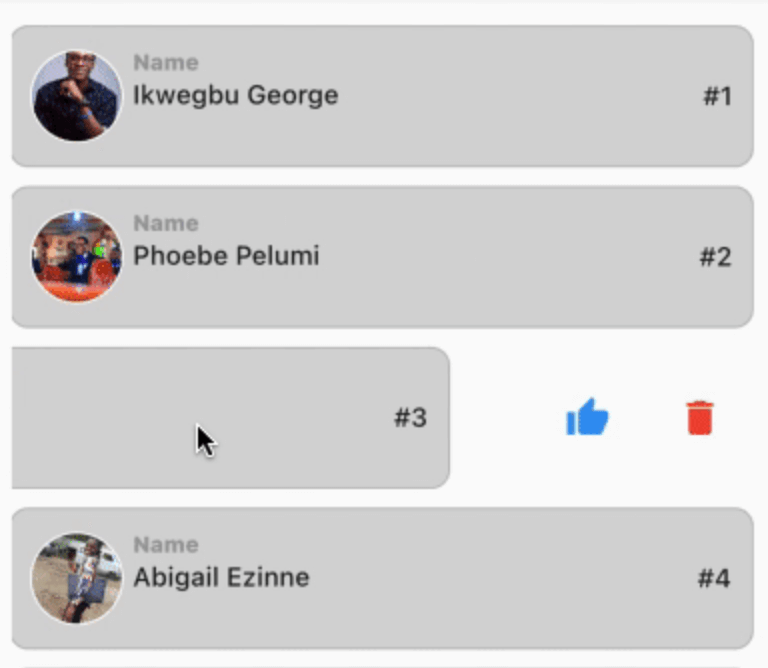
// This is used to monitor the item index in the list, and later used to closeup or leave open the slide.

int resetSlideIndex = 0;

Slideable(
 resetSlide: resetSlide,
 items: <ActionItems>[
    ActionItems(
      icon: const Icon(
         Icons.thumb_up,
         color: Colors.blue,
      ),
      onPress: () {},
      backgroudColor: Colors.transparent,
    ),
 ],
 child: Container(
   padding: const EdgeInsets.symmetric(
      horizontal: 10,
      vertical: 12,
   ),
   decoration: BoxDecoration(
      color: const Color.fromARGB(255, 214, 214, 214),
      border: Border.all(
         width: 1,
         color: const Color.fromARGB(124, 158, 158, 158),
      ),
      borderRadius: BorderRadius.circular(10),
      ),
   child: Row(
     crossAxisAlignment: CrossAxisAlignment.center,
     children: [
       Container(
         height: 50,
         width: 50,
         decoration: BoxDecoration(
            color: Colors.grey[350],
            shape: BoxShape.circle,
            border: Border.all(
               width: 1,
               color: Colors.white,
            ),
         ),
         child: ClipRRect(
            borderRadius: BorderRadius.circular(100),
            child: Image.network(         "https://images.pexels.com/photos/2379429/pexels-photo-2379429.jpeg?auto=compress&cs=tinysrgb&w=1600",
            fit: BoxFit.cover,
           ),
         ),
     ),
       const SizedBox( width: 5),
       Expanded(
          child: Column(
            crossAxisAlignment: CrossAxisAlignment.start,
            children: [
               const Text(
                  "Name",
                  style: TextStyle(
                    color: Colors.grey,
                    fontSize: 12,
                    fontWeight: 
                    FontWeight.w800,
                  ),
               ),
               const SizedBox(height: 2),
               const Text(
                  "George Ikwegbu",
                  style: const TextStyle(
                    fontWeight: FontWeight.w500,
                  ),
               ),
          ]
        ),
       ),
       Text(
         "#1",
         style: const TextStyle(
            fontWeight: FontWeight.w500,
         ),
       ),
     ],
    ),
   ),
  );

Example

import 'package:flutter/material.dart';
import 'package:slideable/Slideable.dart';

void main() => runApp(const MyApp());

class MyApp extends StatelessWidget {
  const MyApp({
    Key? key,
  }) : super(key: key);

  @override
  Widget build(BuildContext context) {
    return const MaterialApp(
      debugShowCheckedModeBanner: false,
      title: 'Slideable Widget',
      home: Home(),
    );
  }
}

class Home extends StatefulWidget {
  const Home({
    Key? key,
  }) : super(key: key);

  @override
  State<Home> createState() => _HomeState();
}

class _HomeState extends State<Home> {
  // This is used to monitor the item index in the list, and later used to closeup or leave open the slide.
  int resetSlideIndex = 0;

  @override
  Widget build(BuildContext context) {
    return Scaffold(
      appBar: AppBar(
        title: const Text("Class List"),
      ),
      body: ListView.separated(
        itemCount: _classList.length,
        padding: const EdgeInsets.symmetric(
          horizontal: 16,
          vertical: 20,
        ),
        itemBuilder: (context, index) {
          Map<String, dynamic> _student = _classList[index];
          return GestureDetector(
            onLongPressDown: (val) {
              // This allows you the time taken for a user to slide upon the widget in the list.
              // NB: Using the onTap or onHorizontalDragStart seemed to have caused a seizure in the widget, hence my resulting to onLongPressDown
              setState(() {
                // This updates the widget, and inturn rebuilds it, thereby notifying the Slidable widget to close an already slide item
                resetSlideIndex = index;
              });
            },
            child: _listItem(
              context: context,
              student: _student,
              index: index,
              resetSlide: index == resetSlideIndex ? false : true, 
              // Reverse engineering the notion, meaning the Slidable widget will close all slid item, except one with false, i.e the currently slide item
            ),
          );
        },
        separatorBuilder: (context, index) => const SizedBox(height: 10),
      ),
    );
  }

  Slideable _listItem({
    required BuildContext context,
    required Map<String, dynamic> student,
    required int index,
    required bool resetSlide,
  }) {
    return Slideable(
      resetSlide: resetSlide,
      items: <ActionItems>[
        ActionItems(
          icon: const Icon(
            Icons.thumb_up,
            color: Colors.blue,
          ),
          onPress: () => _likeUser(student["name"]),
          backgroudColor: Colors.transparent,
        ),
        ActionItems(
          icon: const Icon(
            Icons.delete,
            color: Colors.red,
          ),
          onPress: () => _deleteUser(student["name"]),
          backgroudColor: Colors.transparent,
        ),
      ],
      child: Container(
        padding: const EdgeInsets.symmetric(
          horizontal: 10,
          vertical: 12,
        ),
        decoration: BoxDecoration(
          color: const Color.fromARGB(255, 214, 214, 214),
          border: Border.all(
            width: 1,
            color: const Color.fromARGB(124, 158, 158, 158),
          ),
          borderRadius: BorderRadius.circular(10),
        ),
        child: Row(
          crossAxisAlignment: CrossAxisAlignment.center,
          children: [
            Container(
              height: 50,
              width: 50,
              decoration: BoxDecoration(
                color: Colors.grey[350],
                shape: BoxShape.circle,
                border: Border.all(
                  width: 1,
                  color: Colors.white,
                ),
              ),
              child: ClipRRect(
                borderRadius: BorderRadius.circular(100),
                child: Image.network(
                  student["img"],
                  fit: BoxFit.cover,
                ),
              ),
            ),
            const SizedBox(
              width: 5,
            ),
            Expanded(
              child: Column(
                crossAxisAlignment: CrossAxisAlignment.start,
                children: [
                  const Text(
                    "Name",
                    style: TextStyle(
                      color: Colors.grey,
                      fontSize: 12,
                      fontWeight: FontWeight.w800,
                    ),
                  ),
                  const SizedBox(height: 2),
                  Text(
                    student["name"],
                    style: const TextStyle(
                      fontWeight: FontWeight.w500,
                    ),
                  ),
                ],
              ),
            ),
            Text(
              "#${index + 1}",
              style: const TextStyle(
                fontWeight: FontWeight.w500,
              ),
            ),
          ],
        ),
      ),
    );
  }

  _deleteUser(user) {
    ScaffoldMessenger.of(context).showSnackBar(
      SnackBar(
        content: Text("$user, will be deleted."),
        backgroundColor: Colors.grey[450],
      ),
    );
  }

  _likeUser(user) {
    ScaffoldMessenger.of(context).showSnackBar(
      SnackBar(
        content: Text("You gave $user a thumbs up, pretty cool 🥰"),
        backgroundColor: Colors.grey[450],
      ),
    );
  }

  final List<Map<String, dynamic>> _classList = [
    {
      "name": "Ikwegbu George",
      "img":
          "https://images.pexels.com/photos/2379429/pexels-photo-2379429.jpeg?auto=compress&cs=tinysrgb&w=1600",
    },
    {
      "name": "Phoebe Pelumi",
      "img":
          "https://images.pexels.com/photos/3986672/pexels-photo-3986672.jpeg?auto=compress&cs=tinysrgb&w=1600&lazy=load",
    },
    {
      "name": "James Mike",
      "img":
          "https://images.pexels.com/photos/11828983/pexels-photo-11828983.jpeg?auto=compress&cs=tinysrgb&w=1600&lazy=load",
    },
    {
      "name": "Abigail Ezinne",
      "img":
          "https://images.pexels.com/photos/3030252/pexels-photo-3030252.jpeg?auto=compress&cs=tinysrgb&w=1600&lazy=load",
    },
    {
      "name": "Chioma Chinedu",
      "img":
          "https://images.pexels.com/photos/4491630/pexels-photo-4491630.jpeg?auto=compress&cs=tinysrgb&w=1600",
    },
  ];
}

Example

You can find the example code here

所屬分類

原始碼儲存庫

使用此套件的專案

暫無相關資料。