Table of Contents
Features
- 🌨️ Realistic snow fall animation
- 🎄 Support for custom emojis (snowflakes, Christmas-themed, etc.)
- ⚡ Smooth performance with multiple animation styles
- 🎮 Customizable controls for speed, density, and wind effects
- 🏔️ Optional snow accumulation at the bottom
- 🎯 Easy to implement with minimal setup
- 📱 Works on all Flutter platforms
Demo Examples
 |
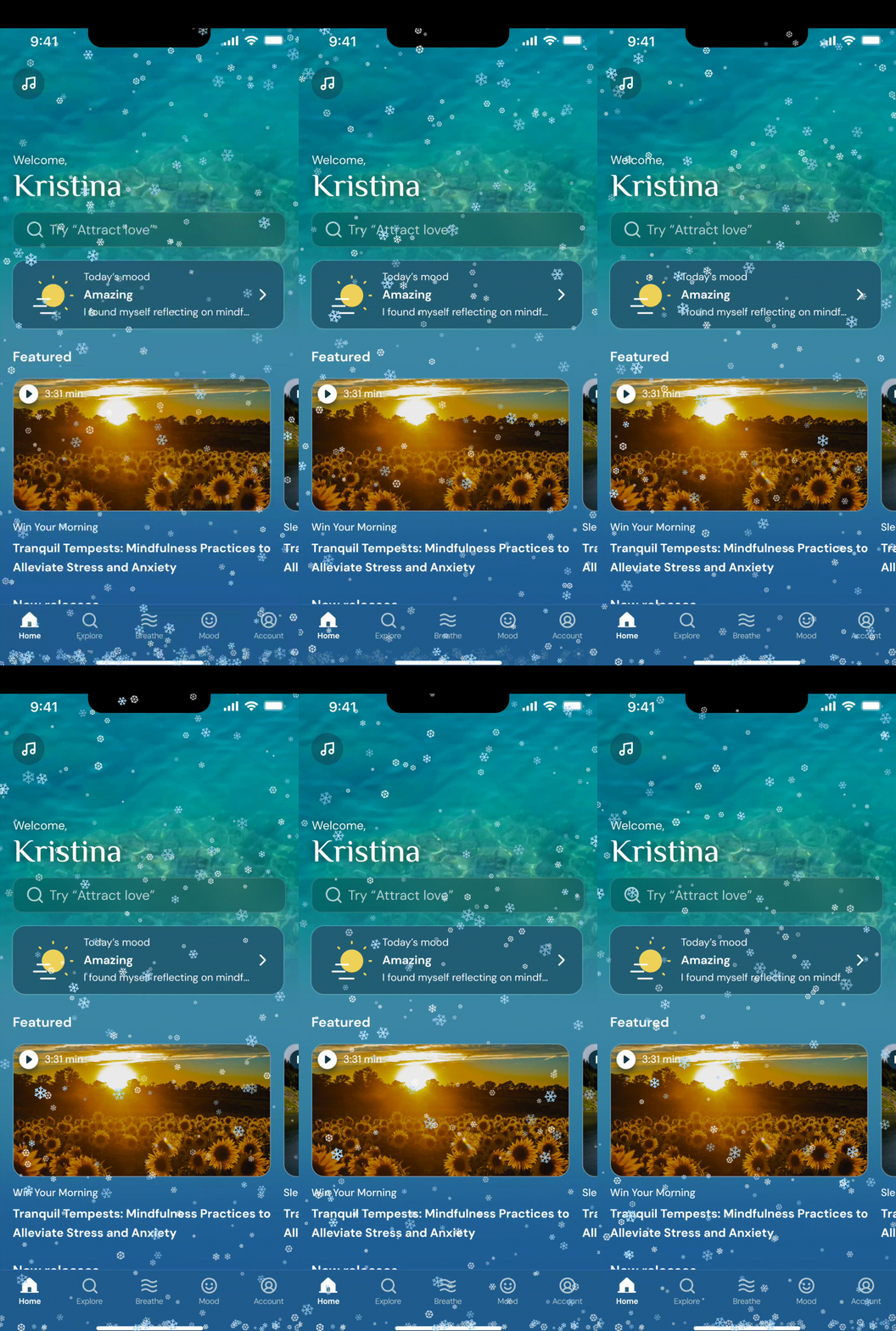 |
 |
'Default Snow' |
'Christmas Magic' |
'Winter Wonderland' |
Getting Started
Installation
Add snow_fall_animation to your pubspec.yaml:
dependencies:
  snow_fall_animation: ^0.0.1+2
Or install via command line:
flutter pub add snow_fall_animation
Basic Usage
import 'package:snow_fall_animation/snow_fall_animation.dart';
class MyApp extends StatelessWidget {
@override
Widget build(BuildContext context) {
return Scaffold(
body: Stack(
children: [
Container(
decoration: BoxDecoration(
gradient: LinearGradient(
begin: Alignment.topCenter,
end: Alignment.bottomCenter,
colors: [
Colors.blue[900]!,
Colors.blue[700]!,
],
),
),
),
SnowFallAnimation(
config: SnowfallConfig(
numberOfSnowflakes: 200,
speed: 1.0,
useEmoji: true,
customEmojis: ['❄️', '❅', '❆'],
),
),
YourContent(),
],
),
);
}
}
Configuration Properties
SnowfallConfig Properties
| Property |
Type |
Default |
Range/Values |
Description |
numberOfSnowflakes |
int |
200 |
50-500 |
Number of snowflakes displayed on screen |
speed |
double |
1.0 |
0.1-3.0 |
Base falling speed of the snowflakes |
useEmoji |
bool |
true |
true/false |
Whether to use emojis or basic shapes |
customEmojis |
List<String> |
['❄️', '❅', '❆'] |
Any emoji list |
List of emojis to use as snowflakes |
snowColor |
Color |
Colors.white |
Any Color |
Color of non-emoji snowflakes |
holdSnowAtBottom |
bool |
true |
true/false |
Whether snow accumulates at bottom |
cleanupDuration |
Duration |
3 seconds |
Any Duration |
Time taken for cleanup animation |
accumulationDuration |
Duration |
10 seconds |
Any Duration |
Time between cleanup cycles |
minSnowflakeSize |
double |
2.0 |
1.0-10.0 |
Minimum size of snowflakes |
maxSnowflakeSize |
double |
8.0 |
1.0-20.0 |
Maximum size of snowflakes |
swingRange |
double |
1.0 |
0.0-2.0 |
Horizontal swing amplitude |
rotationSpeed |
double |
1.0 |
0.0-3.0 |
Rotation speed of snowflakes |
maxSnowHeight |
double |
50.0 |
0.0-100.0 |
Maximum height of accumulated snow |
enableSnowDrift |
bool |
true |
true/false |
Enable horizontal drifting |
windForce |
double |
0.0 |
-2.0-2.0 |
Horizontal wind force (negative = left) |
enableRandomSize |
bool |
true |
true/false |
Randomize snowflake sizes |
enableRandomOpacity |
bool |
true |
true/false |
Randomize snowflake opacity |
minOpacity |
double |
0.5 |
0.0-1.0 |
Minimum snowflake opacity |
maxOpacity |
double |
1.0 |
0.0-1.0 |
Maximum snowflake opacity |
Presets & Effects
Animation Effects
| Effect |
Properties |
Values |
Description |
| Heavy Snow |
numberOfSnowflakes
speed |
300-500
1.5-2.0 |
Dense, fast-falling snow |
| Light Snow |
numberOfSnowflakes
speed |
50-100
0.5-0.8 |
Sparse, gentle snow |
| Blizzard |
windForce
speed |
1.5-2.0
2.0-3.0 |
Strong sideways wind |
| Gentle Drift |
windForce
swingRange |
0.2-0.5
0.5-1.0 |
Slight drifting motion |
Preset Configurations
SnowfallConfig
(
numberOfSnowflakes: 200,
speed: 1.0,
customEmojis: ['❄️', '🎅', '🎄', '🎁', '⭐'],
windForce: 0.5,
)
SnowfallConfig(
numberOfSnowflakes: 250,
speed: 1.2,
customEmojis: ['❄️', '⛄', '🦌', '✨', '⭐'],
windForce: 1.0,
)
SnowfallConfig(
numberOfSnowflakes: 120,
speed: 0.5,
customEmojis: ['❄️', '🕯️', '🧦', '🍪', '🥛'],
windForce:
0.2
,
)
Emoji Groups
Available Emojis
| Category |
Emojis |
Purpose |
| Snow |
❄️ ❅ ❆ ✻ ✼ |
Basic snow effects |
| Christmas |
🎅 🤶 🎄 🎁 ⭐ 🔔 |
Christmas theme |
| Winter |
⛄ 🧣 🧤 🎿 🦌 |
Winter activities |
| Decorations |
🎄 ⭐ 🔔 🧦 🕯️ |
Holiday decorations |
| Treats |
🍪 🥛 🍷 |
Holiday treats |
Advanced Usage
Customization Bottom Sheet
showCustomizationBottomSheet
(
context: context,
config: currentConfig,
onConfigChanged: (newConfig) {
setState(() {
config = newConfig;
});
},
);
Dynamic Configuration
class _MyHomePageState extends State<MyHomePage> {
late SnowfallConfig _config;
@override
void initState() {
super.initState();
_config = const SnowfallConfig(
numberOfSnowflakes: 200,
speed: 1.0,
customEmojis: ['❄️', '🎅', '🎄'],
);
}
void _updateConfig(SnowfallConfig newConfig) {
setState(() {
_config = newConfig;
});
}
}
Performance
Optimization Tips
- Keep
numberOfSnowflakes between 100-300 for best performance
- Disable unnecessary effects (
enableRandomOpacity, enableSnowDrift) if not needed
- Use basic shapes instead of emojis for better performance
- Adjust cleanup cycle timing based on your needs
Platform-Specific Notes
- Web: Keep number of snowflakes lower for better performance
- Mobile: Works well with default settings
- Desktop: Can handle higher numbers of snowflakes
Example App
The plugin includes a complete example app. To run:
- Clone the repository
- Navigate to example directory:
cd example
- Run the app:
flutter run
The example app demonstrates:
- Different preset configurations
- Custom emoji selection
- Animation controls
- Bottom sheet customization
- Preset switching
Contributing
Contributions are welcome! Please feel free to submit a Pull Request.
Development Setup
- Fork the repository
- Clone your fork
- Create a new branch
- Make your changes
- Submit a pull request
Visitors Count