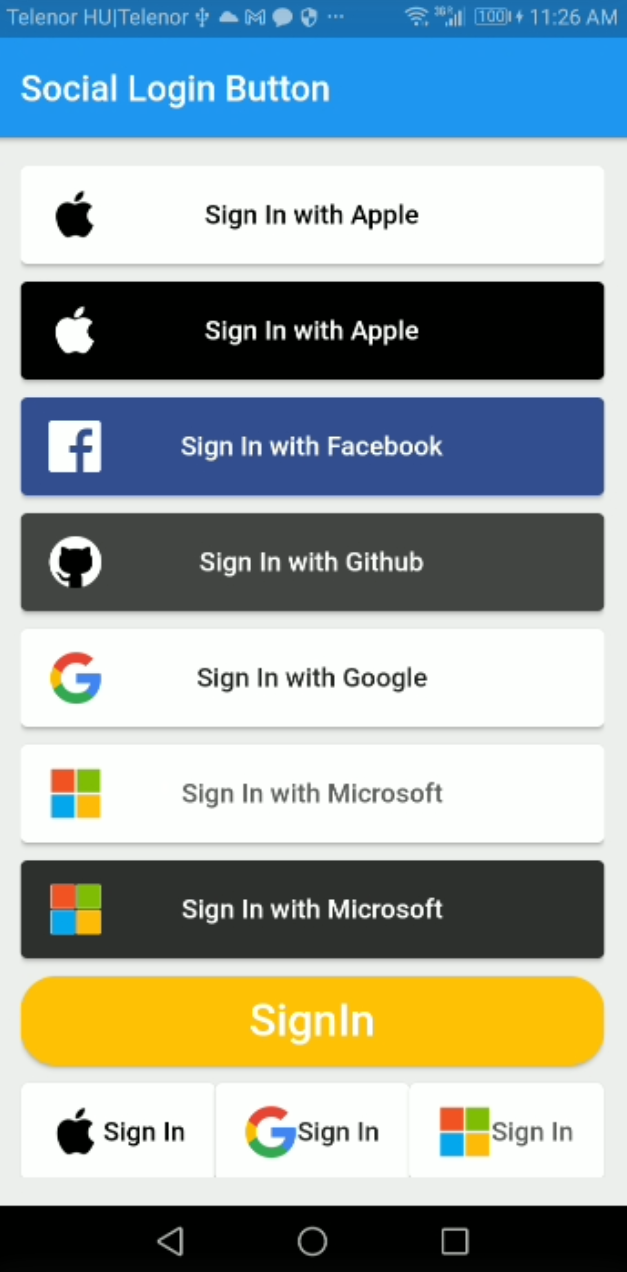
Flutter Social Login Button
Social Login Button is a flutter package to create social media login buttons of all common used SSO.
Usage
Add the dependency in pubsec.yaml file.
  dependencies:
    flutter:
      sdk: flutter
    social_login_buttons: 1.0.7
How to Use
  SocialLoginButton(
    buttonType: SocialLoginButtonType.apple,
    onPressed: () {},
  )
You can also specify some other arguments which are:
- imageURL (if you're specifying the image link from your Github repo, don't forget to change blob with raw)
- imagePath (you can also use local image, Local will be preferred incase cpecifed both)
- imageWidth
- text
- backgroundColor
- textColor
- height
- width
- borderRadius
- fontSize
- mode
Below is the example with all arguments supplied:
   SocialLoginButton(
      backgroundColor: Colors.amber,
      height: 50,
      text: 'SignIn',
      borderRadius: 20,
      fontSize: 25,
      buttonType: SocialLoginButtonType.generalLogin,
      imageWidth: 20,
      imagepath: "assets/file.png",
      imageURL: "URL",
      onPressed: () {},
   ),
Button Types
- Facebook
- Google
- Twitter
- Apple
- AppleBlack
- Microsoft
- MicrosoftBlack
- Github
- General Login
Mode
There are two modes available for the buttons, You can make shorter buttons with single mode.
Example
import 'package:flutter/material.dart';
import 'package:social_login_buttons/social_login_buttons.dart';

void main() {
  runApp(const MyApp());
}

class MyApp extends StatelessWidget {
  const MyApp({Key? key}) : super(key: key);

  @override
  Widget build(BuildContext context) {
    return MaterialApp(
      title: 'Flutter Social Login Buttons',
      debugShowCheckedModeBanner: false,
      theme: ThemeData(
        primarySwatch: Colors.blue,
      ),
      home: const MyHomePage(tittle: 'Flutter Social Login Buttons'),
    );
  }
}

class MyHomePage extends StatelessWidget {
  const MyHomePage({Key? key, required this.tittle}) : super(key: key);
  final String tittle;

  @override
  Widget build(BuildContext context) {
    return Scaffold(
      appBar: AppBar(
        title: const Text('Social Login Button'),
        elevation: 2.0,
      ),
      body: _buildContainer(context),
      backgroundColor: Colors.grey[200],
    );
  }

  Widget _buildContainer(BuildContext context) {
    return Padding(
      padding: const EdgeInsets.all(16.0),
      child: Center(
        child: SingleChildScrollView(
          child: Column(
            crossAxisAlignment: CrossAxisAlignment.stretch,
            mainAxisAlignment: MainAxisAlignment.center,
            children: <Widget>[
              SocialLoginButton(
                buttonType: SocialLoginButtonType.apple,
                onPressed: () {},
              ),
              const SizedBox(height: 10),
              SocialLoginButton(
                buttonType: SocialLoginButtonType.appleBlack,
                onPressed: () {},
              ),
              const SizedBox(height: 10),
              SocialLoginButton(
                buttonType: SocialLoginButtonType.facebook,
                onPressed: () {},
              ),
              const SizedBox(height: 10),
              SocialLoginButton(
                buttonType: SocialLoginButtonType.github,
                onPressed: () {},
              ),
              const SizedBox(height: 10),
              SocialLoginButton(
                buttonType: SocialLoginButtonType.google,
                onPressed: () {},
              ),
              const SizedBox(height: 10),
              SocialLoginButton(
                buttonType: SocialLoginButtonType.microsoft,
                onPressed: () {},
              ),
              const SizedBox(height: 10),
              SocialLoginButton(
                buttonType: SocialLoginButtonType.microsoftBlack,
                onPressed: () {},
                imageWidth: 20,
              ),
              const SizedBox(height: 10),
              SocialLoginButton(
                backgroundColor: Colors.amber,
                height: 50,
                text: 'SignIn',
                borderRadius: 20,
                fontSize: 25,
                buttonType: SocialLoginButtonType.generalLogin,
                onPressed: () {},
              ),
              const SizedBox(height: 10),
              Row(
                mainAxisAlignment: MainAxisAlignment.spaceBetween,
                children: [
                  SocialLoginButton(
                    buttonType: SocialLoginButtonType.google,
                    onPressed: () {},
                    mode: SocialLoginButtonMode.single,
                  ),
                ],
              )
            ],
          ),
        ),
      ),
    );
  }
}
Contributing
Pull requests are welcome. For major changes, please open an issue first to discuss what you would like to change.
License
Apache-2.0
Screenshot