搜尋套件、儲存庫與 APP 分類

statsfl 封面
套件詳情v2.3.0

statsfl

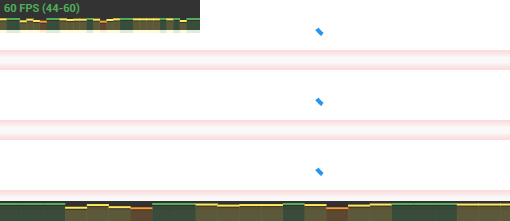
一個簡單的 Flutter FPS 監控器。有助於輕鬆診斷應用程式中的效能問題。

AndroidiOSWebmacOSWindowsLinux
近 30 天下載
6050
喜歡數
130
Pub 分數
145

安裝套件

flutter pub add statsfl

套件介紹

根據套件公開資料產生的選型評估,僅供參考。

StatsFL 是一個輕量級的 Flutter 套件,提供易於使用的 FPS(每秒幀數)監控工具,用於調試 Flutter 應用程式的效能問題。它可直接在應用程式中即時顯示幀率資料,幫助開發者識別渲染瓶頸並優化 UI 回應速度,適用於 Android、iOS、Web、macOS、Windows 與 Linux 平台。此套件整合簡單,設定最少,非常適合開發與測試階段。

適用情境

  • 開發過程中的性能調試
  • 識別 UI 滯後或卡頓
  • 監控不同裝置上的應用程式回應性
  • 即時幀率可視化
  • 測試優化改進

主要特色

  • 顯示即時FPS計數器
  • 最小整合工作量
  • 跨平台支援
  • 可自訂的覆蓋層外觀
  • 輕量且無侵入性

適合對象

  • Flutter 開發人員排錯 UI 性能
  • 進行性能測試的團隊
  • 教育專案,學習應用程式優化
  • 需要流暢動畫和過渡的App

使用建議

  • 不適用於生產發行
  • 疊加層可能影響UI設計
  • 僅限FPS監控
  • 不包含進階分析工具
  • 最終建構中可能需要停用

原始 README

以下為關聯原始碼儲存庫的 README 原文快照,最新內容請造訪原始碼儲存庫。

statsfl - A simple FPS monitor for Flutter

🔨 Installation

dependencies:
  statsfl: ^2.2.0+1
⚙ Import
import 'package:statsfl/statsfl.dart';

🕹️ Usage

Just wrap your root view in the StatsFl widget:

StatsFl(child: MyApp());

There are a few additional options you can play with:

return StatsFl(
        isEnabled: true, //Toggle on/off
        width: 600, //Set size
        height: 20, //
        maxFps: 90, // Support custom FPS target (default is 60)
        showText: true, // Hide text label
        sampleTime: .5, //Interval between fps calculations, in seconds.
        totalTime: 15, //Total length of timeline, in seconds.
        align: Alignment.topLeft, //Alignment of statsbox
        child: MyApp());

🐞 Bugs/Requests

If you encounter any problems please open an issue. If you feel the library is missing a feature, please raise a ticket on Github and we'll look into it. Pull request are welcome.

📃 License

MIT License

所屬分類

原始碼儲存庫

使用此套件的專案