搜尋套件、儲存庫與 APP 分類

sticky_grouped_list 封面
套件詳情v3.1.0

sticky_grouped_list

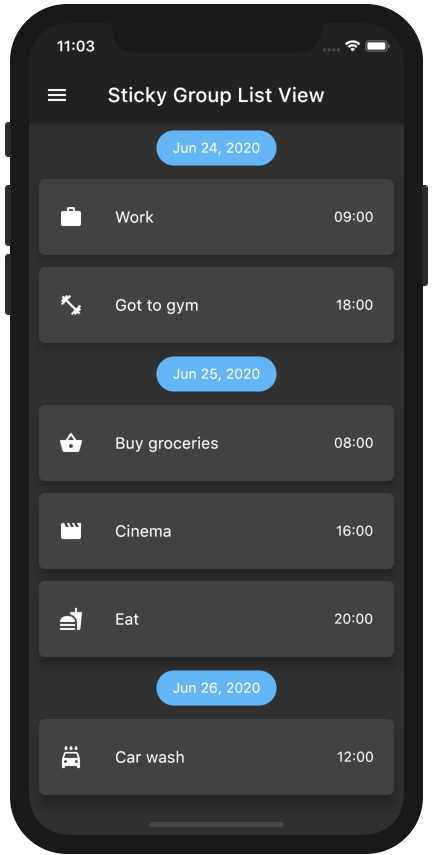
一個可滾動的位置清單,其中清單項目可以分組為部分。

AndroidiOSWebmacOSWindowsLinux
近 30 天下載
7780
喜歡數
311
Pub 分數
150

安裝套件

flutter pub add sticky_grouped_list

套件介紹

根據套件公開資料產生的選型評估,僅供參考。

一個擴展 ScrollablePositionedList 的 Flutter 套件,可實現帶有黏性標題的分組列表區段。它允許使用者將項目組織成邏輯群組,當使用者滾動內容時,章節標題會保持在螢幕頂部固定不動。非常適合具有明確分類的長清單,例如聯絡人、訊息或產品目錄。此套件支援所有主要平台,並能與現有的 Flutter 應用程式無縫整合。

適用情境

  • 按字母順序組織聯絡人
  • 按日期顯示聊天訊息
  • 建立分類產品清單
  • 建構一個可搜尋的目錄
  • 實現分組任務清單

主要特色

  • 黏性章節標題
  • 對可滾動分組項的支援
  • 跨平台相容性
  • 與 ScrollablePositionedList 的輕鬆整合
  • 可自訂的標題樣式

適合對象

  • 包含分類資料的應用程式
  • 長可滾動清單
  • 需要章節導航的使用者介面
  • 使用 ScrollablePositionedList 的開發者
  • 需要響應式群組標題的專案

使用建議

  • 需要小心處理項目鍵
  • 在非常大的資料集上可能會影響效能
  • 標題行為取決於捲動位置
  • 有限的內建動畫
  • 不適用於非滾動佈局

原始 README

以下為關聯原始碼儲存庫的 README 原文快照,最新內容請造訪原始碼儲存庫。

pub package package publisher build

A ListView in which list items can be grouped to sections. Based on scrollable_positioned_list, which enables programatically scrolling of the list.

Features
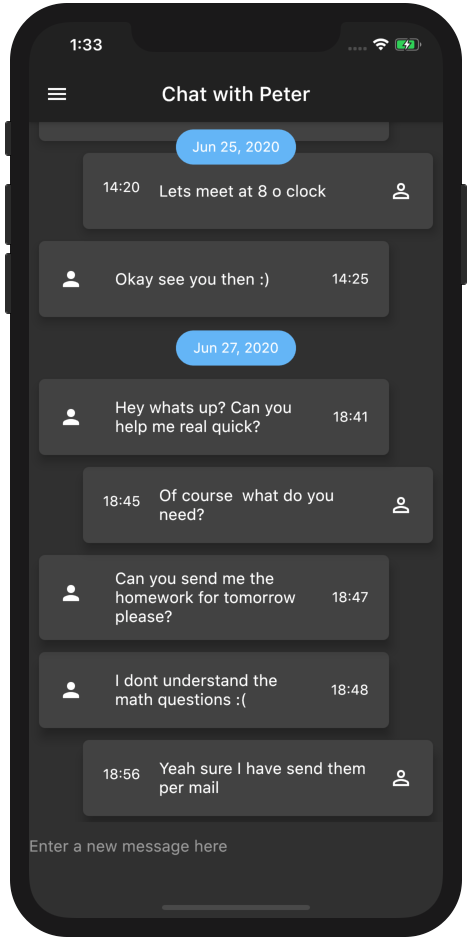
  • Easy creation of chat-like interfaces.
  • List items can be separated in groups.
  • For the groups an individual header can be set.
  • Sticky headers with floating option.
  • All fields from ScrollablePositionedList available.

Getting Started

Add the package to your pubspec.yaml:

sticky_grouped_list: ^3.1.0

In your dart file, import the library:

import 'package:sticky_grouped_list/sticky_grouped_list.dart';

Create a StickyGroupedListView Widget:

 final GroupedItemScrollController itemScrollController = GroupedItemScrollController();

 StickyGroupedListView<dynamic, String>(
   elements: _elements,
   groupBy: (dynamic element) => element['group'],
   groupSeparatorBuilder: (dynamic element) => Text(element['group']),
   itemBuilder: (context, dynamic element) => Text(element['name']),
   itemComparator: (e1, e2) => e1['name'].compareTo(e2['name']), // optional
   elementIdentifier: (element) => element.name // optional - see below for usage
   itemScrollController: itemScrollController, // optional
   order: StickyGroupedListOrder.ASC, // optional
 );

If you are using the GroupedItemScrollController you can scroll or jump to an specific position in the list programatically:

  1. By using the index, which will scroll to the element at position [index]:
  itemScrollController.scrollTo(index: 4, duration: Duration(seconds: 2));
  itemScrollController.jumpTo(index: 4);
  1. By using a pre defined element identifier. The identifier is defined by a Function which takes one element and returns a unique identifier of any type. The methods scrollToElement and jumpToElement can be used to jump to an element by providing the elements identifier instead of the index:
  final GroupedItemScrollController itemScrollController = GroupedItemScrollController();

  StickyGroupedListView<dynamic, String>(
    elements: _elements,
    elementIdentifier: (element) => element.name
    itemScrollController: itemScrollController, 
    [...]
  );

  itemScrollController.scrollToElement(identifier: 'item-1', duration: Duration(seconds: 2));
  itemScrollController.jumpToElement(identifier: 'item-2');
Parameters:
Name Description Required Default value
elements A list of the data you want to display in the list required -
itemBuilder / indexedItemBuilder Function which returns an Widget which defines the item. indexedItemBuilder provides the current index as well. If both are defined indexedItemBuilder is preferred yes, either of them -
groupBy Function which maps an element to its grouped value required -
groupSeparatorBuilder Function which gets a element and returns an Widget which defines the group header separator required -
separator A Widget which defines a separator between items inside a group no no separator
floatingHeader When set to true the sticky header will float over the list no false
stickyHeaderBackgroundColor Defines the background color of the sticky header no Color(0xffF7F7F7)
itemScrollController Instead of an ItemScrollController a GroupedItemScrollController needs to be provided. no -
elementIdentifier Used by itemScrollController and defines the unique identifier for each element. no -
order Change to StickyGroupedListOrder.DESC to reverse the group sorting no StickyGroupedListOrder.ASC
groupComparator Can be used to define a custom sorting for the groups. Otherwise the natural sorting order is used no -
itemComparator Can be used to define a custom sorting for the elements inside each group. Otherwise the natural sorting order is used no -
reverse Scrolls in opposite from reading direction (Starting at bottom and scrolling up). Same as in scrollable_positioned_list. no false

GroupedItemScrollController.srollTo() and GroupedItemScrollController.jumpTo() automatic set the alignment so that the item is fully visible aligned under the group header. Both methods take automaticAlignment as a additional optional paramenter which needs to be set to true if alignment is specified.

Also the fields from ScrollablePositionedList.builder can be used.

Highlight - Chat Dialog

Easy creation of chat-like dialogs. Just set the option reverse to true and the option order to StickyGroupedListOrder.DESC. A full example can be found in the examples. The list will be scrolled to the end in the initial state and therefore scrolling will be against redeaing direction.

Difference between grouped_list and sticky_grouped_list:

TThe list views in the GroupedList package are based on the default flutter listview and the silver list. This package is based on the scrollable_positioned_list which enables the possibility to programatically scroll to certain positions in the list. So if you need the ability to programatically scroll the list use the this package otherwise I would recommend to use the GroupedList package.

Used packages:

Package name Copyright License
scrollable_positioned_list Copyright 2018 the Dart project authors, Inc. All rights reserved BSD 3-Clause "New" or "Revised" License

所屬分類

依賴

依賴清單 2 項

原始碼儲存庫

使用此套件的專案

暫無相關資料。