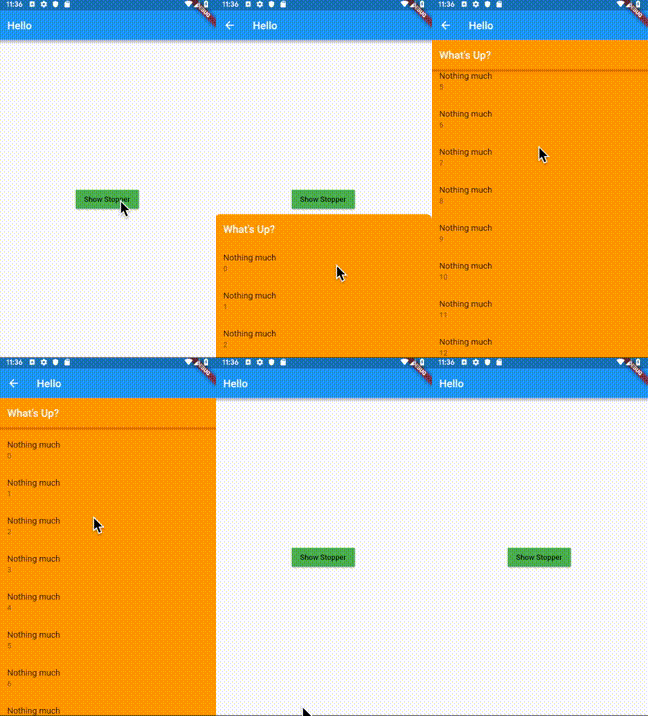
A bottom sheet that can be expanded to one of the pre-defined stop heights by dragging.
Introduction
Some iOS applications have a bottom sheet that has two states: half-expanded and fully expanded.
The standard showBottomSheet method lacks such a capability. The complexity in implementing this
behavior arises when the the bottom sheet needs to be scrollable, making scroll and drag
event handling difficult as these gestures can be used for scrolling the list as well as
for dragging the bottom sheet up/down, depending on the position of the bottom sheet and the current
scroll position. The Stopper plugin addresses this problem by:
Letting the developer define discreet height values (stops) to which the bottom sheet can be expanded;
Using the builder pattern to build the bottom sheet depending on the current stop value;
Instantiating ScrollController and ScrollPhysics objects and passing them to the
bottom sheet builder;
Using animations to make transitions of the bottom sheet between the stops look natural;
Providing a convenient showStopper function to be used instead of showBottomSheet in
order to handle dismissal of the bottom sheet by the user.
This plugin utilizes bottom sheet functionality from the Scaffold
widget and avoids copy/paste from the standard library, making the implementation clear and
easy to maintain.
Note: The build context passed to showStopper must have a Scaffold widget as an ancestor.
Therefore it's recommended to use Builder to build the body of the Scaffold. See
the complete example app provided in this package for details on this approach.