搜尋套件、儲存庫與 APP 分類

storage_view 封面
套件詳情v0.1.0-dev.5

storage_view

適用於任何資料庫、儲存空間和 shared_preferences 的 Flutter 調試工具

AndroidiOSWebmacOSWindowsLinux
近 30 天下載
394
喜歡數
29
Pub 分數
140

安裝套件

flutter pub add storage_view

套件介紹

根據套件公開資料產生的選型評估,僅供參考。

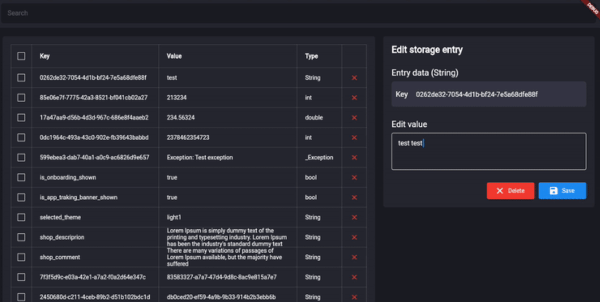
Storage View 是一個 Flutter 檢查工具,專為可視化和管理來自任何資料庫、儲存系統或 shared_preferences 的資料而設計。它提供了一個即時介面,可在 Android、iOS、Web、macOS、Windows 和 Linux 等平台探索儲存的值。非常適合除錯與開發,讓開發者能在不修改程式碼的情況下檢查、編輯和監控持久性資料。該工具可透過簡單的 pub add 命令順暢整合至 Flutter 工作流程中。

適用情境

  • 除錯持續性資料問題
  • 檢查 shared_preferences 值
  • 開發過程中監控資料庫狀態
  • 即時數據可視化
  • 測試儲存邏輯
  • 跨平台探索應用狀態

主要特色

  • 跨平台支援
  • 即時數據檢查
  • 可編輯的儲存值
  • 透過 pub 簡單整合
  • 資料庫的可視化介面
  • 支援多種儲存類型

適合對象

  • Flutter 開發人員在除錯模式下
  • Teams 測試持久性邏輯
  • 應用維護人員排錯資料問題
  • 前端工程師需要快速數據檢查
  • 用於學習儲存機制的教育用途

使用建議

  • 不適用於生產使用
  • 需要在開發模式下手動啟用
  • 如果被濫用,可能會暴露敏感資料
  • 僅限本機儲存檢查
  • 無加密處理
  • 僅在開發期間使用最佳

原始 README

以下為關聯原始碼儲存庫的 README 原文快照,最新內容請造訪原始碼儲存庫。

StorageView 🔎

Flutter inspector tool for any database, storage and shared_preferences.
Check and modify database values from UI of application.

Show some ❤️ and star the repo to support the project!

Getting started

Follow these steps to use this package

Add dependency
dependencies:
  storage_view: ^0.1.0-dev.5
Add import package
import 'package:storage_view/storage_view.dart';
Implement driver

The package uses a driver StorageDriver to interact with the database.
In order to connect your database you should use one of available drivers:

Or create your own StorageDriver implementation like there:

class MockStorageDriver implements StorageDriver {
  final _data = <String, dynamic>{
    'test_id' : 'test',
  };

  @override
  FutureOr<Set<String>> getKeys<String>() {
    return _data.keys.toSet() as Set<String>;
  }

  @override
  FutureOr<T?> read<T>(String key) {
    return _data[key] as T;
  }

  @override
  FutureOr<void> write<T>({required String key, required T value}) {
    _data[key] = value;
  }

  @override
  FutureOr<void> delete(String key) {
    _data.remove(key);
  }
}
Implement StoargeView

After the driver was connected, you can use StorageView anywhere in your application.

final _mockStorageDriver = MockStorageDriver();
Scaffold(
    body: StorageView(storageDriver: _mockStorageDriver),
),

Repository views

Additional information

The project is under development and ready for your pull-requests and issues 👍
Thank you for support ❤️

For help getting started with 😍 Flutter, view online documentation, which offers tutorials, samples, guidance on mobile development, and a full API reference.

所屬分類

依賴

依賴清單 2 項

原始碼儲存庫

使用此套件的專案

暫無相關資料。