搜尋套件、儲存庫與 APP 分類

swipe_cards 封面
套件詳情v2.0.0+1

swipe_cards

類似 Tinder 的滑動卡片。

AndroidiOSWebmacOSWindowsLinux
近 30 天下載
64
喜歡數
117
Pub 分數
130

安裝套件

flutter pub add swipe_cards

套件介紹

根據套件公開資料產生的選型評估,僅供參考。

Swipe Cards 是一個 Flutter 套件,讓開發者能夠建立類似 Tinder 的可滑動卡片介面。它支援水平滑動與直覺的手勢操作,允許使用者向左或向右滑動卡片。此套件設計簡單且可客製化,非常適合需要卡片導航功能的應用程式,例如約會應用、產品展示或內容探索功能。它可在 Android、iOS、Web、macOS、Windows 與 Linux 等多個平台運作。

適用情境

  • 約會應用介面
  • 產品或商品發現
  • 內容瀏覽
  • 使用者偏好收集
  • 互動式入門畫面

主要特色

  • Tinder風格的滑動手勢
  • 可自訂的卡片外觀
  • 跨平台支援
  • 流暢的動畫過渡
  • 手勢識別
  • 與 Flutter 的輕鬆整合

適合對象

  • 開發基於滑動的使用者介面的開發者
  • 需要使用者透過卡片滑動進行互動的應用程式
  • 針對多個平台的專案

使用建議

  • 需要處理狀態管理
  • 有限的內建卡資料處理
  • 可能需要額外的樣式來處理複雜的佈局
  • 未針對無分頁的大卡資料集進行優化

原始 README

以下為關聯原始碼儲存庫的 README 原文快照,最新內容請造訪原始碼儲存庫。

swipe_cards pub package

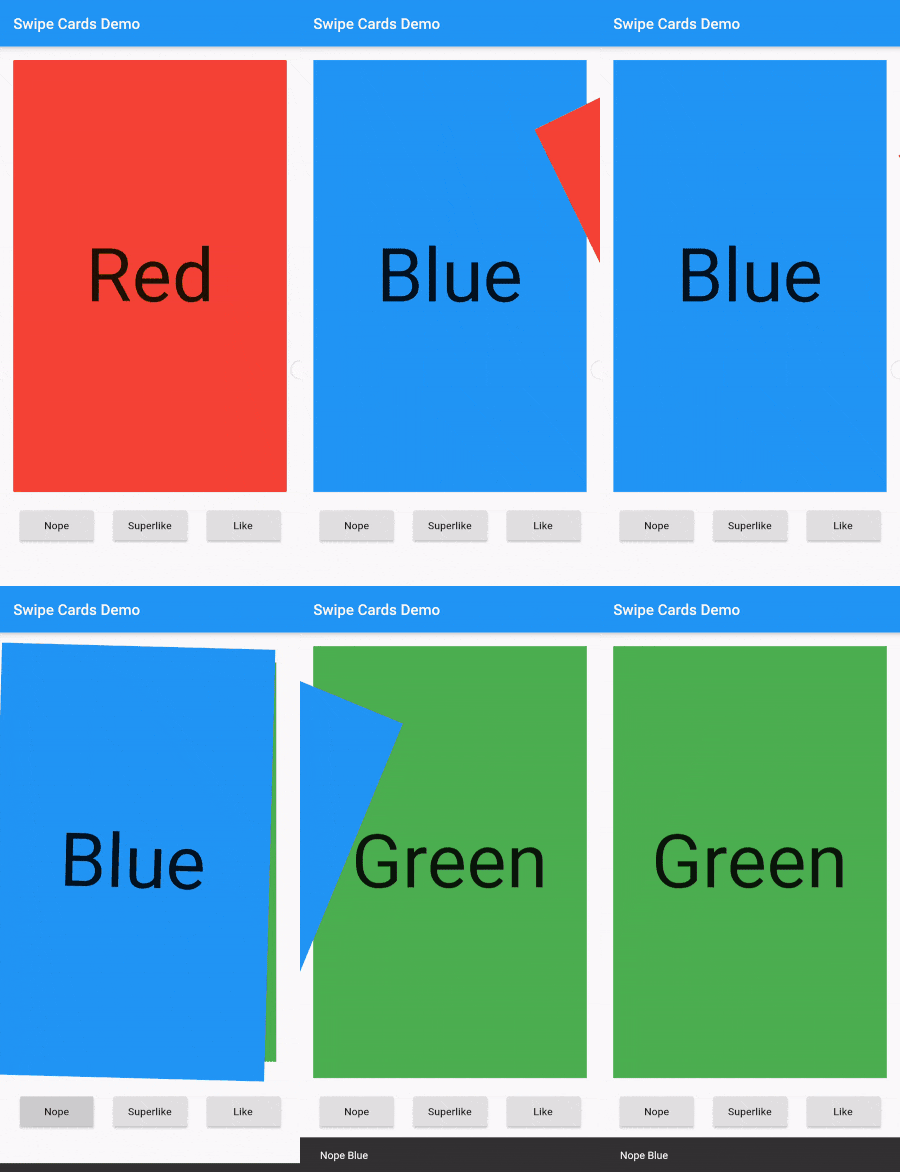
A Flutter widget for Tinder like swipe cards. The card can be swiped right, left and up for different responses. Currently it supports the following responses:

  • Right swipe for like
  • Left swipe for nope
  • Up swipe for superlike

Install

To install the package, add the following dependency to your pubspec.yaml

dependencies:
  swipe_cards: ^2.0.0+1

Usage

Basic
import 'package:swipe_cards/swipe_cards.dart';

SwipeCards(
            matchEngine: <MatchEngine>,
            itemBuilder: (BuildContext context, int index) {},
            onStackFinished: () {},
            itemChanged: (SwipeItem item, int index) {},
            upSwipeAllowed: <bool>,
            fillSpace: <bool>,
);
Attributes of SwipeCards
Key Description
matchEngine An instance of MatchEngine that acts as controller for trigerring swipes manually.
itemBuilder A function that returns the view inside a swipe card.
likeTag Widget appears in like/right area during swipe.
nopeTag Widget appears in nope/left area during swipe.
superLikeTag Widget appears in super-like/up area during swipe.
onStackFinished A function that is triggered as soon as all the cards have been swiped.
itemChanged A function that is triggered when item in the stack changes (moves to next card).
leftSwipeAllowed To enable/disable left swipe. (Default: true)
rightSwipeAllowed To enable/disable right swipe. (Default: true)
upSwipeAllowed To enable/disable up swipe. (Default: false)
fillSpace Config weather to fill up the space or not. (Default: true)
MatchEngine

MatchEngine is the controller for the swipe cards. It takes swipeItems as an argument and is used to trigger the swipes manually, for example on button press. The data type of swipeItems is List<SwipeItem>.

MatchEngine _matchEngine = MatchEngine(swipeItems: List<SwipeItem>);
Functions in MatchEngine
Key Description
_matchEngine.currentItem.like(); To trigger right swipe manually.
_matchEngine.currentItem.nope(); To trigger left swipe manually.
_matchEngine.currentItem.superLike(); To trigger up swipe manually.
SwipeItem

SwipeItem contains the actual data that can be rendered in the swipe card. Actually it is a wrapper over any dynamic object and just adds the functionality of like, nope and superlike to that object.

SwipeItem(
            content: "Anup Kumar Panwar",
            likeAction: () {
                log("Like");
            },
            nopeAction: () {
                log("Nope");
            },
            superlikeAction: () {
                log("Superlike");
            },
            onSlideUpdate: (SlideRegion? region){
                log("Region $region");
            }
);
Attributes of SwipeItem
Key Description
content An object that contains the actual data to be rendered in the swipe card.
likeAction A function that is triggered when the card is liked.
nopeAction A function that is triggered when the card is not liked / swiped left.
superlikeAction A function that is triggered when the card is superliked.
onSlideUpdate A function that is triggered when the card is being dragged and tells about the current region of the card.
Example
List<SwipeItem> _swipeItems = List<SwipeItem>();
  MatchEngine _matchEngine;
  GlobalKey<ScaffoldState> _scaffoldKey = GlobalKey();
  List<String> _names = ["Red", "Blue", "Green", "Yellow", "Orange"];
  List<Color> _colors = [
    Colors.red,
    Colors.blue,
    Colors.green,
    Colors.yellow,
    Colors.orange
  ];

  @override
  void initState() {
    for (int i = 0; i < _names.length; i++) {
      _swipeItems.add(SwipeItem(
          content: Content(text: _names[i], color: _colors[i]),
          likeAction: () {
            ScaffoldMessenger.of(context).showSnackBar(SnackBar(
              content: Text("Liked ${_names[i]}"),
              duration: Duration(milliseconds: 500),
            ));
          },
          nopeAction: () {
            ScaffoldMessenger.of(context).showSnackBar(SnackBar(
              content: Text("Nope ${_names[i]}"),
              duration: Duration(milliseconds: 500),
            ));
          },
          superlikeAction: () {
            ScaffoldMessenger.of(context).showSnackBar(SnackBar(
              content: Text("Superliked ${_names[i]}"),
              duration: Duration(milliseconds: 500),
            ));
          },
          onSlideUpdate: (SlideRegion? region) async {
            print("Region $region");
          }));
    }

    _matchEngine = MatchEngine(swipeItems: _swipeItems);
    super.initState();
  }

  @override
  Widget build(BuildContext context) {
    return Scaffold(
        key: _scaffoldKey,
        appBar: AppBar(
          title: Text(widget.title),
        ),
        body: Container(
            child: Column(children: [
          Container(
            height: 550,
            child: SwipeCards(
              matchEngine: _matchEngine,
              itemBuilder: (BuildContext context, int index) {
                return Container(
                  alignment: Alignment.center,
                  color: _swipeItems[index].content.color,
                  child: Text(
                    _swipeItems[index].content.text,
                    style: TextStyle(fontSize: 100),
                  ),
                );
                  },
                  onStackFinished: () {
                    ScaffoldMessenger.of(context).showSnackBar(SnackBar(
                      content: Text("Stack Finished"),
                      duration: Duration(milliseconds: 500),
                    ));
                  },
                  itemChanged: (SwipeItem item, int index) {
                    print("item: ${item.content.text}, index: $index");
                  },
                  upSwipeAllowed: true,
                  fillSpace: true,
                ),
              ),
              Row(
                mainAxisAlignment: MainAxisAlignment.spaceEvenly,
                children: [
                  RaisedButton(
                      onPressed: () {
                        _matchEngine.currentItem.nope();
                      },
                      child: Text("Nope")),
                  RaisedButton(
                      onPressed: () {
                        _matchEngine.currentItem.superLike();
                      },
                      child: Text("Superlike")),
                  RaisedButton(
                      onPressed: () {
                        _matchEngine.currentItem.like();
                      },
                      child: Text("Like"))
                ],
              )
            ])));
  }
  class Content {
    final String text;
    final Color color;

    Content({this.text, this.color});
  }

Screenshot

Screenshot

所屬分類

原始碼儲存庫

使用此套件的專案

暫無相關資料。