搜尋套件、儲存庫與 APP 分類

textuality 封面
套件詳情v0.0.4

textuality

Textuality 是一個 Flutter 套件,透過漸變、描邊、霓虹、陰影等進階樣式選項增強了 Text 小工具。

AndroidiOSWebmacOSWindowsLinux
近 30 天下載
374
喜歡數
39
Pub 分數
140

安裝套件

flutter pub add textuality

套件介紹

根據套件公開資料產生的選型評估,僅供參考。

Textuality 是一個 Flutter 套件,透過先進的視覺效果擴展 Text 小工具的功能。它讓開發者能直接為文字套用漸層填滿、描邊輪廓、霓虹燈效果和陰影效果,從而提升 UI 美學,且無需複雜的自訂繪圖。此套件設計簡單易用,可輕鬆整合至現有的 Flutter 項目中。該套件支援多個平台,包括 Android、iOS、Web、macOS、Windows 和 Linux,非常適合需要表現力強排版的跨平台應用程式。

適用情境

  • 創建引人注目的標題
  • 在遊戲中加入裝飾性文字效果
  • 增強應用啟動畫面
  • 使用鮮豔文字設計主題式UI
  • 透過視覺對比度改善可存取性

主要特色

  • 漸變文字樣式
  • 描邊與輪廓效果
  • 霓虹光效
  • 陰影與深度增強
  • 簡單的 API 結合

適合對象

  • 尋求視覺魅力的UI設計師
  • 開發創意應用的開發者
  • 跨平台行動與Web專案
  • 具有動態或動畫文字的應用程式

使用建議

  • 使用複雜特效可能影響效能
  • 超出所提供樣式的有限自訂
  • 需要在跨平台環境下進行仔細測試
  • 不適合高效率動畫

原始 README

以下為關聯原始碼儲存庫的 README 原文快照,最新內容請造訪原始碼儲存庫。

Textuality Package

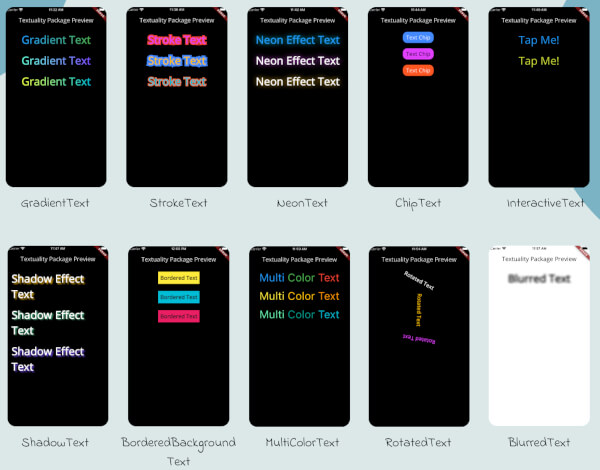
Textuality is a powerful Flutter package that enhances the appearance of text widgets with a variety of customizable text effects and styles. With this package, you can easily add gradient text, stroke text, neon effects, shadow effects, interactive text, and more to your Flutter app.

Textuality

Features

  • GradientText: Add gradient colors to your text.
  • StrokeText: Apply an outline or stroke around your text.
  • NeonText: Create a glowing neon text effect.
  • ChipText: Display text inside stylish chip-like containers.
  • ShadowText: Add customizable shadows to your text.
  • InteractiveText: Make text interactive for clicks, taps, or custom gestures.
  • MultiColorText: Display text in multiple colors, even within the same string.
  • RotatedText: Rotate the text in any direction, including vertical.
  • BlurredText: Add a blurred effect to your text.
  • BorderedBackgroundText: Add a border around the background of your text.

Each widget accepts various optional parameters for customization, such as style, text alignment, maxLines, overflow, and more.

Installation

To use the textuality package in your Flutter project, follow these steps:

  1. Add the package to your pubspec.yaml file:

    dependencies:
      textuality: ^0.0.1


Run the following command to install the package:

flutter pub get

💻Example

Below is an example of how to use the Textuality package in your Flutter app:

import 'package:flutter/material.dart';
import 'package:textuality/textuality.dart';

class TextualityExample extends StatefulWidget {
  const TextualityExample({super.key});

  @override
  State<TextualityExample> createState() => _TextualityExampleState();
}

class _TextualityExampleState extends State<TextualityExample> {
  @override
  Widget build(BuildContext context) {
    return Scaffold(
      backgroundColor: Colors.white,
      appBar: AppBar(
          backgroundColor: Colors.white,
          title: Text(
            'Textuality Package Preview',
            style: TextStyle(color: Colors.black),
          )),
      body: SingleChildScrollView(
        padding: EdgeInsets.all(16.0),
        child: Center(
          child: Column(
            children: [
              // Gradient Text
              GradientText(
                text: 'Gradient Text',
                giveGradient: [Colors.blue, Colors.green],
                style: TextStyle(fontSize: 40, fontWeight: FontWeight.bold),
              ),
              SizedBox(height: 20),

              // Stroke Text
              StrokeText(
                text: 'Stroke Text',
                strokeColor: Colors.red,
                strokeWidth: 8.0,
                style: TextStyle(
                    fontSize: 40,
                    fontWeight: FontWeight.bold,
                    color: Colors.purpleAccent),
              ),
              SizedBox(height: 20),
              // Neon Text
              NeonText(
                text: 'Neon Effect Text',
                glowColor: Colors.cyan,
                blurRadius: 20.0,
                style: TextStyle(
                    fontSize: 40,
                    fontWeight: FontWeight.bold,
                    color: Colors.blue),
              ),
              SizedBox(height: 20),
              // Text Chips
              ChipText(
                text: 'Text Chip',
                chipColor: Colors.blueAccent,
                style: TextStyle(fontSize: 20, color: Colors.white),
              ),
              SizedBox(height: 20),

              // Shadow Text
              ShadowText(
                  text: 'Shadow Effect Text',
                  shadows: [
                    Shadow(
                      blurRadius: 5.0,
                      color: Colors.amber,
                      offset: Offset(5, 5),
                    ),
                  ],
                  style: TextStyle(
                      fontSize: 40,
                      fontWeight: FontWeight.bold,
                      color: Colors.white)),
              SizedBox(height: 20),
               ShadowText.simple(
                  text: 'Simple Shadow Effect Text',
                  style: TextStyle(
                     fontSize: 24,
                     fontWeight: FontWeight.bold,
                     color: Colors.blue,
                  ),
                  shadowColor: Colors.red,
                  shadowBlurRadius: 8.0,
                  shadowOffset: Offset(3, 3),
               ),
               SizedBox(height: 20),
              // Multi-Color Text
              MultiColorText(
                spans: [
                  TextSpan(
                    text: 'Multi',
                    style: TextStyle(color: Colors.blue, fontSize: 40),
                  ),
                  TextSpan(
                    text: 'Color ',
                    style: TextStyle(color: Colors.green, fontSize: 40),
                  ),
                  TextSpan(
                    text: 'Text',
                    style: TextStyle(color: Colors.red, fontSize: 40),
                  ),
                ],
              ),
              SizedBox(height: 20),
              // InteractiveTextuality
              InteractiveText(
                text: 'on Tap',
                onTap: () {},
                style: TextStyle(fontSize: 20, fontWeight: FontWeight.bold),
              ),
              SizedBox(height: 20),
              // Rotated Text
              RotatedText(
                text: 'Rotated Text',
                rotationAngle: 0.5, // Rotate 90 degrees
                style: TextStyle(fontSize: 40, fontWeight: FontWeight.bold),
              ),
              SizedBox(height: 20),

              // Blurred Text
              BlurredText(
                text: 'Blurred Text',
                blurStrength: 5.0,
                style: TextStyle(fontSize: 40, fontWeight: FontWeight.bold),
              ),
              SizedBox(height: 20),

              // Bordered Background Text
              BorderedBackgroundText(
                text: 'Bordered Background Text',
                borderColor: Colors.black,
                borderWidth: 3.0,
                backgroundColor: Colors.yellow,
                style: TextStyle(fontSize: 40, fontWeight: FontWeight.bold),
              ),
            ],
          ),
        ),
      ),
    );
  }
}


GradientTextuality GradientText

ChipTextuality ChipText

StrokeTextuality StrokeText

InteractiveTextuality InteractiveText

NeonTextuality NeonText

ShadowTextuality ShadowText

MultiColorTextuality MultiColorText

RotatedTextuality RotatedText

BlurredTextuality BlurredText

BorderedBackgroundTextuality BorderedText

Changelog

See the CHANGELOG.md file for updates.

License

This package is licensed under the MIT License.

Author

Hassan Zaheer

所屬分類

原始碼儲存庫

使用此套件的專案

暫無相關資料。