搜尋套件、儲存庫與 APP 分類

套件詳情v0.1.1

timed_widget

一組可重複使用的 Flutter 小工具,用於定時互動:延遲可見性、切換器、序列器、動畫等。

AndroidiOSWebmacOSWindowsLinux
近 30 天下載
9
喜歡數
4
Pub 分數
155

安裝套件

flutter pub add timed_widget

套件介紹

根據套件公開資料產生的選型評估,僅供參考。

timed_widget 是一個 Flutter 套件,提供可重複使用的組件,用於管理使用者介面中的定時互動。它讓開發者能夠輕鬆建立延遲顯示、動畫切換器、順序顯示元件以及定時過渡效果。適用於引導流程、啟動畫面或互動式教學,無需撰寫複雜的自訂程式碼即可簡化基於時間的 UI 邏輯實作。該套件支援所有主要平台,並能順暢整合至現有的 Flutter 專案中。

適用情境

  • 引導流程
  • 啟動畫面動畫
  • 逐步教學
  • 定時內容揭露
  • 互動式指南
  • 動畫過渡

主要特色

  • 延遲的元件可見性
  • 順序小部件顯示
  • 內建動畫
  • 跨平台支援
  • 簡單 API
  • 可重用元件

適合對象

  • UI/UX 設計師
  • Flutter 初學者
  • App 啟動開發者
  • 互動式教程創建者
  • 以動畫為重點的應用

使用建議

  • 需要了解 Flutter 的 widget 生命週期
  • 進階動畫的自訂功能有限
  • 最適合簡單的定時場景
  • 複雜的轉場可能需要額外的套件
  • 不適合高性能量化動畫應用

原始 README

以下為關聯原始碼儲存庫的 README 原文快照,最新內容請造訪原始碼儲存庫。

⏱️ timed_widget

A flexible and lightweight Flutter package that provides time-based UI building blocks — including delayed visibility, timed switchers, animated builders, scheduled sequences, and more.

Ideal for onboarding flows, staggered animations, tutorial steps, micro-interactions, and other UI effects that rely on timing.


✨ Features

  • Show or hide widgets after a delay
  • Switch between two widgets with timing & animation
  • Run a function after a specified delay
  • Rebuild widgets repeatedly on a timer
  • Animate widgets using AnimationController with duration + curve
  • Trigger a sequence of widget displays with custom delay per step
  • Manage widget visibility in groups or sequences
  • Use mixin utilities to manage Timer lifecycle cleanly

📦 Installation

Add to your pubspec.yaml:

dependencies:
  timed_widget: ^0.1.0

Then import:

import 'package:timed_widget/timed_widget.dart';

🧩 Available Widgets

Widget/Class Purpose
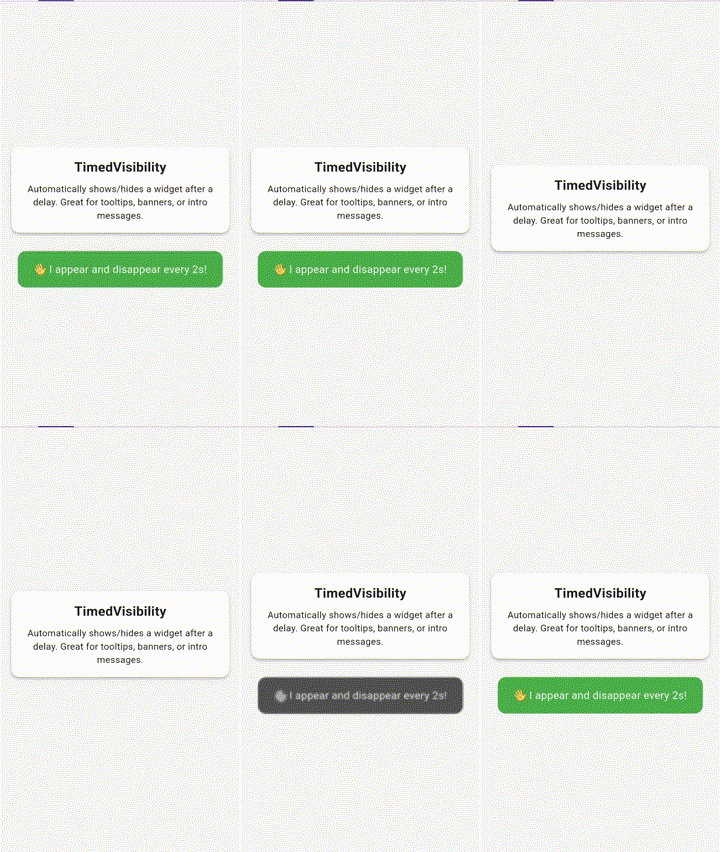
TimedVisibility Show/hide a widget after a delay, optionally reverse or loop
TimedSwitcher Switch between two widgets after a delay, animated
TimedBuilder Conditionally build a widget after a delay (bool isElapsed)
TimedFunction Execute a callback once after a delay
TimedRepeatBuilder Periodically rebuild a widget with tick counter
TimedAnimatedBuilder Animate a value (0.0 → 1.0) over time
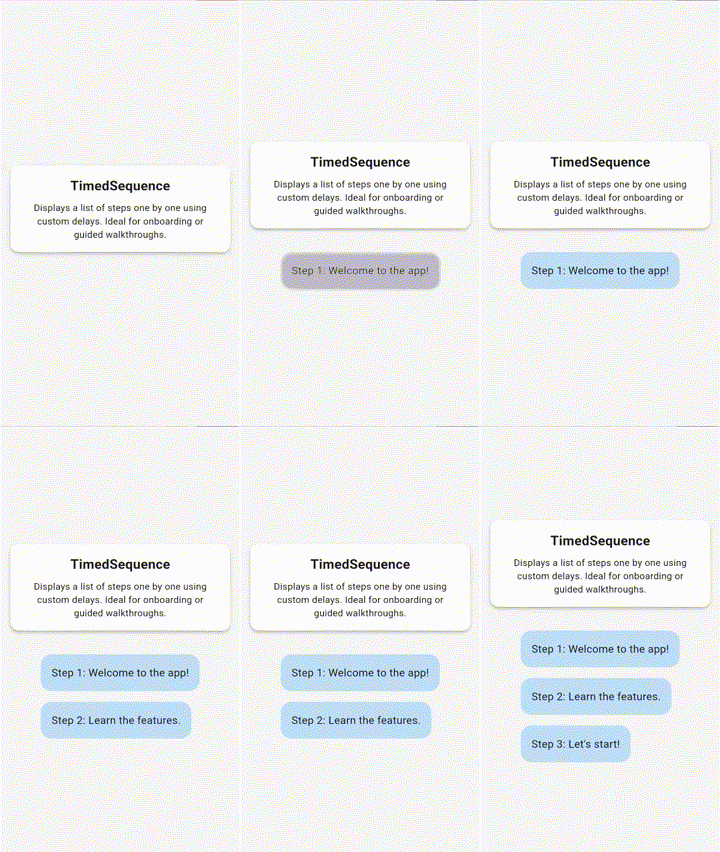
TimedSequence Step-based widget display with delays and optional controller
TimedVisibilityController Imperative control for TimedVisibility
TimedGroupController Start/reset multiple TimedVisibility widgets at once
TimedSequenceController External control of sequence progression or reset
TimedMixin Mixin for stateful widgets to safely manage timers

🚀 Example

TimedVisibility(
  delay: Duration(seconds: 2),
  reverseAfter: Duration(seconds: 3),
  loop: true,
  child: Text('Hello after 2 seconds!'),
);
TimedFunction(
  delay: Duration(milliseconds: 500),
  onElapsed: () => print('Half a second passed!'),
);
TimedSequence(
  steps: [
    TimedStep(delay: Duration(seconds: 1), child: Text('Step 1')),
    TimedStep(delay: Duration(seconds: 2), child: Text('Step 2')),
  ],
);

📷 Demo

🕑 TimedVisibility

TimedVisibility demo

📋 TimedSequence

TimedSequence demo


📝 License

MIT License. See LICENSE.


🙌 Contributing

Contributions are welcome and appreciated.

Whether you're fixing a typo, adding a test, or suggesting a new widget, your input helps make this package better for everyone.

Open an issue, start a discussion, or send a pull request — let's collaborate. 🧩


🔗 Links

所屬分類

原始碼儲存庫

使用此套件的專案

暫無相關資料。