搜尋套件、儲存庫與 APP 分類

update_notification 封面
套件詳情v1.0.1

update_notification

檢查使用者是否擁有您 Flutter 應用的最新版本。

AndroidiOSmacOS
近 30 天下載
22
喜歡數
29
Pub 分數
120

安裝套件

flutter pub add update_notification

套件介紹

根據套件公開資料產生的選型評估,僅供參考。

update_notification 套件幫助 Flutter 應用程式透過檢查遠端設定檔來判斷使用者是否正在執行最新版本。它支援 Android、iOS 與 macOS 平台,讓開發者能在有新版可用時提示使用者更新。此套件會從指定的網址取得版本資訊,與目前應用程式版本進行比對,並依情況觸發通知或警示。非常適合維護應用品質,並確保使用者能享受最新的改進與安全修復。

適用情境

  • 提示使用者更新應用
  • 監控應用版本合規性
  • 通知使用者新版本發佈
  • 確保安全補丁的採用
  • 透過及時更新改善使用者體驗

主要特色

  • 透過URL檢查遠端版本
  • 支援多個平台
  • 可自定義的更新提示
  • 輕量且易於整合
  • 即時版本比較

適合對象

  • 需要頻繁更新的應用
  • 企業應用
  • 安全敏感的應用程式
  • 面向使用者的行動應用程式
  • 跨平台 Flutter 項目

使用建議

  • 需要一個公開可訪問的版本配置文件
  • 需要網絡訪問以進行檢查
  • 如果設定不當,可能會影響效能
  • 依賴外部伺服器的可靠性
  • 僅限基於版本的更新檢測

原始 README

以下為關聯原始碼儲存庫的 README 原文快照,最新內容請造訪原始碼儲存庫。

update_notification

  • This flutter package will alert app users to update the application.
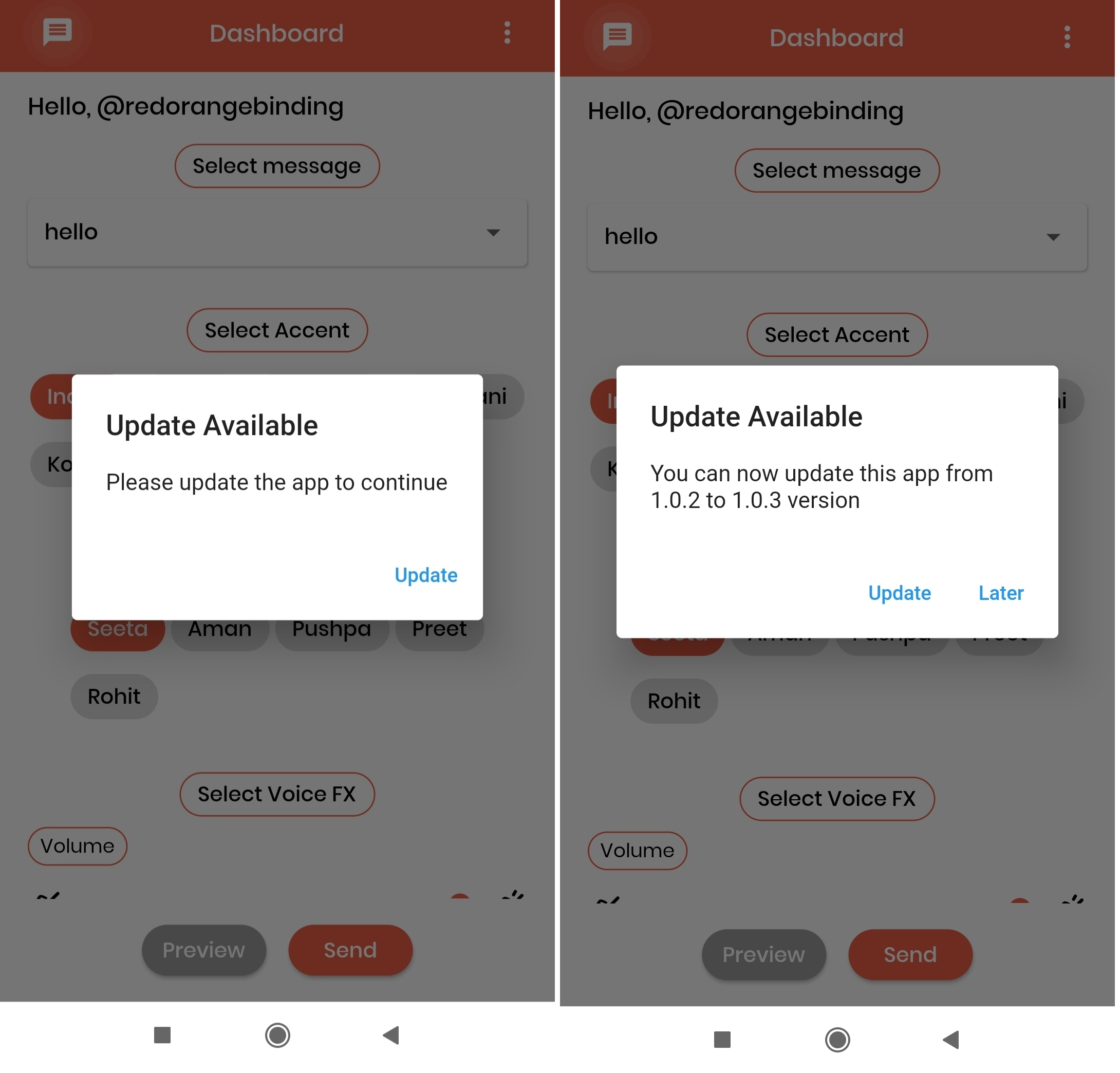
  • With the help of an alert pop-up, users can easily navigate to the respective stores(App Store or play Store) to update the app.

UI

The UI of the alert dialog is simply a card.

Screenshots:

Installation

Add update_notification as a dependency in your pubspec.yaml file.

dependencies:
  update_notification: ^1.0.1

Usage

  • In main.dart (or any) file, first create an instance of the UpdateNotification class in your initState() method.

    final UpdateNotification updateNotification = UpdateNotification();

  • Pass the application package name in andoidAppId, iOSAppId.

  • Pass application minimum version value in minimumVersion parameter. This parameter is used to force people to update application, any user having version less than the specified version will be forced to update application

  • Call showAlertDialog method- updateNotification.showAlertDialog(context: context);

  • If updated app version is available on stores, application will get a popup on launch of application and an option to Update. On click of update button user will be directed to the respective stores(App store or play store).

Example

 import 'package:flutter/cupertino.dart';
 import 'package:flutter/material.dart';
 import '/update_notification.dart';

 class Example extends StatefulWidget {
   const Example({Key? key}) : super(key: key);

   @override
   _ExampleState createState() => _ExampleState();
 }

 class _ExampleState extends State<Example> {
   @override
   void initState() {
     super.initState();

     final UpdateNotification updateNotification =
         UpdateNotification(
             iOSAppId: 'com.google.myride',
             androidAppId: 'com.google.rever',
             minimumVersion: '1.0.0');

     showDialog(updateNotification);
   }

   void showDialog(UpdateNotification updateVersion) {
     updateVersion.showAlertDialog(context: context);
   }

   @override
   Widget build(BuildContext context) {
     return Scaffold(
       body: Container(),
     );
   }
 }

所屬分類

依賴

依賴清單 6 項

原始碼儲存庫

使用此套件的專案

暫無相關資料。