搜尋套件、儲存庫與 APP 分類

upi_india 封面
套件詳情v3.0.1

upi_india

一個用於在 Android 上透過不同應用程式執行 UPI 交易的 Flutter 插件。

Android
近 30 天下載
248
喜歡數
141
Pub 分數
150

安裝套件

flutter pub add upi_india

套件介紹

根據套件公開資料產生的選型評估,僅供參考。

upi_india 套件是一個專為 Android 設計的 Flutter 外掛程式,透過與裝置上安裝的各種支援 UPI(統一支付介面)的應用程式整合,實現無縫的 UPI 交易。它讓使用者可以直接透過 Google Pay、PhonePe 或 Paytm 等主流 UPI 應用程式發起付款,無需手動輸入銀行資料。該外掛程式透過利用原生 UPI 功能,簡化了印度電商與服務類應用中的支付處理流程。它支援動態交易參數,例如金額、收款人及交易參考編號,確保支付的安全與高效。此套件非常適合開發針對印度市場的金融或零售應用程式之開發者。

適用情境

  • 行動端電商結帳
  • 數位錢包整合
  • 服務付款收取
  • 帳單分攤應用
  • 捐贈平台

主要特色

  • 支援多個UPI應用程式
  • 安全交易啟動
  • 動態支付參數
  • Android 的簡單 API
  • 內建錯誤處理

適合對象

  • 面向印度的行動應用程式
  • 支付網關
  • 零售與服務平台
  • Flutter 開發人員在 Android 上
  • 需要UPI付款的应用

使用建議

  • 僅限 Android 支援
  • 需要安裝 UPI 應用
  • 僅限印度銀行系統
  • 不支援 iOS
  • 取決於使用者 UPI 應用程式的可用性

原始 README

以下為關聯原始碼儲存庫的 README 原文快照,最新內容請造訪原始碼儲存庫。

This repository is now Archived.

UPI India (for Android only)

This plugin is used to integrate UPI Options in your Android app. You can use this plugin to initiate transaction to any UPI ID or to any Account number.
Check the Supported apps here.

For a complete example of how to use this plugin, look at the Example tab or in the Github repository.

IMPORTANT!

Some apps like Google Pay, PhonePe, Paytm are currently unable to process the transaction and showing "Maximum limit exceeded" or "Risk threshold exceeded" errors. Reason for this is not clear yet.

Help required

If you can help to extend this for iOS, feel free to check this issue.
If you can help to verify the compatibility of different UPI apps, feel free to check this issue.

Thanks in advance :)


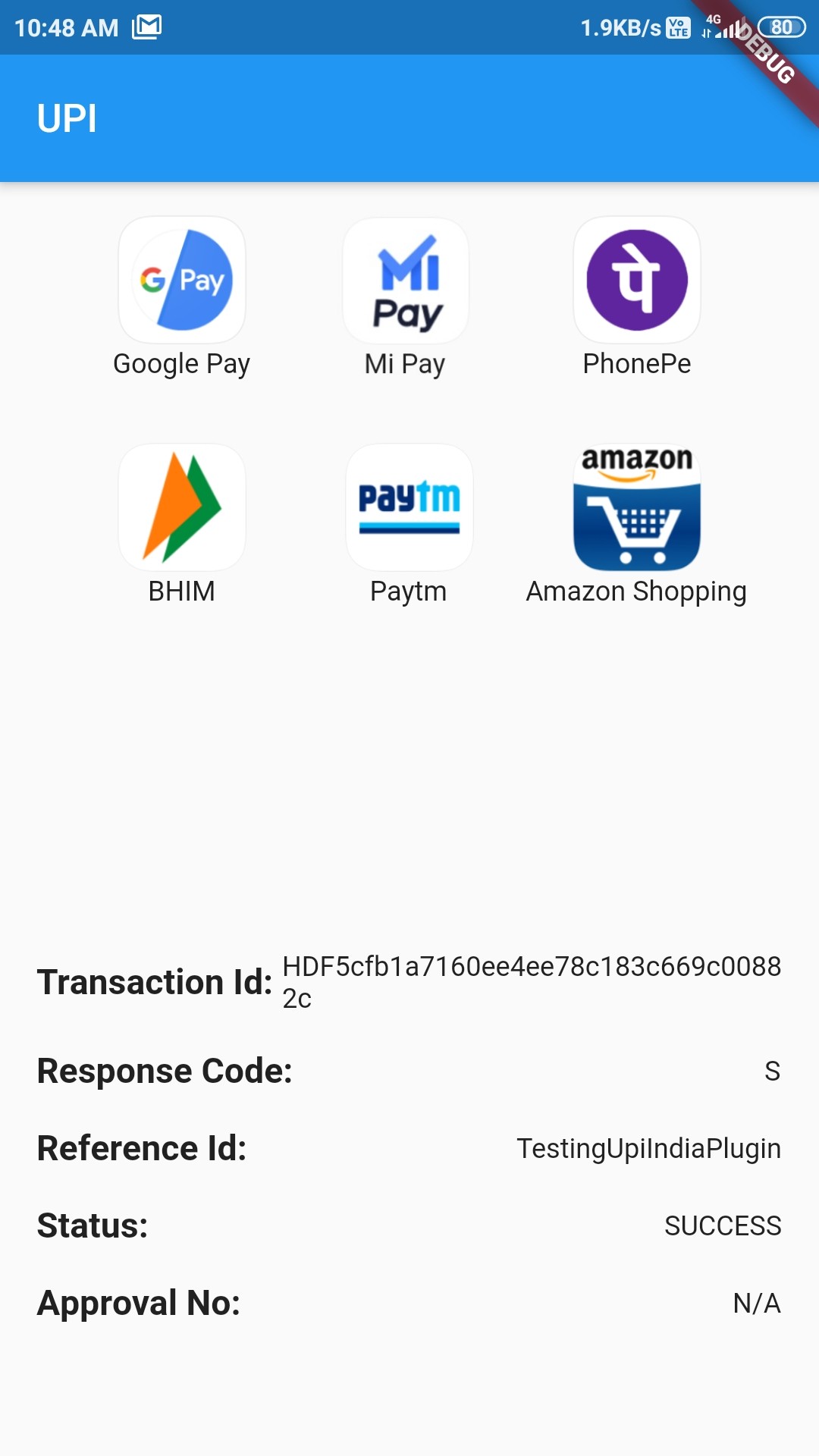
How example looks Success Status

Classes to know

  1. UpiIndia - It is the main class containing two methods:
  • getAllUpiApps() - It takes:

    • bool allowNonVerifiedApps: Should include apps whose working has not been verified yet or not
    • List[UpiApp] includeOnly: List of UpiApps which should be shown and hide the others.
    • bool mandatoryTransactionId: Should include those apps which doesn't return Transaction ID or not
  • startTransaction() - It takes:

    • double amount: Amount to transfer (in ₹)
    • UpiApp app: Which app to use to do the transaction
    • String currency: Currently only supports INR
    • bool flexibleAmount: Set true to allow user to fill the amount
    • String merchantId: Merchant code if present
    • String receiverId: ID of the receiver
    • String receiverName: Name of receiver
    • String transactionNote: A note about the transaction
    • String transactionRefId: Reference Id of transaction
    • String url: For some extra information
  1. UpiApp - It contains supported apps. It is also the model class for the apps returned by getAllUpiApps().

  2. UpiResponse - You will use this to get response from the requested app.

  3. UpiPaymentStatus - Use this to see if transaction was a success or not.


Custom Exception thrown by this Plugin (with self explanatory names)

  1. UpiIndiaAppNotInstalledException

  2. UpiIndiaUserCancelledException

  3. UpiIndiaNullResponseException

  4. UpiIndiaInvalidParametersException

  5. UpiIndiaActivityMissingException

  6. UpiIndiaAppsGetException

How to start transaction?

Step 1:

Import the Package:

import 'package:upi_india/upi_india.dart';
Step 2:

Create UpiIndia object.

UpiIndia _upiIndia = UpiIndia();
Step 3:

Get list of all apps in the device which can handle UPI Intent, as shown.

  List<UpiApp>? apps;

  @override
  void initState() {
    _upiIndia.getAllUpiApps(mandatoryTransactionId: false).then((value) {
      setState(() {
        apps = value;
      });
    }).catchError((e) {
      apps = [];
    });
    super.initState();
  }

OR

You can directly use the predefined apps, like:

UpiApp app = UpiApp.googlePay;

and assign it to the app parameter in Step 4

Step 4:

Create a method which will start the transaction on being called, as shown.
To initiate transaction to any UPI ID, directly pass the ID to receiverId

  Future<UpiResponse> initiateTransaction(UpiApp app) async {
    return _upiIndia.startTransaction(
      app: app,
      receiverUpiId: "9078600498@ybl",
      receiverName: 'Md Azharuddin',
      transactionRefId: 'TestingUpiIndiaPlugin',
      transactionNote: 'Not actual. Just an example.',
      amount: 1.00,
    );
  }
Step 5:

Call this method on any button click or through FutureBuilder and then you will get the Response!


How to handle Response?

Step 1:

After getting the snapshot from the Future, check if there is any error or not:

if (snapshot.hasError) {
  switch (snapshot.error.runtimeType) {
    case UpiIndiaAppNotInstalledException:
      print("Requested app not installed on device");
      break;
    case UpiIndiaUserCancelledException:
      print("You cancelled the transaction");
      break;
    case UpiIndiaNullResponseException:
      print("Requested app didn't return any response");
      break;
    case UpiIndiaInvalidParametersException:
      print("Requested app cannot handle the transaction");
      break;
    default:
      print("An Unknown error has occurred");
      break;
  }
}
Step 2:

If snapshot.hasError is false, you can then get the response UpiResponse from snapshot.data and extract these parameters:

  • Transaction ID
  • Response Code
  • Approval Reference Number
  • Transaction Reference ID
  • Status
Step 3:

Check the Status property. It has following values:

  • UpiPaymentStatus.SUCCESS
  • UpiPaymentStatus.SUBMITTED
  • UpiPaymentStatus.FAILURE

If Status is SUCCESS, Congratulations! You have successfully used this plugin.


For a complete example of how to use this plugin, look at the Example tab or in the Github repository.

Supported Apps

Verified Apps - These Apps have been tested to work fine with this plugin (included by default):
  • All Bank
  • Amazon Pay
  • Axis Pay
  • Baroda Pay
  • BHIM
  • Cent UPI
  • Cointab
  • Corp UPI
  • DCB UPI
  • Fino BPay
  • Freecharge
  • Google Pay
  • iMobile ICICI
  • Indus Pay
  • Khaali Jeb
  • Maha UPI
  • Mobikwik
  • Oriental Pay
  • Paytm
  • Paywiz
  • PhonePe
  • PSB
  • SBI Pay
  • Yes Pay
Apps that don't return Transaction ID in response (pass mandatoryTransactionId: false to getAllUpiApps to use them):
  • MiPay (Both Play Store and GetApps version)
  • HSBC Simply Pay
Non-Verified Apps - These apps haven't been tested yet (pass allowNonVerifiedApps: true to getAllUpiApps to use them):
  • True Caller
  • BOI UPI
  • CSB UPI
  • CUB UPI
  • digibank
  • Equitas UPI
  • Kotak
  • PayZapp
  • PNB
  • RBL Pay
  • realme PaySa
  • United UPI Pay
  • Vijaya UPI

Unsupported Apps

(These apps are not working as expected currently)
  • Airtel Thanks
  • AUPay
  • Bandhan Bank UPI
  • CANDI
  • Indian Bank UPI
  • Jet Pay
  • KBL UPI
  • KVB UPI
  • LVB UPAAY
  • Synd UPI
  • UCO UPI
  • Ultra Cash

Special Thanks to:

Don't forget to give Like and Stars!

所屬分類

原始碼儲存庫

使用此套件的專案