搜尋套件、儲存庫與 APP 分類

套件詳情v1.0.2

use_optimistic

一個容易使用的鈎子,可樂觀地更新通用狀態,然後透過 `accept`、`acceptAs` 或 `reject` 異步解析。

AndroidiOSWebmacOSWindowsLinux
近 30 天下載
10
喜歡數
5
Pub 分數
160

安裝套件

flutter pub add use_optimistic

套件介紹

根據套件公開資料產生的選型評估,僅供參考。

一個 Flutter/Dart 套件,提供簡單的鈎子,用於樂觀更新狀態。它允許開發者立即在 UI 中反映變更,然後使用 accept、acceptAs 或 reject 方法異步處理。適用於表單提交、切換動作或任何需要在伺服器確認前立即回饋以改善使用者體驗的場景。此鈎子可順暢管理狀態轉換,並支援多個平台。

適用情境

  • 即時表單更新
  • 切換操作並立即獲得回饋
  • 具有樂觀 UI 的非同步作業
  • 具備回滾功能的資料提交
  • 使用者互動模擬

主要特色

  • 樂觀狀態更新
  • 對 accept/acceptAs/reject 的支援
  • 簡單的 API,最小化樣板程式碼
  • 跨平台相容性
  • 內建狀態管理
  • 與現有鈎子的輕鬆整合

適合對象

  • 尋求即時 UI 反饋的開發者
  • 需要臨時狀態變更的項目
  • 頻繁異步互動的應用程式
  • 注重使用者體驗回應速度的團隊
  • 使用函數式組件的Flutter應用

使用建議

  • 需要理解非同步狀態處理
  • 不適用於關鍵資料,除非有備用方案
  • 拒絕時需要適當的錯誤處理
  • 最佳搭配清晰的使用者回饋機制使用
  • 可能需要額外的邏輯來處理複雜的工作流程

原始 README

以下為關聯原始碼儲存庫的 README 原文快照,最新內容請造訪原始碼儲存庫。

Flutter hook: useOptimistic 🪝

An easy-to-use hook to optimistically update generic state and then resolve it later (async or sync) by accept, acceptAs, or reject-ing.


Documentation
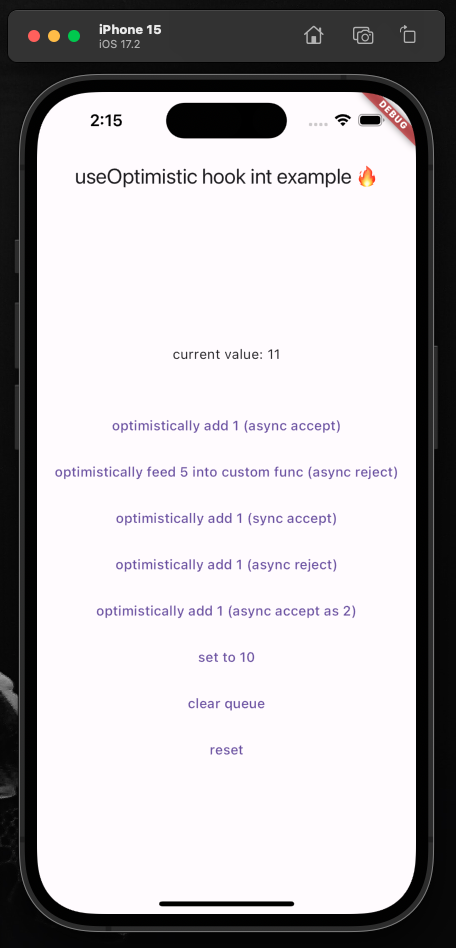
  • Full example of using this hook to manage integer state.
  • GitHub repo found here.
  • Package found here.

Documentation is largely found in the package itself via doc-comments (i.e. hover over package functions in your editor and it'll tell you what they do). First, however, view the above full example to get started.

Simple usage

demo image

Initialize the hook:

  final UseOptimistic<int> useOptimistic = UseOptimistic<int>(initialState: 0)

Ensure your widget listens to its state changes:

@override
void initState() {
  super.initState();
  useOptimistic.addListener(() => setState(() => debugPrint("state changed to: ${useOptimistic.state}")));
}

Ensure the hook will be disposed when your widget is:

@override
void dispose() {
  super.dispose();
  useOptimistic.dispose();
}

Update your state optimistically:

TextButton(
  onPressed: () async {

    Resolver r = useOptimistic.fn(
      1, // the [newValue] to be passed to functions below
      todo: (currentState, newValue) => currentState + newValue,
      undo: (currentState, oldValue) => currentState - oldValue,
    );

    // simulating an API call
    await Future.delayed(const Duration(seconds: 1));

    // three mutually exclusive ways to deal with result
    r.acceptAs(2); // [undo] original function, then [todo] with new value
    r.accept(); // accept the original optimistic update
    r.reject(); // reject the original optimistic update and [undo] original function

  },
  child: const Text("optimistically add 1"),
),

You can call useOptimistic.fn( ... ) multiple times with different todo and undo functions and it'll execute the proper todo/undo associated with fn at the moment you called it. This means you can call multiple separate useOptimistic.fn( ... )s safely together. It does not mean you can have a single fn like this (pseudo-code): useOptimistic.fn( if x todo: () => {...} else todo: () => {...} ) that has conditionally rendered todo/undo functions.

Listen to the state:

Text("current value: ${useOptimistic.state}"),
Extra
  • The package is always open to improvements, [suggestions](mailto:me@matthewtrent.me), and additions!
  • I'll look through GitHub PRs and Issues as soon as I can.

analytics

所屬分類

依賴

依賴清單 1 項

原始碼儲存庫

使用此套件的專案

暫無相關資料。