搜尋套件、儲存庫與 APP 分類

validation_textformfield 封面
套件詳情v2.2.5

validation_textformfield

Flutter 文字欄位驗證讓您可以在 Flutter 應用程式中驗證不同的文字表單欄位。

AndroidiOSWebmacOSWindowsLinux
近 30 天下載
41
喜歡數
37
Pub 分數
130

安裝套件

flutter pub add validation_textformfield

套件介紹

根據套件公開資料產生的選型評估,僅供參考。

validation_textformfield 套件透過提供易用的驗證功能,增強了 Flutter 應用程式。它允許開發者直接在 TextFormField 小工具中套用各種驗證規則,例如必填欄位、電子郵件格式和自訂模式。支援所有主要平台,無需編寫樣板程式碼即可簡化輸入驗證。該套件可順暢整合至現有表單中,透過即時反饋提升使用者體驗。非常適合需要強大且可重複使用的表單驗證邏輯的應用。

適用情境

  • 表單輸入驗證
  • 電子郵件與電話號碼驗證
  • 自定驗證規則
  • 即時用戶反饋
  • 可重複使用的表單元件
  • 跨平台表單處理

主要特色

  • 內建驗證規則
  • 自定義驗證器支援
  • 即時驗證反饋
  • 跨平台相容性
  • 與 TextFormField 的簡單整合
  • 可擴充的驗證邏輯

適合對象

  • Flutter 初學者
  • 表單密集型應用
  • 行動與網頁應用程式
  • 尋求快速驗證的開發者
  • 需要一致輸入驗證的應用程式
  • 重視開發速度的團隊

使用建議

  • 僅限文字輸入欄位
  • 無內建國際化支援
  • 需要手動自定義錯誤訊息
  • 依賴外部相依性
  • 不適用於複雜的嵌套表單
  • 可能需要額外的樣式以保持UI一致性

原始 README

以下為關聯原始碼儲存庫的 README 原文快照,最新內容請造訪原始碼儲存庫。

Installation

  1. Add the latest version of package to your pubspec.yaml (and rundart pub get):
dependencies:
  validation_textformfield: Update version
  1. Import the package and use it in your Flutter App.
import 'package:validation_textformfield/validation_textformfield.dart';
    

A Flutter package for launching a Validation TextFormField . Supports iOS, Android, web, Windows, macOS, and Linux.

Example


EmailValidationTextField(
 whenTextFieldEmpty: "Please enter  email",
 validatorMassage: "Please enter valid email",
 decoration: InputDecoration(
 focusedBorder: OutlineInputBorder(
 borderSide: BorderSide(color: Colors.black, width: 0.5),
),
 enabledBorder: OutlineInputBorder(
 borderSide: BorderSide(color: Colors.black, width: 0.5),
),
 border: OutlineInputBorder(),
 counterText: '',
 hintStyle: TextStyle(color: Colors.black, fontSize: 18.0)),
 textEditingController: txtEmailCtrl,
)
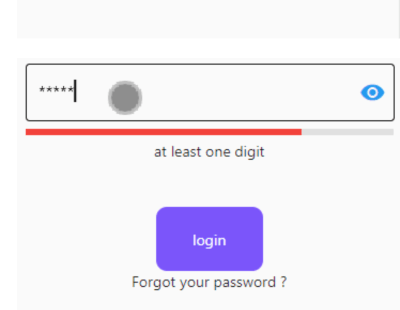
PassWordValidationTextFiled(
 lineIndicator:false,
 passwordMinError: "Must be more than 5 charater", 
 hasPasswordEmpty: "Password is Empty",
 passwordMaxError: "Password to long", 
 passWordUpperCaseError: "at least one Uppercase (Capital)lette",
 passWordDigitsCaseError: "at least one digit",
 passwordLowercaseError: "at least one lowercase character",
 passWordSpecialCharacters: "at least one Special Characters",
 obscureText: _isObscure,
 scrollPadding: EdgeInsets.only(left: 60),
 onChanged: (value) {
  // print(value);
 },
 passTextEditingController: txtPasswordCtrl,
 passwordMaxLength: 10,
 passwordMinLength: 5,
),

ConfirmPassWordValidationTextFromField(
 obscureText: _isObscure,
// obscureText: _isObscure,
 scrollPadding: EdgeInsets.only(left: 60),
 onChanged: (value) {
// print(value);
 },
 whenTextFieldEmpty: "Empty",
 validatorMassage: "Password not Match",
 confirmtextEditingController: txtConfPasswordCtrl,
// passtControllername:txtPasswordCtrl
),

See the example app for more complex examples.

Image

Email

BasicPassword

passwordLiner

Getting Started

For help getting started with Flutter, view our online documentation.

所屬分類

原始碼儲存庫

使用此套件的專案

暫無相關資料。