搜尋套件、儲存庫與 APP 分類

套件詳情v0.2.0

wave_slider

一個在拖曳時會產生波浪效果的 Flutter 滑桿。釋放時會輕微彈跳。

近 30 天下載
14
喜歡數
131
Pub 分數
30

安裝套件

flutter pub add wave_slider

套件介紹

根據套件公開資料產生的選型評估,僅供參考。

Wave Slider 是一個 Flutter 套件,透過在拖曳時加入動態波浪動畫,以及釋放時的微小彈跳效果,增強標準滑桿。專為富有趣味性、吸引人的使用者介面設計,為滑桿互動提供視覺反饋,讓操作感覺更即時且有趣。適合希望以生動、觸覺動畫脫穎而出的應用程式。此套件可無縫整合至 Flutter 專案中,並由 FunWithFlutter 維護。

適用情境

  • 互動式表單滑桿
  • 遊戲化應用介面
  • 設定中的視覺反饋
  • 引人入勝的入門體驗
  • 創意UI原型設計

主要特色

  • 拖動時的波浪動畫
  • 釋放時的彈跳效果
  • 平滑、流暢的運動
  • 使用 pub add 的最小設定
  • 可自訂波形外觀

適合對象

  • 尋求表達性使用者介面的設計人員
  • 開發互動式應用程式的開發者
  • 強調使用者參與度的專案
  • 面向年輕受眾的應用程式
  • 需要動畫反饋的原型

使用建議

  • 可能影響低階裝置的效能
  • 超出波浪樣式之外的自訂功能有限
  • 不適合極簡或嚴肅的使用者介面
  • 需要 Flutter 3.0+ 才能獲得最佳效能
  • 無內建方向波支援

原始 README

以下為關聯原始碼儲存庫的 README 原文快照,最新內容請造訪原始碼儲存庫。

A Flutter slider that makes a wave effect when dragged. Does a little bounce when dropped.

Demo

Getting Started

To use this plugin, add wave_slider as a dependency in your pubspec.yaml file.

The color can be set with the color property. The slider size is dependent on the size of its parent. The height of the wave slider can be set with the sliderHeigth property - which is constrained with a minimum of 50 and a maximum of 600.

An option displayTrackball property can be set to true to show a trackball along with the slider. The default is false

Values are retrieved by passing in an onChanged callback, which returns a value between 0 and 1 to indicate the current drag completion percentage.

The onChangeStart and onChangeEnd callbacks can be used to retrieve the start and end drag percentages respectively.

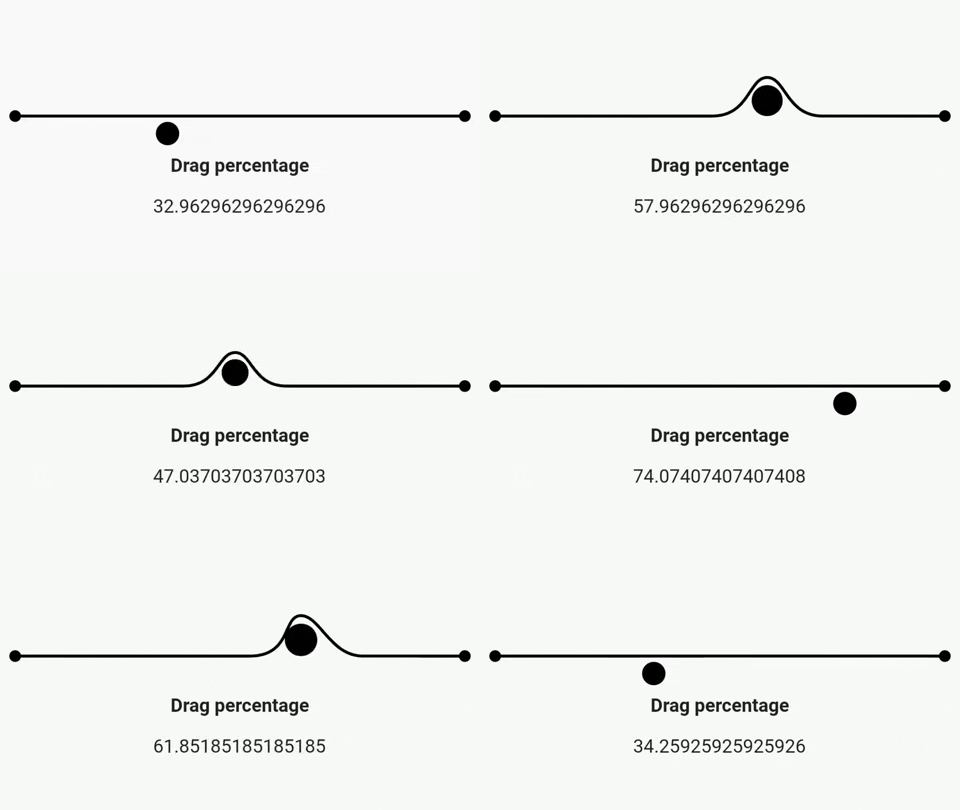
Example
import 'package:flutter/material.dart';
import 'package:wave_slider/wave_slider.dart';

void main() => runApp(MaterialApp(
      home: App(),
    ));

class App extends StatefulWidget {
  @override
  _AppState createState() => _AppState();
}

class _AppState extends State<App> {
  double _dragPercentage = 0;

  @override
  Widget build(BuildContext context) {
    return Scaffold(
      body: Column(
        mainAxisAlignment: MainAxisAlignment.center,
        children: <Widget>[
          WaveSlider(
            displayTrackball: false,
            onChanged: (double dragUpdate) {
              setState(() {
                _dragPercentage = dragUpdate *
                    100; // dragUpdate is a fractional value between 0 and 1
              });
            },
          ),
          Padding(
            padding: const EdgeInsets.all(8.0),
            child: Text(
              'Drag percentage',
              style: TextStyle(fontSize: 16, fontWeight: FontWeight.bold),
            ),
          ),
          Padding(
            padding: const EdgeInsets.all(8.0),
            child: Text(
              '$_dragPercentage',
              style: TextStyle(fontSize: 16),
            ),
          )
        ],
      ),
    );
  }
}
Interested in how the package was made?

Check out this playlist on the Fun with Flutter YouTube channel!

所屬分類

原始碼儲存庫

使用此套件的專案

暫無相關資料。