搜尋套件、儲存庫與 APP 分類

widget_marker_google_map 封面
套件詳情v0.0.2

widget_marker_google_map

具有小部件標記的自訂 Google 地圖。可顯示使用小部件代碼的標記。

AndroidiOSWeb
近 30 天下載
75
喜歡數
23
Pub 分數
140

安裝套件

flutter pub add widget_marker_google_map

套件介紹

根據套件公開資料產生的選型評估,僅供參考。

一個擴展 Google 地圖的 Flutter 套件,讓開發者能在地圖上放置基於自訂 widget 的標記。與標準標記不同,此套件支援使用任何 Flutter widget(例如圖示、頭像或互動元件)作為地圖標記。它能順暢整合至 Google 地圖外掛,並支援 Android、iOS 與 Web 平台。適合需要豐富、動態或互動式標記內容之應用程式,遠超簡單的影像或文字。

適用情境

  • 互動式地圖介面
  • 帶動畫的自定義標記 UI
  • 即時位置追蹤,視覺效果豐富
  • 地圖上的使用者輪廓標記
  • 地圖上的動態數據可視化

主要特色

  • 支援任意 Flutter 小部件作為標記
  • 跨平台相容性(Android、iOS、Web)
  • 與 Google 地圖外掛輕鬆整合
  • 可自訂的標記定位和行為
  • 動態標記內容的即時更新

適合對象

  • 開發互動地圖的開發者
  • 需要品牌化或動畫標記的應用程式
  • 具有即時位置資料的專案
  • UI密集型的地點定位應用
  • 使用 Flutter 實現全棧地圖功能的團隊

使用建議

  • 使用大量複雜小部件時的性能影響
  • 需要正確的狀態管理以實現動態更新
  • 對高級標記聚類的有限支援
  • 可能需要針對大規模地圖渲染進行優化
  • 取決於 Google Maps SDK 的可用性

原始 README

以下為關聯原始碼儲存庫的 README 原文快照,最新內容請造訪原始碼儲存庫。

widget_marker_google_map

All Contributors

pub package License: MIT

Google map with widget markers.

Set up

Follow the steps on google_maps_flutter document.

Usage

Same as google_maps_flutter except for widgetMarkers.

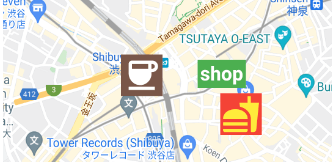
 WidgetMarkerGoogleMap(
    initialCameraPosition: shibuya,
    mapType: MapType.normal,
    widgetMarkers: [
      WidgetMarker(
        position: cafePosition,
        markerId: 'cafe',
        widget: Container(
          color: Colors.brown,
          padding: const EdgeInsets.all(2),
          child: const Icon(
            Icons.coffee,
            color: Colors.white,
            size: 64,
          ),
        ),
      ),
      WidgetMarker(
        position: clothesShopPosition,
        markerId: 'clothes',
        widget: Container(
          color: Colors.green,
          padding: const EdgeInsets.all(4),
          child: const Text(
            'shop',
            style: TextStyle(
              color: Colors.white,
              fontWeight: FontWeight.bold,
              fontSize: 32,
            ),
          ),
        ),
      ),
      WidgetMarker(
        position: hamburgerShopPosition,
        markerId: 'hamburger',
        widget: Container(
          color: Colors.red,
          padding: const EdgeInsets.all(2),
          child: const Icon(
            Icons.fastfood,
            color: Colors.yellow,
            size: 64,
          ),
        ),
      ),
    ],
  ),
WidgetMarker

You need to insert the list of WidgetMarker to use widget markers.

Make sure that you still need to use onTap method when you use gestures.

class WidgetMarker {
  WidgetMarker({
    required this.position,
    required this.markerId,
    required this.widget,
    this.onTap,
  }) : assert(markerId.isNotEmpty);

  final LatLng position;

  /// Keep this unique, otherwise it will not appear.
  final String markerId;

  /// Gestures of widget is disabled.
  /// Use this callback instead.
  final VoidCallback? onTap;

  final Widget widget;
}

If you have any requests or questions, feel free to ask on github.

Contributors ✨

Thanks goes to these wonderful people (emoji key):

Devin
Devin

💻
Santa Takahashi
Santa Takahashi

💻

This project follows the all-contributors specification. Contributions of any kind welcome!

所屬分類

依賴

依賴清單 2 項

原始碼儲存庫

使用此套件的專案

暫無相關資料。