搜尋套件、儲存庫與 APP 分類

wifi_hunter 封面
套件詳情v1.1.1+2

wifi_hunter

一個 Flutter 套件,用於搜尋您周圍所有 WiFi 接入點的資訊。

Android
近 30 天下載
18
喜歡數
27
Pub 分數
150

安裝套件

flutter pub add wifi_hunter

套件介紹

根據套件公開資料產生的選型評估,僅供參考。

wifi_hunter 是一個 Flutter 套件,專為掃描並檢索 Android 裝置附近 Wi-Fi 接入點資訊而設計。它讓開發者能夠偵測可用網路,包括其 SSID、訊號強度和 MAC 位址,提供即時的網路可視性。適用於網路診斷、基於位置的服務或安全性評估,此套件利用 Android 的 Wi-Fi 掃描 API。需要適當權限,且僅在 Android 平台上運作。

適用情境

  • 網路發現
  • 基於位置的服務
  • 安全審計
  • 設備連接監控
  • Wi-Fi信號分析

主要特色

  • 即時Wi-Fi掃描
  • SSID 和 MAC 位址檢索
  • 訊號強度檢測
  • 僅支援 Android
  • 簡單 API 結合

適合對象

  • Android應用開發者
  • 網路診斷工具
  • 物聯網設備管理
  • 安全研究人員
  • 位置感知應用程式

使用建議

  • 需要 Android 權限
  • 僅限Android平台
  • 隱私敏感資料存取
  • 背景掃描限制
  • 無 iOS 支援

原始 README

以下為關聯原始碼儲存庫的 README 原文快照,最新內容請造訪原始碼儲存庫。

wifi_hunter

A flutter package to hunt down info from all WiFi APs around you.

version BSD License PRs Welcome

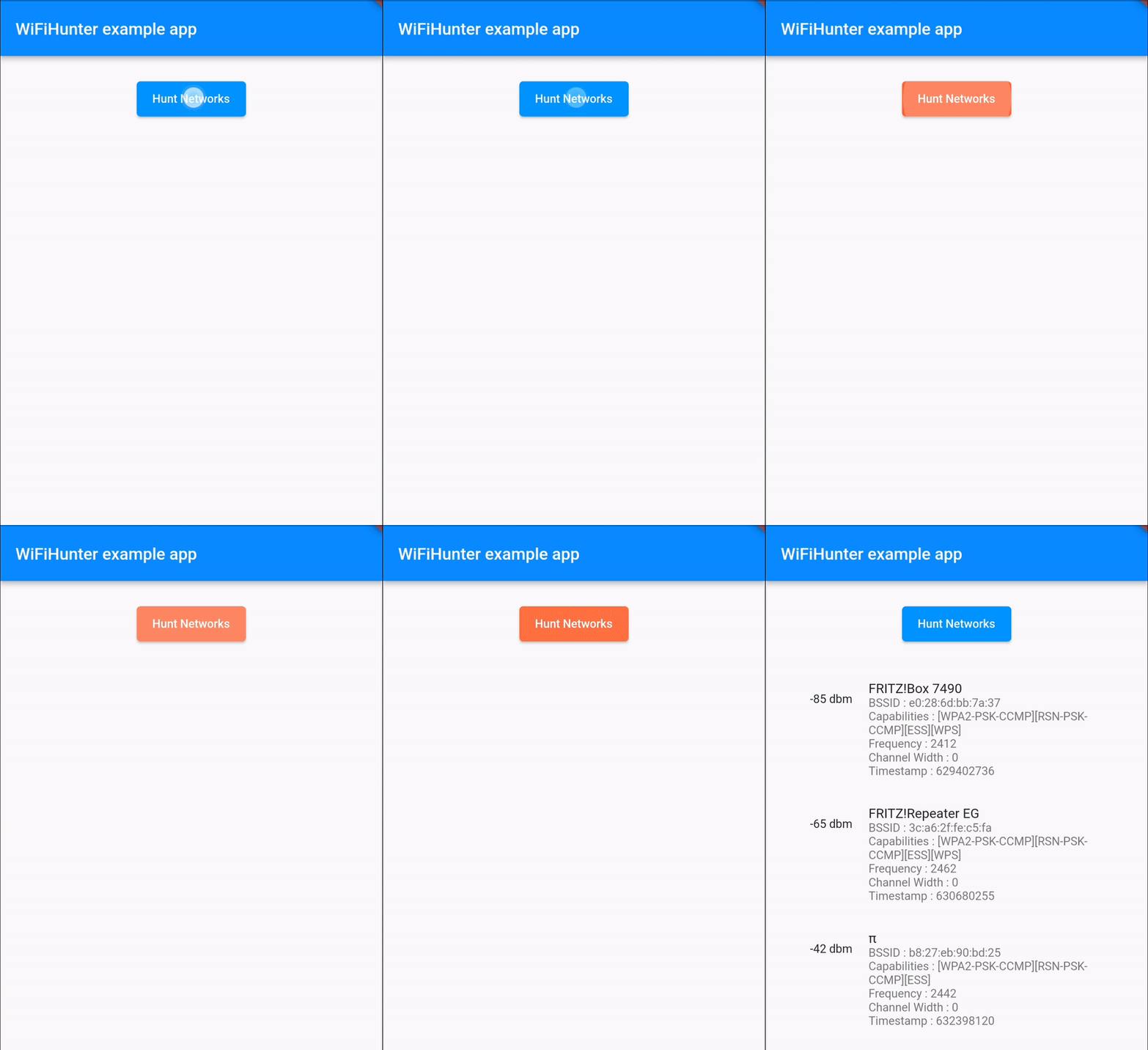
Demonstration

demo.gif

Getting Started


import 'package:flutter/material.dart';
import 'package:flutter/services.dart';
import 'dart:async';

import 'package:wifi_hunter/wifi_hunter.dart';
import 'package:wifi_hunter/wifi_hunter_result.dart';

void main() {
  runApp(const MyApp());
}

class MyApp extends StatefulWidget {
  const MyApp({Key? key}) : super(key: key);

  @override
  State<MyApp> createState() => _MyAppState();
}

class _MyAppState extends State<MyApp> {
  WiFiHunterResult wiFiHunterResult = WiFiHunterResult();
  
  Future<void> huntWiFis() async {
    try {
      wiFiHunterResult = (await WiFiHunter.huntWiFiNetworks)!;
    } on PlatformException catch (exception) {
      print(exception.toString());
    }
    
    for (var i = 0; i < wiFiHunterResult.results.length) {
      print(wiFiHunterResult.results[i].ssid);
      print(wiFiHunterResult.results[i].bssid);
      print(wiFiHunterResult.results[i].capabilities);
      print(wiFiHunterResult.results[i].frequency);
      print(wiFiHunterResult.results[i].level);
      print(wiFiHunterResult.results[i].channelWidth);
      print(wiFiHunterResult.results[i].timestamp);
    }

    if (!mounted) return;
  }

  @override
  Widget build(BuildContext context) {
    return MaterialApp(
      home: Scaffold(
      appBar: AppBar(
        title: const Text('WiFiHunter example app'),
      ),
      body: ElevatedButton(
        onPressed: () => huntWiFis(),
        child: const Text('Hunt Networks')
      )
    );
  }
}


Functionality and Features

Here is what infos you can get by using this package :

  • String[] SSIDs

  • String[] BSSIDs

  • String[] Signal strength

  • int[] Frequencies

  • int[] Capabilities

  • int[] Channel widths

  • long[] Timestamps (of information retrieval)

    ... of all WiFi APs in reach.

Running the sample

When running the sample app, make sure you've granted it the location permissions available in the system preferences, as there is currently no permission dialog implemented in the example app.
The permission settings are available under Settings > Apps > wifi_hunter_example > Permissions > Location > Allow only while using the app

Android WiFi Scan Throttling

Starting with Android 8.0 and up, the operating system severely limits the number of WiFi scans.
Please keep this limit in mind when implementing your scan issuing logic.
Find out more about these limits on developer.android.com.

Debugging

You can get a good overview of pretty much all related log entries by searching for wifi in the Logcat output.

所屬分類

原始碼儲存庫

使用此套件的專案

暫無相關資料。