搜尋套件、儲存庫與 APP 分類

套件詳情v1.1.0

zoom_tap_animation

縮放點擊動畫讓您可以實現類似今日標籤頁中 App Store 項目的效果,當您長按某個項目時,它會開始放大,然後縮小。

AndroidiOSWebmacOSWindowsLinux
近 30 天下載
5450
喜歡數
139
Pub 分數
140

安裝套件

flutter pub add zoom_tap_animation

套件介紹

根據套件公開資料產生的選型評估,僅供參考。

Zoom Tap Animation 是一個 Flutter 套件,當使用者長按項目時會產生動態縮放效果,模擬 App Store 的 Today 標籤頁中的互動行為。它透過在觸控互動期間提供視覺反饋來提升使用者參與度。此動畫流暢且可自訂,適用於按鈕、卡片或任何互動式 UI 元素。該套件以效能與跨平台相容性為設計重點,可在 Android、iOS、Web、macOS、Windows 與 Linux 上順暢運作。

適用情境

  • 互動式應用程式圖示
  • 動畫卡片點擊
  • 增強的按鈕反饋
  • 今日標籤式介面
  • 用戶參與元素
  • 觸控互動強調

主要特色

  • 長按觸發縮放
  • 平滑縮放放大與縮小
  • 跨平台支援
  • 可自訂的動畫持續時間
  • 與現有組件的輕鬆整合
  • 輕量且高效

適合對象

  • 尋求引人入勝的觸控效果的開發者
  • UI 設計師增強互動性
  • 基於手勢的導航應用
  • 需要類似 App Store 動畫的專案
  • Flutter 應用針對多個平台

使用建議

  • 可能需要調整以獲得最佳時間
  • 不適合靜態或非互動式內容
  • 最佳搭配清晰的視覺目標使用
  • 如果未妥善管理,可能與其他手勢衝突
  • 限制為輕觸/長按觸發

原始 README

以下為關聯原始碼儲存庫的 README 原文快照,最新內容請造訪原始碼儲存庫。

pub package

Zoom Tap Animation

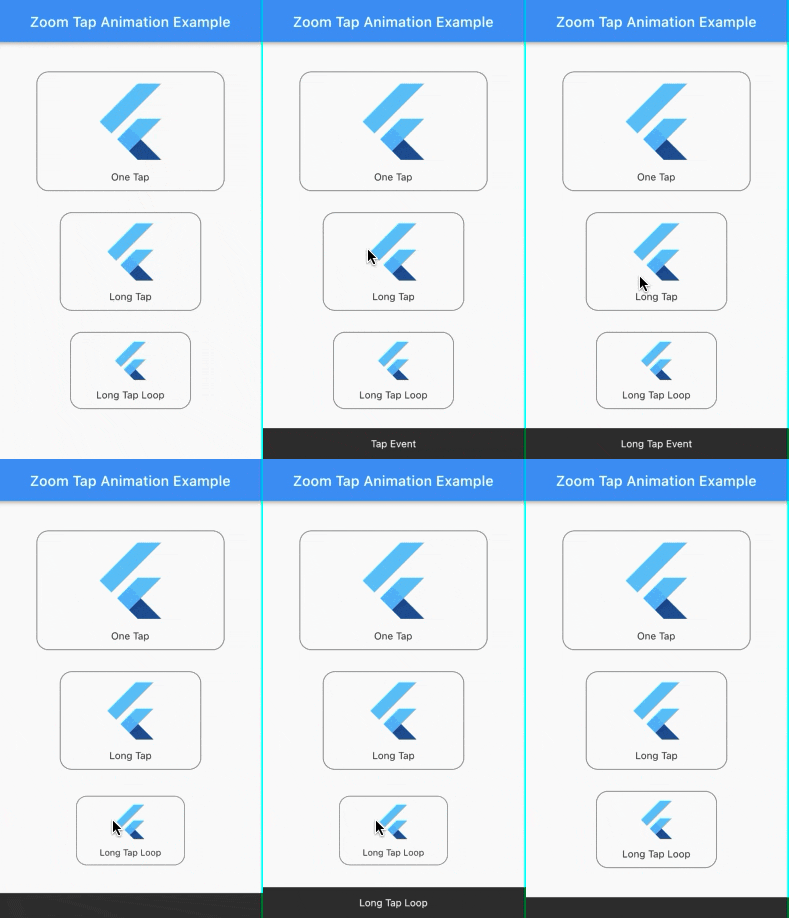
Zoom Tap Animation is is a package that allows you to make an zoom animation effect similar to App Store's (ios app) items in Today tab, when you long tap on some item, it start to zoom in then it zoom out when you release it.

Screenshots:

Source of idea

The idea is inspired from App Store app in Today tab where you can long tap on some item and it start to zoom in then zoom out as shown in the screenshot below.

Example:

Check out the example project in the example folder.

Installation:

add the package to your dependencies
dependencies:
  zoom_tap_animation: ^1.1.0
import 'package:zoom_tap_animation/zoom_tap_animation.dart';

Usage:

default use of ZoomTapAnimation widget
ZoomTapAnimation(
      onTap: (){},
      child: YOUR_WIDGET
);
and you can also define custom parameters
ZoomTapAnimation(
      child: YOUR_WIDGET,
      onTap: (){},
      onLongTap: (){},
      enableLongTapRepeatEvent: false,
      longTapRepeatDuration: const Duration(milliseconds: 100),
      begin: 1.0,
      end: 0.93,
      beginDuration: const Duration(milliseconds: 20),
      endDuration: const Duration(milliseconds: 120),
      beginCurve: Curves.decelerate,
      endCurve: Curves.fastOutSlowIn
);
also you can use ZoomTapAnimation with your custom gestures
ZoomTapAnimation(
      child: GestureDetector(
      onTap: () {},
      onLongPress: (){},
      onDoubleTap: (){},
      // you can add more gestures...
      child: Container(color: Colors.yellow, width: 100.0, height: 100.0),
      ),
);
parameters
parameter description default
child your child widget that you want to put the zoom effect on.
onTap what should happen when you tap on the widget. null
onLongTap what should happen when you long tap on the widget. null
enableLongTapRepeatEvent option to enable long tap loop which repeat every onTap event (in case onLongTap is specified, it repeats the onLongTap event). false
longTapRepeatDuration the duration between every onTap/onLongTap loop event. const Duration(milliseconds: 100)
begin the size of widget you want to begin with. 1.0
end the size of widget you want to begin with. 0.93
beginDuration the duration of the begin zoom in animation. const Duration(milliseconds: 20)
endDuration the duration of the end zoom in animation. const Duration(milliseconds: 120)
beginCurve the curve animation type of the begin zoom in animation. Curves.decelerate
endCurve the curve animation type of the end zoom in animation. Curves.fastOutSlowIn

所屬分類

原始碼儲存庫

使用此套件的專案