Package selection guidance compiled from public package information, community data, and project usage.
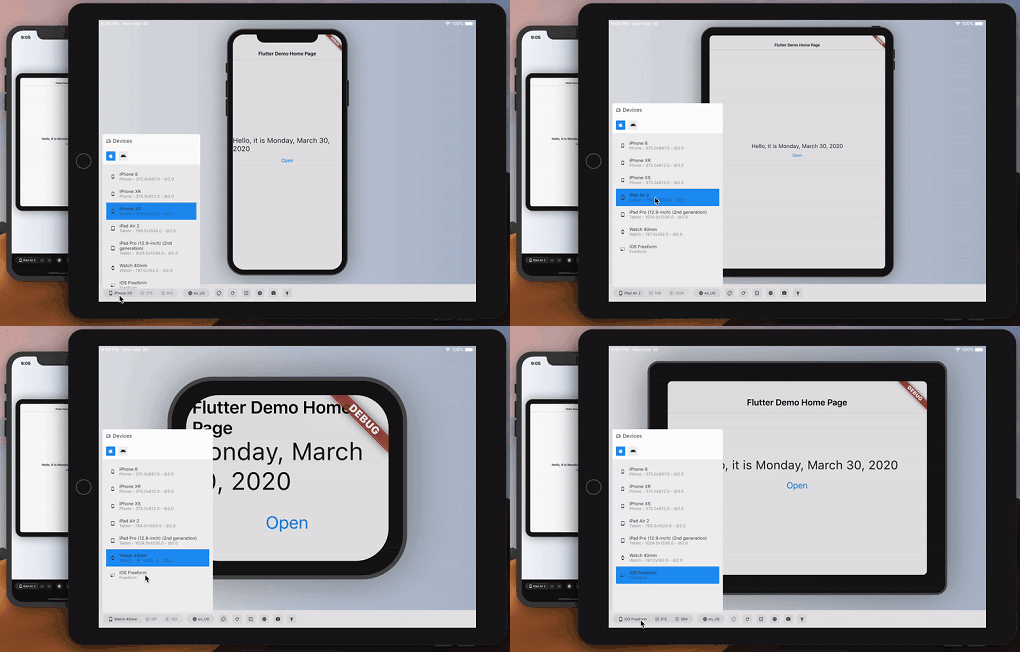
Device Preview is a Flutter package that allows developers to simulate how their app appears and behaves on different devices directly within the development environment. It provides real-time device emulation, including screen size, orientation, platform, and system settings like dark mode. This helps ensure consistent UI across various devices without needing physical hardware. The package supports multiple platforms, including Android, iOS, Web, macOS, Windows, and Linux, making it ideal for cross-platform testing.
Use cases
Testing UI responsiveness across devices
Simulating different screen sizes and orientations
Validating dark mode and platform-specific behaviors
Previewing app appearance on various device types
Cross-platform UI consistency checks
Key features
Real-time device emulation
Support for multiple platforms
Dynamic device selection
Orientation and theme simulation
Integration with Flutter DevTools
Suitable for
Flutter developers testing UI layouts
Teams working on cross-platform apps
Designers validating responsive designs
Developers ensuring accessibility and usability
Considerations
Not a substitute for physical device testing
Performance may vary with complex UIs
Limited to visual and behavioral simulation
Does not replicate network or hardware conditions
Original README
Original README snapshot from the linked source repository. Visit the repository for the latest content.
Simulate any device — screen, safe areas, locale, accessibility — with full framework fidelity.
You build on one screen; your users arrive on hundreds. Device Preview switches your running app to another device — an old 320pt phone, a tablet in landscape, a notched display, a half-width desktop window — instantly, with no rebuild and no simulator.
Screen size, pixel ratio, safe areas, orientation, folds, the software keyboard, locales, brightness, text scale, accessibility settings and target platform all change with it, and your app reads them through the same MediaQuery it always used. So the problems that normally surface in front of a customer — a clipped headline, a button under the home indicator, an overflow at 200% text — surface in front of you instead.
Control it from Flutter DevTools, from Dart, or from your tests.
Quickstart
dependencies:device_preview:<latestversion>
voidmain() {
DevicePreview.enable();
runApp(constMyApp()); // runs as usual — now simulatable
}
That's the whole integration. Open DevTools, select the device_preview tab, and pick a device.
enable() is safe to call unconditionally: simulation is active in debug and profile builds and completely off in release, so nothing ships to your users. Pass a value to decide yourself — DevicePreview.enable(enabled: kDebugMode) for debug only, DevicePreview.enable(enabled: false) to turn it off.
Programmatic control:
import'package:device_preview/presets.dart';
final c = DevicePreview.controller;
await c.applyPreset(DevicePresets.iPhone16Pro);
await c.setOrientation(Orientation.landscape);
await c.update((s) => s.copyWith(textScaleFactor: 2.0, platformBrightness: Brightness.dark));
await c.reset();
DevicePreview.controller throws when simulation is off (every release build); use DevicePreview.maybeController?.… from code that ships.
See device_preview/README.md for the full package documentation, including widget-test support via DevicePreviewBindingMixin.
The device catalog: one JSON per device — metrics, screen outline and body artwork. Generated into both the extension catalog and the package's built-in DevicePresets; see its README to add a device.
Legacy device frame drawings package from the 2.x era. Nothing in the 3.0 release depends on it — 3.0 renders frames from the device_specs artwork, carried by the built-in presets and pushed over the DevTools protocol.
The website, including its interactive demo — docs/demo is the counter example built for the web, docs/device_catalog.json the catalog its HTML panel pushes to it. Rebuild both with tool/build_demo.sh.