v3.4.3
hooks_riverpod
一个响应式缓存和数据绑定框架。Riverpod 让处理异步代码变得轻而易举。
931喜欢 65.9万近 30 天下载150Pub 分数
AndroidiOSmacOSWindowsLinux
一个免费且开源的漫画阅读应用,用于从 Tachidesk-Server 实例中阅读漫画。

以下为英文项目原文快照,最新内容请访问 GitHub。







A free and open source manga reader based on Flutter to read manga from a Suwayomi-Server instance.
Sorayomi need to connect with an already hosted server.
Sorayomi supports Linux, Windows, MacOS, Web, iOS and Android.
Here is a list of current features for interaction with Sorayomi:
Note: Keep in mind that Sorayomi and Suwayomi-Server are alpha software, so it can have issues. See Support and help if it happens.
These are the versions of Suwayomi-Server that Sorayomi supports.
Download *-android-all.apk file from latest release the releases section.
Download the latest .msi file from the releases section.
if you use WINGET, you can run
winget install tachidesk-sorayomi
if you use HomeBrew, you can run
brew install --cask tachidesk-sorayomi
Download the latest deb release from the releases section.
Download the latest release from the aur.
If you use yay, you can run
yay -S tachidesk-sorayomi-bin
inside a terminal window.
Download the latest web.zip file from the releases section.
Navigation bar > more screen > Server URL.These instructions will get you a copy of the project up and running on your local machine for development and testing purposes.
You can install Flutter & Dart from Official website
  $ git clone https://github.com/Suwayomi/Tachidesk-Sorayomi.git
  $ cd Tachidesk-Sorayomi/
$ flutter pub get
$ flutter run
$ flutter gen-l10n
git config --local core.hooksPath .githooksFlutter is an open source framework by Google for building beautiful, natively compiled, multi-platform applications from a single codebase.
Flutter Riverpod - A simple way to access state while robust and testable.
Riverpod Architecture - File architecture developed by @bizz84
Find other dependencies in pubspec.yaml
The Suwayomi-server project is developed by @AriaMoradi and contributors,
The Tachidesk-Sorayomi project is developed by @DattatreyaReddy and contributors,
CI-CD for Tachidesk-Sorayomi is developed by @mahor1221 and contributors.
Feel free to translate the project on Weblate
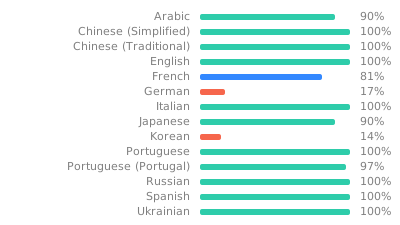
A link for Tachidesk is provided here and is licensed under Mozilla Public License v2.0.
You can obtain a copy of Mozilla Public License v2.0 from https://mozilla.org/MPL/2.0/
Copyright (C) Contributors to the Suwayomi project

This Source Code Form is subject to the terms of the Mozilla Public
License, v. 2.0. If a copy of the MPL was not distributed with this
file, You can obtain one at http://mozilla.org/MPL/2.0/.
一个响应式缓存和数据绑定框架。Riverpod 让处理异步代码变得轻而易举。
一个为 riverpod_generator 暴露注解的包
Riverpod 的代码生成器。它既简化了语法,又增强了功能,例如支持有状态热重载。
一个支持为 package:go_router 生成强类型路由助手的构建器
用纯 Dart 编写的轻量级且速度极快的键值数据库。使用 AES-256 强加密。
Hive 的扩展。使在 Flutter 应用中使用 Hive 更加简单。
React hooks 的 Flutter 实现。它添加了一种具有增强代码复用功能的新类型小部件。
一个独立的 Dart GraphQL 客户端,将现代 GraphQL 客户端的所有功能整合到一个易于使用的包中。
适用于 Flutter 的 GraphQL 客户端,将现代 GraphQL 客户端的所有功能集成到一个易于使用的包中。
用于发现网络信息(例如 WiFi 详细信息)的 Flutter 插件。
一个包为 Flutter 项目提供了一种简便的方法来添加闪烁效果
用于您的资源、字体、颜色等的 Flutter 代码生成器 —— 摒弃所有基于字符串的 API。
依赖清单 55 项
^5.1.1^3.2.2^4.0.0^1.0.5^1.0.10^8.0.0+1^8.2.0{"sdk":"flutter"}{"git":"https://github.com/DattatreyaReddy/flutter_android_volume_keydown"}^3.3.0^0.20.0{"sdk":"flutter"}^0.7.1^8.1.1^10.2.1^2.2.0^3.0.1^14.0.2^1.0.1-alpha+1730759315362^1.0.1+1^5.2.0-beta.10^5.2.0-beta.8^2.2.3^1.1.0^2.1.1^1.2.0^4.0.0^0.20.2^4.9.0^2.5.0^6.0.0^8.0.0^1.8.3^2.0.11^11.0.0^2.1.2^3.1.0+2^2.0.0^0.3.5^2.0.15^3.0.0^6.1.6^3.0.0^2.4.14^5.1.0+1^0.14.1^5.0.0^2.2.14{"sdk":"flutter"}^2.2.1^2.0.0^1.1.1^6.5.4^5.0.0^2.0.0先按使用场景筛选,再比较项目活跃情况,最后到原始仓库核对使用要求。
“A repository is the most basic element of GitHub.”
GitHub Docs — About repositories ↗