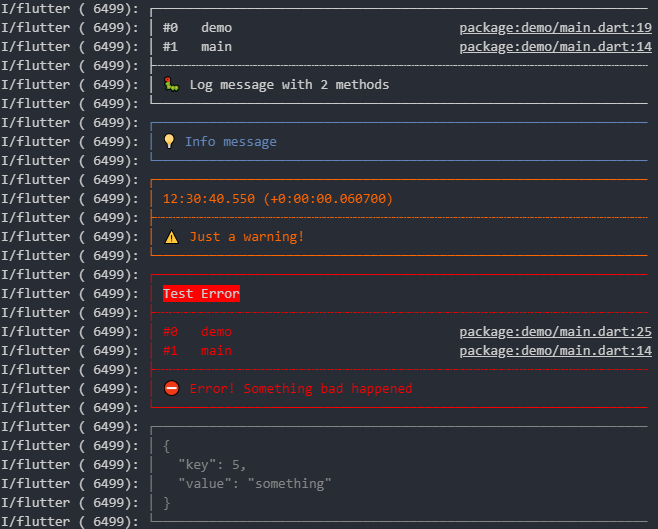
When creating a logger, you can pass some options:
var logger = Logger(
  filter: null, // Use the default LogFilter (-> only log in debug mode)
  printer: PrettyPrinter(), // Use the PrettyPrinter to format and print log
  output: null, // Use the default LogOutput (-> send everything to console)
);
If you use the PrettyPrinter, there are more options:
var logger = Logger(
printer: PrettyPrinter(
methodCount: 2, // Number of method calls to be displayed
errorMethodCount: 8, // Number of method calls if stacktrace is provided
lineLength: 120, // Width of the output
colors: true, // Colorful log messages
printEmojis: true, // Print an emoji for each log message// Should each log print contain a timestamp
dateTimeFormat: DateTimeFormat.onlyTimeAndSinceStart,
),
);
Auto detecting
With the io package you can auto detect the lineLength and colors arguments.
Assuming you have imported the io package with import 'dart:io' as io; you
can auto detect colors with io.stdout.supportsAnsiEscapes and lineLength
with io.stdout.terminalColumns.
You should probably do this unless there's a good reason you don't want to
import io, for example when using this library on the web.
LogFilter
The LogFilter decides which log events should be shown and which don't.
The default implementation (DevelopmentFilter) shows all logs with level >= Logger.level while
in debug mode (i.e., running dart with --enable-asserts).
In release mode all logs are omitted.
This will show all logs even in release mode. (NOT a good idea)
LogPrinter
The LogPrinter creates and formats the output, which is then sent to the LogOutput.
You can implement your own LogPrinter. This gives you maximum flexibility.
If you created a cool LogPrinter which might be helpful to others, feel free to open a pull
request.
:)
Colors
Please note that in some cases ANSI escape sequences do not work under macOS.
These escape sequences are used to colorize the output.
This seems to be related to a Flutter bug that affects iOS builds:
https://github.com/flutter/flutter/issues/64491
However, if you are using a JetBrains IDE (Android Studio, IntelliJ, etc.)
you can make use of
the Grep Console Plugin
and the PrefixPrinter
decorator to achieve colored logs for any logger:
var logger = Logger(
    printer: PrefixPrinter(PrettyPrinter(colors: false))
);
LogOutput
LogOutput sends the log lines to the desired destination.
The default implementation (ConsoleOutput) send every line to the system console.
classConsoleOutputextendsLogOutput{
@overridevoidoutput(OutputEvent event) {
for (var line in event.lines) {
print(line);
}
}
}
Other provided LogOutputs are:
FileOutput/AdvancedFileOutput
StreamOutput
Possible future LogOutputs could send to Firebase or to Logcat. Feel free to open pull
requests.
Acknowledgments
This package was originally created by Simon Choi, with further
development by Harm Aarts, greatly enhancing its functionality over
time.