搜索插件、代码仓与 APP 分类

插件详情v5.1.1

infinite_scroll_pagination

在用户向下滚动屏幕时,懒加载并显示项目页面。

AndroidiOSWebmacOSWindowsLinux
近 30 天下载
48.1万
喜欢数
4050
Pub 分数
150

安装插件

flutter pub add infinite_scroll_pagination

插件介绍

基于插件公开信息、社区数据与项目使用情况整理的选型参考。

一个 Flutter 包,可在用户滚动时实现分页内容的延迟加载,通过增量获取数据来提升性能和用户体验。它可无缝集成到 ListView 及其他可滚动控件中,当接近当前内容末尾时自动触发分页请求。适用于显示长列表的应用程序,如社交动态、搜索结果或产品目录。该包以最少的样板代码处理加载状态、错误恢复和空状态。

适合场景

  • 社交媒体动态滚动
  • 搜索结果分页
  • 电子商务产品列表
  • 长篇文章展示
  • 仪表板中的无限内容加载

主要特点

  • 滚动时自动加载页面
  • 内置的加载和错误状态
  • 对多个可滚动组件的支持
  • 可自定义的页面请求逻辑
  • 通过延迟加载实现高效的内存使用

适合对象

  • 大型数据集的应用程序
  • 可滚动列表界面
  • 对性能敏感的UI
  • 寻求最小化设置的开发者
  • 需要流畅无限滚动的项目

使用建议

  • 需要正确处理异步数据源
  • 可能需要自定义缓存策略
  • 不适合小型静态列表
  • 依赖于页面令牌或偏移逻辑的正确实现
  • 如果配置不当,存在过度获取数据的潜在风险

原始 README

以下为关联源码仓库的 README 原文快照,最新内容请访问源码仓库。

Package Logo with Flutter Favorite Badge

Chosen as a Flutter Favorite by the Flutter Ecosystem Committee

Pub.dev Badge GitHub Build Badge Code Coverage Badge Gitter Badge Effective Dart Badge MIT License Badge Flutter Platform Badge


Infinite Scroll Pagination

Unopinionated, extensible and highly customizable package to help you lazily load and display small chunks of items as the user scrolls down the screen – known as infinite scrolling pagination, endless scrolling pagination, auto-pagination, lazy loading pagination, progressive loading pagination, etc.

Designed to feel like part of the Flutter framework.

Example Project

Tutorial

By raywenderlich.com (step-by-step, hands-on, in-depth, and illustrated).

Usage

class ListViewScreen extends StatefulWidget {
  const ListViewScreen({super.key});

  @override
  State<ListViewScreen> createState() => _ListViewScreenState();
}

class _ListViewScreenState extends State<ListViewScreen> {
  late final _pagingController = PagingController<int, Photo>(
    getNextPageKey: (state) => state.lastPageIsEmpty ? null : state.nextIntPageKey,
    fetchPage: (pageKey) => RemoteApi.getPhotos(pageKey),
  );

  @override
  void dispose() {
    _pagingController.dispose();
    super.dispose();
  }

  @override
  Widget build(BuildContext context) => PagingListener(
    controller: _pagingController,
    builder: (context, state, fetchNextPage) => PagedListView<int, Photo>(
      state: state,
      fetchNextPage: fetchNextPage,
      builderDelegate: PagedChildBuilderDelegate(
        itemBuilder: (context, item, index) => ImageListTile(item: item),
      ),
    ),
  );
}

For more usage examples, please take a look at our cookbook or check out the example project.

Features

Migration

if you are upgrading the package, please check the migration guide for instructions on how to update your code.


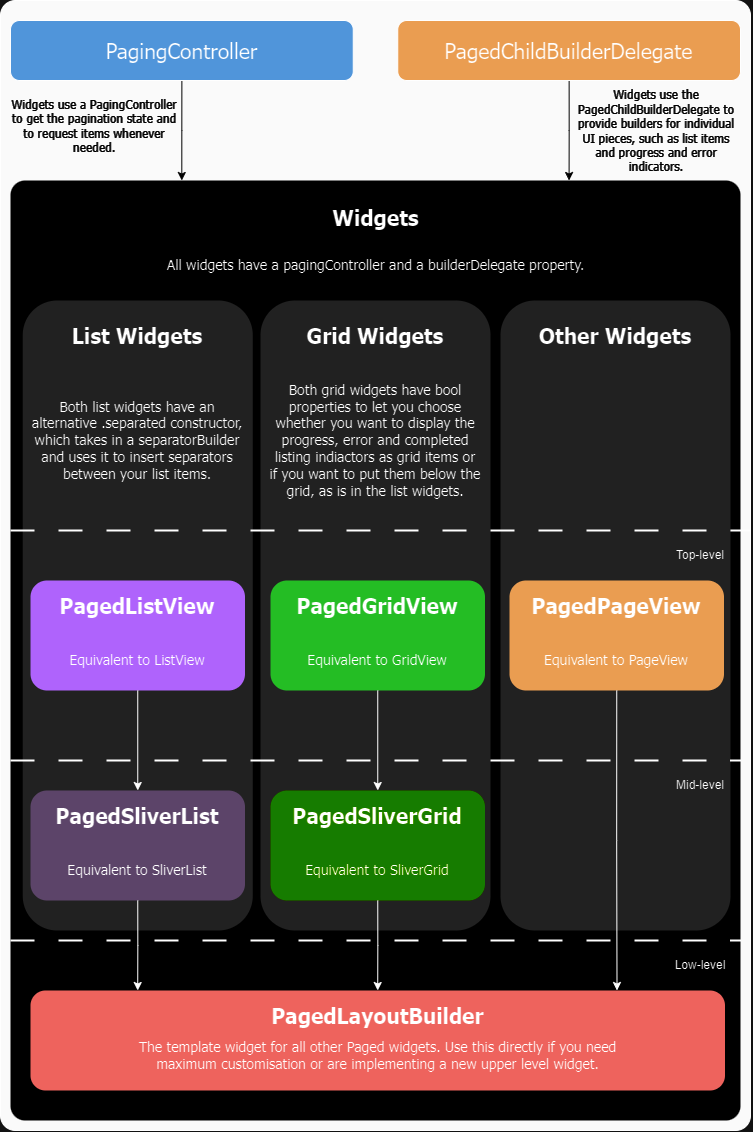
API Overview

API Diagram

所属分类

依赖

依赖清单 4 项

源码仓库

使用此插件的项目

所在榜单