
 v5.1.0
flex_grid
FlexGrid 以表格格式显示数据。它包含冻结列/行、加载更多、高性能以及在 TabBarView/PageView 中更佳的体验。
51喜欢 156近 30 天下载130Pub 分数
AndroidiOSWebmacOSWindowsLinux
FlexGrid 控件提供了一种强大且快速的方式来以表格格式显示数据。它支持冻结列/行、加载更多、高性能以及在 TabBarView/PageView 中的更好体验。

^2.0.0^4.1.0{"sdk":"flutter"}^5.0.0^1.1.0{"sdk":"flutter"}以下为英文项目原文快照,最新内容请访问 GitHub。
pub package GitHub stars GitHub forks GitHub license GitHub issues FlutterCandies QQ 群
Language: English| 中文简体
The FlexGrid control provides a powerful and quickly way to display data in a tabular format. It is including that frozened column/row,loading more, high performance and better experience in TabBarView/PageView.
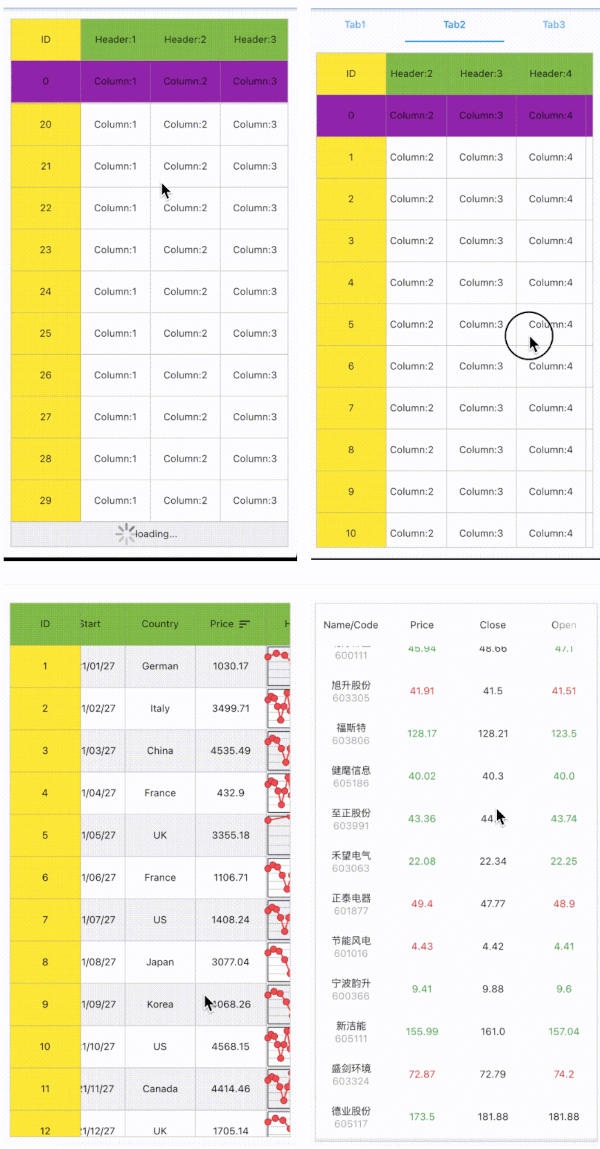
| https://github.com/fluttercandies/flutter_candies/blob/master/gif/flex_grid/FrozenedRowColumn.gif | https://github.com/fluttercandies/flutter_candies/blob/master/gif/flex_grid/TabView.gif | https://github.com/fluttercandies/flutter_candies/blob/master/gif/flex_grid/HugeData.gif |
| https://github.com/fluttercandies/flutter_candies/blob/master/gif/flex_grid/Excel.gif | https://github.com/fluttercandies/flutter_candies/blob/master/gif/flex_grid/StockList.gif |
| parameter | description | default |
|---|---|---|
| frozenedColumnsCount | The count of forzened columns | 0 |
| frozenedRowsCount | The count of forzened rows | 0 |
| cellBuilder | The builder to create cell | required |
| cellBuilder | The builder to create header | required |
| columnsCount | The count of columns, it should big than 0 | required |
| source | The data source of [FlexGrid] | required |
| rowWrapper | decorate row widget in this call back | null |
| rebuildCustomScrollView | rebuild when source is changed, It's from [LoadingMoreCustomScrollView] | false |
| controller | The [ScrollController] on vertical direction | null |
| horizontalController | The [SyncControllerMixin] for horizontal direction | null |
| outerHorizontalSyncController | The Outer [SyncControllerMixin], for example [ExtendedTabBarView] or [ExtendedPageView]. It make better experience when scroll on horizontal direction | null |
| physics | The physics on both horizontal and vertical direction | null |
| verticalHighPerformance/horizontalHighPerformance | If true, forces the children to have the given extent(Cell height/width) in the scroll direction. | false |
| headerStyle | An immutable style describing how to create header | CellStyle.header() |
| cellStyle | An immutable style describing how to create cell | CellStyle.cell() |
| indicatorBuilder | Widget builder for different loading state, it's from [LoadingMoreCustomScrollView] | null |
| extendedListDelegate | A delegate that provides extensions, it's from [LoadingMoreCustomScrollView] | null |
| headersBuilder | The builder to custom the headers of [FlexGrid] | null |
| link | if link is true, scroll parent [ExtendedTabView] when [FlexGrid] is over scroll | false |
[FlexGrid.source] is form loading_more_list, LoadingMoreBase is data collection for loading more. override loadData method to load your data. set hasMore to false when it has no more data.
class FlexGridSource extends LoadingMoreBase<GridRow> {
  int _pageIndex = 1;

  void _load() {
    for (int i = 0; i < 15; i++) {
      add(GridRow(name: 'index:$_pageIndex-$i'));
    }
  }

  @override
  bool get hasMore => _pageIndex < 4;

  @override
  Future<bool> loadData([bool isloadMoreAction = false]) async {
    await Future<void>.delayed(const Duration(seconds: 2));
    _load();
    _pageIndex++;
    return true;
  }

  @override
  Future<bool> refresh([bool notifyStateChanged = false]) async {
    _pageIndex = 1;
    return super.refresh(notifyStateChanged);
  }
}
decorate row widget in this call back.
    FlexGrid(
      rowWrapper: (
        BuildContext context,
        T data,
        int row,
        Widget child,
      ) {
        return Column(
          children: <Widget>[
            child,
            const Divider(),
          ],
        );
      },
    );
you can add anyother headers in this call back.
    FlexGrid(
      headersBuilder: (BuildContext b, Widget header) {
        return <Widget>[
          header,
          SliverToBoxAdapter(
            child: PullToRefreshContainer(
                (PullToRefreshScrollNotificationInfo info) {
              return PullToRefreshHeader(
                info,
                source.lastRefreshTime,
              );
            }),
          ),
        ];
      },
    );