
v3.1.9
riverpod_lint
Riverpod_lint は、Riverpod のユーザー向けに設計された開発者ツールで、一般的な問題を防止し、繰り返し作業を簡素化するのに役立ちます。
330いいね 51.4万30日間ダウンロード130Pub ポイント
AndroidiOSmacOSWindowsLinux
シンプルでローカルなマテリアルデザインのメモ

Riverpod_lint は、Riverpod のユーザー向けに設計された開発者ツールで、一般的な問題を防止し、繰り返し作業を簡素化するのに役立ちます。
ウィジェットの最初のレイアウトが完了した後、つまり最初のフレームが表示された後にコードを実行します。
PointyCastle をベースとした双方向暗号化のための高レベルAPIセット。
 v1.28.0
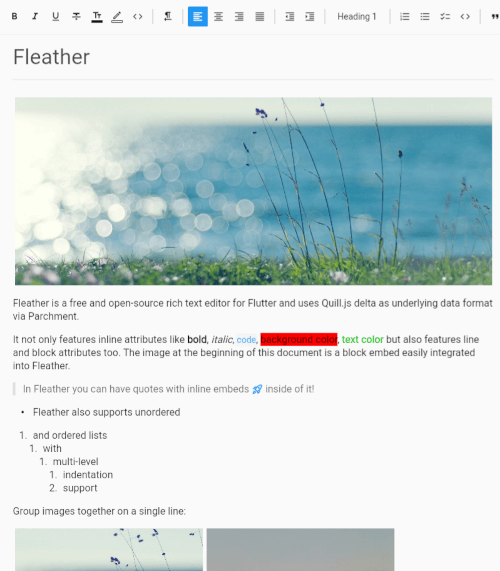
Flutter用のクリーンでミニマリストかつコラボレーション対応のリッチテキストエディタ。
 v4.0.0
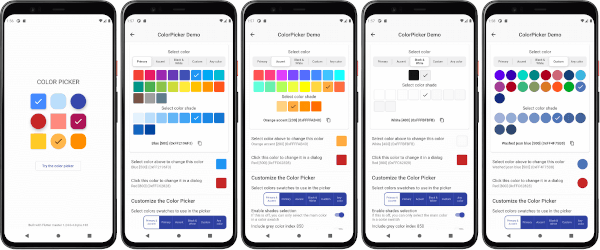
カスタマイズ可能なFlutterの主要色、強調色、カスタムカラーピッカー。オプションのHSVホイールカラーピッカーを含む。
Column や Row などの Flex ウィジェット、またはスクロールビュー内に簡単にギャップを追加するための Flutter ウィジェット。
Flutter用に非常に高速で使いやすく、完全に非同期なNoSQLデータベースです。
タイポに強いフルテキスト検索と宣言型クエリを備えた、非常に強力なリアクティブなNoSQLデータベース。
タイポに強いフルテキスト検索と宣言型クエリを備えた、非常に強力なリアクティブなNoSQLデータベース。
ユーザー入力からの文字列の検証およびクリーニングに特化したDartライブラリ。
プラットフォーム固有のネイティブ動作でFlutterアプリを再起動または再起動するためのFlutterプラグイン。
Dartで書かれたポータブルなMarkdownライブラリで、MarkdownをHTMLにパースできます。
^1.2.0^4.0.9^1.19.1^1.2.1^6.0.2^13.1.0^1.8.1^5.0.3^2.0.8^2.0.2^1.27.0^3.8.0{"sdk":"flutter"}^1.5.5^0.7.0^2.5.2^0.8.0{"sdk":"flutter"}^1.0.7^2.4.8^3.3.1^10.3.1^0.7.0^3.0.1^17.3.0^0.20.2^1.0.0^3.3.2^3.3.2^4.11.0^1.9.2^3.0.1^1.1.1^2.7.0^7.3.1^4.2928.1^10.1.0anyany^1.9.1^2.1.5^1.1.0^0.0.2^1.8.3^4.0.2^2.0.0^2.2.0^1.0.5^6.0.1^13.1.0^2.5.5^16.23.0^1.2.0^1.0.33^6.3.2^4.5.3^2.15.0^3.1.1^0.14.4^6.0.0^3.3.2^6.13.0^4.0.3^3.1.3以下は英語原文のスナップショットです。最新版は GitHub をご覧ください。
Platforms Style Conventional Commits
Get it on Google Play
Get it on IzzyOnDroid
Get it on F-Droid
Get it on Obtainium
Get it on GitHub
Simple, local, material design notes.
[!IMPORTANT] This project is now in maintenance mode.
It is considered feature complete. Only 1 to 2 updates a year should be expected, containing bug fixes and maybe very small improvements.
Thank you very much to anyone who used my first ever app!
All the supported languages are listed here alphabetically. You can see more details on the Crowdin project. To improve a language or add support for a new one, please see CONTRIBUTING.md.
[!NOTE] The conversion scripts are not part of the application at the moment, they must be run on a computer.
The JSON import feature only supports JSON files created by the application. Scripts to convert exports from other applications to the format used by Material Notes are available in the external_imports directory. Please read EXTERNAL_IMPORTS.md for more details.
[!CAUTION] Pre-release versions can be buggy. Some features may not work. You might even loose all your data. That's why they are only meant to be installed manually, after making a backup from the settings.
Pre-release versions of the application are available
on GitHub releases.
You can filter by pre-releases only by typing prerelease:true in the search box.
When using a pre-release version, please report any issue you encounter in the discussion linked to that pre-release.
Please see CONTRIBUTING.md.
You can support the project by making a donation using these platforms: