パッケージ、リポジトリ、アプリカテゴリを検索

パッケージ詳細v1.0.33

substring_highlight

簡単でカスタマイズ可能な検索語の強調表示のために、文字レベルでFlutterテキストをハイライトします。

AndroidiOSWebmacOSWindowsLinux
30日間ダウンロード
7.5万
いいね数
200
Pub ポイント
150

パッケージをインストール

flutter pub add substring_highlight

パッケージ概要

公開情報に基づく選定ガイドです。参考としてご利用ください。

文字レベルのテキストハイライトを可能にするFlutterパッケージで、テキスト内の検索キーワードを視覚的に強調するのに最適です。マッチする部分文字列に対してシンプルな統合とカスタマイズ可能なスタイルオプションを提供し、検索インターフェースに適しています。Android、iOS、Web、macOS、Windows、Linuxなど複数のプラットフォームをサポートしており、デバイス間で一貫した動作を保証します。pubコマンドによる最小限のセットアップで、開発者は検索中に関連するテキストセグメントを明確にマークすることで、ユーザー体験を向上させることができます。

用途

  • 検索結果のプレビュー
  • 視覚的な手がかりを用いたテキストフィルタリング
  • カスタム検索UIコンポーネント
  • リアルタイムキーワードハイライト
  • フォーム内のユーザー入力フィードバック
  • ドキュメントまたはコンテンツのスキャン

主な機能

  • 文字レベルの部分文字列マッチング
  • カスタマイズ可能なハイライトカラーとスタイル
  • 統合のためのシンプルな API
  • クロスプラットフォーム互換性
  • 複数のテキストウィジェットをサポート
  • 設定可能な一致感度

適している対象

  • 検索中心のアプリを開発する開発者
  • 視覚的フィードバックが必要なUIデザイナー
  • リアルタイムテキストハイライトを必要とするアプリ
  • 教育または文書レビュー用ツール
  • コンテンツ発見インターフェース

注意事項

  • 非常に長いテキストではパフォーマンスに影響を与える可能性があります
  • テキストの更新を手動で処理する必要があります
  • 部分文字列の一致に限定(正規表現は不可)
  • スタイリングには、プラットフォーム固有の調整が必要になる場合があります
  • ネストされたテキストスパンを本質的にサポートしていません

元の README

関連するソースリポジトリの README 原文のスナップショットです。最新の内容はリポジトリをご覧ください。

substring_highlight

Highlight Flutter text at the character-level.

Designed for case-insensitive search-term highlighting, a single search term sub-string is highlighted (perhaps multiple times) within a longer string.

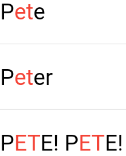
Inspired by the existing Flutter package "highlight_text" which supports word matches ('Peter''), but substring_highlight has more granular character-by-character matches (e.g., 't' in 'Peter').

Limitations:

  1. Highlighted text is not clickable
  2. Doesn't solve perplexing world problems like hunger and climate change

The substrings being searched for highlighting don't have to match at the beginning of the longer strings (can be anywhere inside).

Even space characters will match, but not be highlighted, obviously.

Ancestor MUST have textDirection set (required by internal RichText widget), either through MaterialApp widget or explicitly wrapped by a Directionality widget:

Directionality(
    child: SubstringHighlight(text: 'Peter', term: 't'),
    textDirection: TextDirection.ltr)

Pull Requests

Pull requests are welcome and I try to merge them within a few days.

Examples

Default Styling Example

Code:

As an example, the following code snippet uses this package to highlight matching characters in each search result:

import 'package:substring_highlight/substring_highlight.dart';

...

  @override
  Widget build(BuildContext context) (
    return Container(
      padding: const EdgeInsets.all(12),
      child: SubstringHighlight(
        text: dropDownItem,     // search result string from database or something
        term: searchTerm,       // user typed "et"
      ),
    );
  )
Output:

Screenshot

Customized Styling Example

Code:

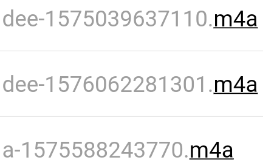
This example adds 'textStyle' and 'textStyleHighlight' to change the colors of the text:

import 'package:substring_highlight/substring_highlight.dart';

...

  @override
  Widget build(BuildContext context) (
    return Container(
      padding: const EdgeInsets.all(12),
      child: SubstringHighlight(
        text: dropDownItem,                         // each string needing highlighting
        term: searchTerm,                           // user typed "m4a"        
        textStyle: TextStyle(                       // non-highlight style                       
          color: Colors.grey,
        ),
        textStyleHighlight: TextStyle(              // highlight style
          color: Colors.black,
          decoration: TextDecoration.underline,
        ),        
      ),
    );
  )
Output:

Screenshot

カテゴリー

ソースリポジトリ

このパッケージを使用しているプロジェクト