Buscar pacotes, repositórios e categorias de apps

Capa de animate_gradient
Detalhes do pacotev0.0.4

animate_gradient

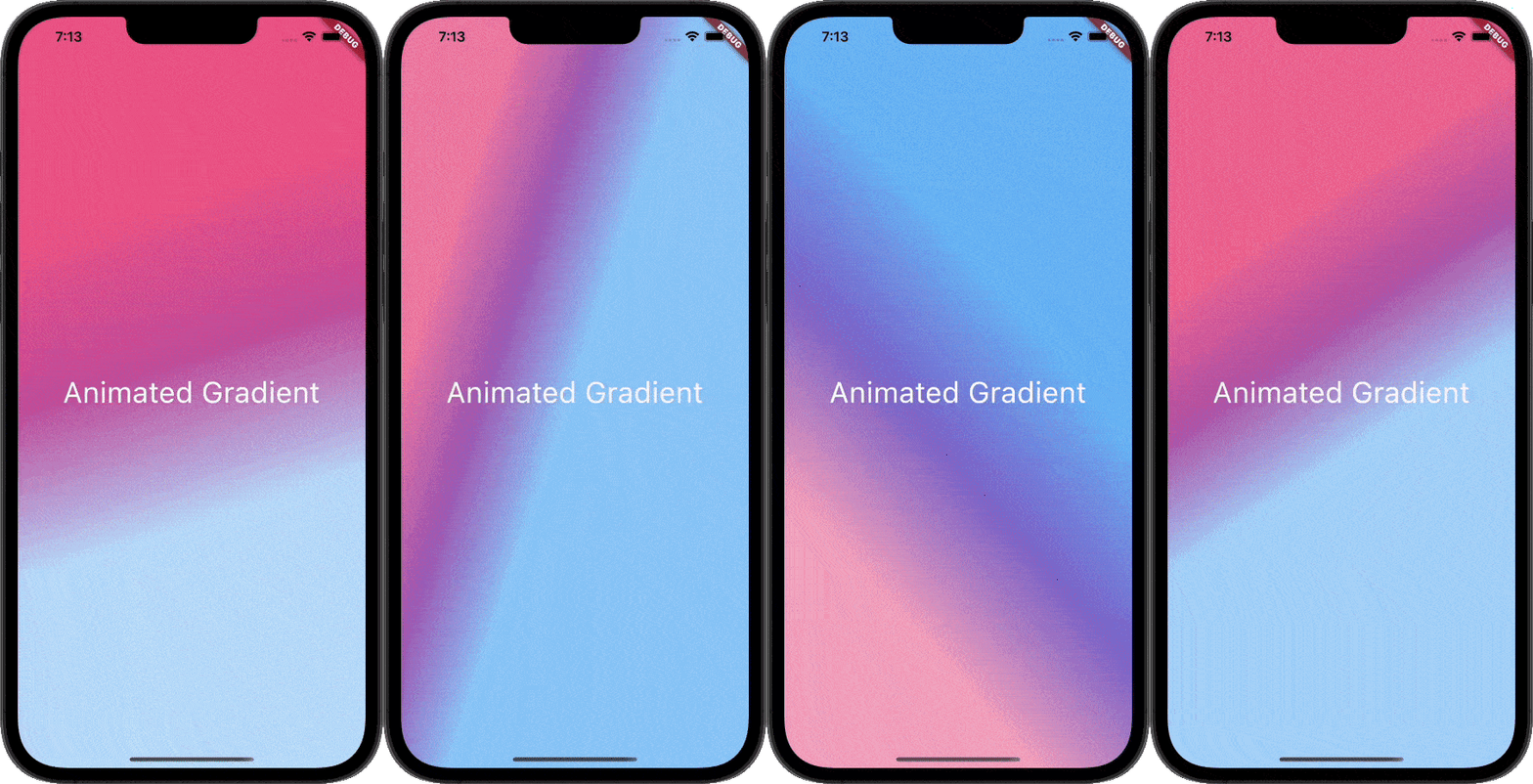
Este pacote permite que você crie gradientes animados sem nenhuma complicação. Basta passar as cores primária e secundária e está pronto.

AndroidiOSWebmacOSWindowsLinux
Downloads em 30 dias
6,4 mil
Curtidas
215
Pontos Pub
160

Instalar pacote

flutter pub add animate_gradient

Visão geral do pacote

Orientação gerada a partir de informações públicas. Apenas para referência.

Animate Gradient é um pacote Flutter que simplifica a criação de gradientes animados. Basta fornecer cores primárias e secundárias para que os desenvolvedores possam gerar transições suaves e dinâmicas de gradiente em diversos elementos da interface. Ele é compatível com múltiplas plataformas, incluindo Android, iOS, Web, macOS, Windows e Linux, tornando-o ideal para aplicativos multiplataforma. O pacote gerencia internamente a lógica de animação, reduzindo o código repetitivo e permitindo integração rápida em projetos existentes. Perfeito para interfaces modernas e visualmente envolventes.

Casos de uso

  • Criando fundos dinâmicos para aplicativos
  • Melhorar telas de inicialização
  • Animando elementos da interface com transições de cor
  • Designando botões interativos
  • Criando fluxos de onboarding visualmente atraentes

Principais recursos

  • Configuração simples baseada em cor
  • Animações suaves de gradiente
  • Compatibilidade multiplataforma
  • Configuração mínima necessária
  • Tratamento de animação embutido

Indicado para

  • Iniciantes do Flutter
  • Designers de UI/UX
  • desenvolvedores de aplicativos multiplataforma
  • Aplicativos que exigem charme visual

Considerações

  • Personalização limitada além da cor e velocidade
  • Pode afetar o desempenho em dispositivos de baixa gama
  • Não adequado para padrões de gradiente complexos

README original

Snapshot do README original do repositório-fonte vinculado. Consulte o repositório para o conteúdo mais recente.

Animate Gradient

pub Animated-Gradient

This Package lets you make animated gradients without any hassle. Just pass the primary and secondary colors and you're done. You can do amazing effects using the alignments. For More info read the docs below.

Usage

Create your first animated gradient.

The only two required arguments are the primaryColors and secondaryColors.

| primaryColors length must greater or equal to 2.| | secondaryColors length must be equal to primaryColors length.|

    import 'package:animate_gradient/animate_gradient.dart';

     AnimateGradient(
        primaryColors: const [
          Colors.pink,
          Colors.pinkAccent,
          Colors.white,
        ],
        secondaryColors: const [
          Colors.blue,
          Colors.blueAccent,
          Colors.white,
        ],
        child: YourWidget(),
      ),
drawing
Play with alignments.

Alignments are optional. You can pass any of the following alignments.

primaryBegin primaryEnd secondaryBegin secondaryEnd

With this in place, you can have some crazy effects.

   import 'package:animate_gradient/animate_gradient.dart';

    AnimateGradient(
       primaryBegin: Alignment.topLeft,
       primaryEnd: Alignment.bottomLeft,
       secondaryBegin: Alignment.bottomLeft,
       secondaryEnd: Alignment.topRight,
       primaryColors: const [
         Colors.pink,
         Colors.pinkAccent,
         Colors.white,
       ],
       secondaryColors: const [
         Colors.white,
         Colors.blueAccent,
         Colors.blue,
       ],
       child: YourWidget(),
     ),
drawing
Alternatively! Use AlignemntGeometry for better control

With the apps built in rtl format normal Alignments cannot always work. So, you can use AlignemntGeometry instead.

primaryBegin --> primaryBeginGeometry

primaryEnd --> primaryEndGeometry

secondaryBegin --> secondaryBeginGeometry

secondaryEnd --> secondaryEndGeometry

With this, you also have an additional property textDirectionForGeometry. This will be used to resolve the AlignmentGeometry

   import 'package:animate_gradient/animate_gradient.dart';

    AnimateGradient(
      primaryBeginGeometry: const AlignmentDirectional(0, 1),
      primaryEndGeometry: const AlignmentDirectional(0, 2),
      secondaryBeginGeometry: const AlignmentDirectional(2, 0),
      secondaryEndGeometry: const AlignmentDirectional(0, -0.8),
      textDirectionForGeometry: TextDirection.rtl,
       primaryColors: const [
         Colors.pink,
         Colors.pinkAccent,
         Colors.white,
       ],
       secondaryColors: const [
         Colors.white,
         Colors.blueAccent,
         Colors.blue,
       ],
       child: YourWidget(),
     ),
drawing

Please note that AlignmentGeometry will be given more priority over Alignment

Available properties

Property Type Description
primaryColors List Starting colors of the animation.
secondaryColors List Ending colors of the animation.
primaryBegin Alignment? Starting Alignment of primaryColors.
primaryEnd Alignment? Ending Alignment of primaryColors.
secondaryBegin Alignment? Starting Alignment of secondaryColors.
secondaryEnd Alignment? Ending Alignment of secondaryColors.
primaryBeginGeometry AlignmentGeometry? Starting AlignmentGeometry of primaryColors.
primaryEndGeometry AlignmentGeometry? Ending AlignmentGeometry of primaryColors.
secondaryBeginGeometry AlignmentGeometry? Starting AlignmentGeometry of secondaryColors.
secondaryEndGeometry AlignmentGeometry? Ending AlignmentGeometry of secondaryColors.
textDirectionForGeometry TextDirection? TextDirection that will be used to resolve AlignmentGeometry
duration Duration? Duration between the transition.
controller AnimationController?
You can pass your own animation controller and use that

to control animation however you want.
animateAlignments bool? If you want to animate alignments.
reverse bool? If you want to reverse the animation.
repeat bool? If you want to repeat the animation.
curve Curve? The curve to use for the animation.
child Widget? You can pass your widget.

Author

This plugin is developed by Vikas Kumar.

Categorias

Repositório-fonte

Projetos que usam este pacote

Ainda não há dados.