Orientação gerada a partir de informações públicas. Apenas para referência.
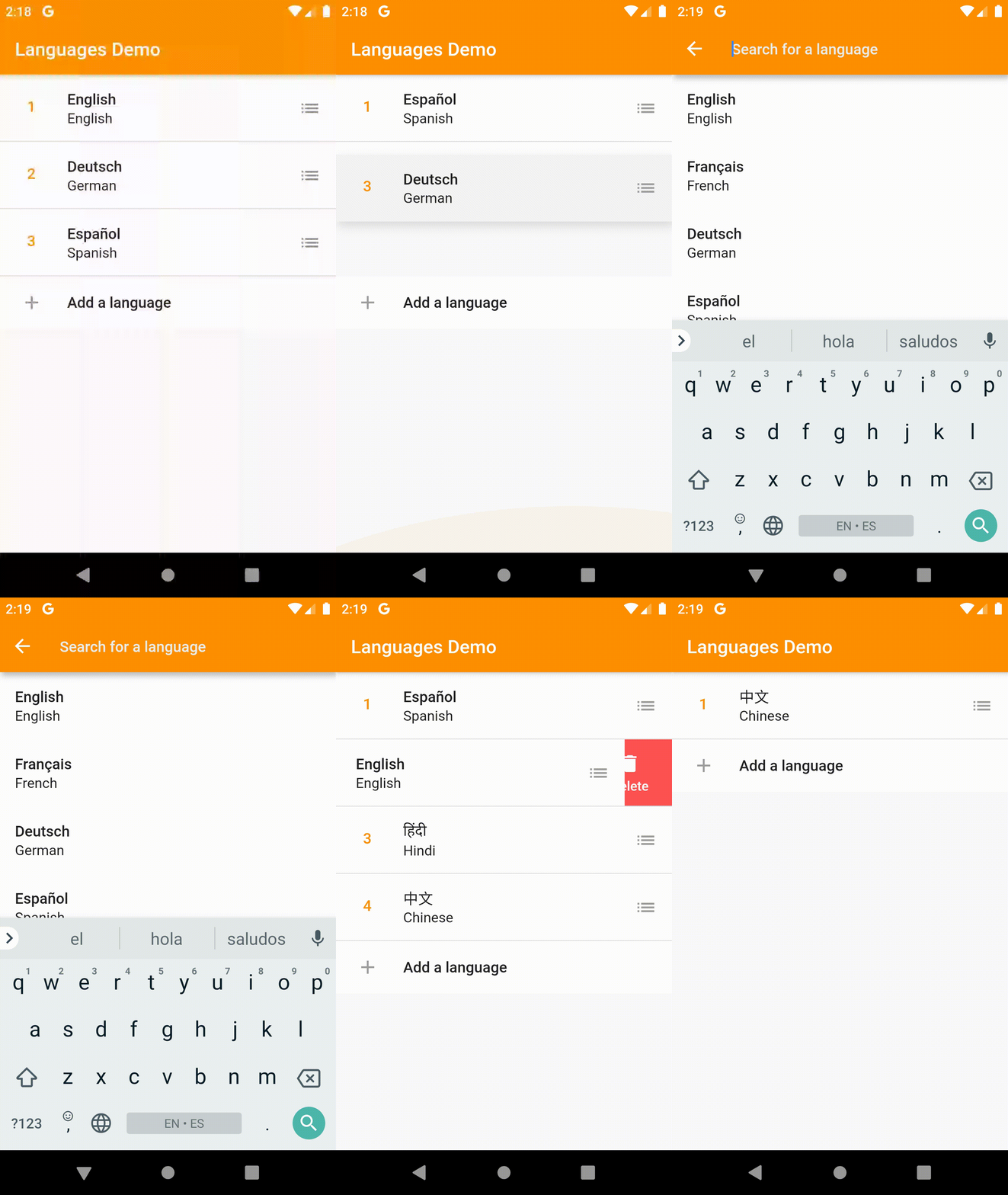
AnimatedListPlus é um pacote Flutter que expande a funcionalidade do ListView fornecendo animações implícitas quando as listas mudam, incluindo transições suaves durante adições, remoções e reordenamento de itens. Ele simplifica a implementação de listas dinâmicas com suporte embutido para animações, garantindo uma experiência fluida do usuário em todas as plataformas. O pacote suporta todas as principais plataformas Flutter e se integra sem problemas em projetos existentes com configuração mínima. Ele melhora as interações da lista ao lidar automaticamente com os estados de animação sem exigir controladores de animação manuais.
Casos de uso
Atualizações dinâmicas da lista com feedback visual
Listas de itens reordenáveis em formulários ou gerenciadores de tarefas
Transições suaves em interfaces de chat ou feed
Aplicações interativas de lista de tarefas
Exibição de dados em tempo real em painéis
Principais recursos
Animações implícitas para mudanças na lista
Suporte integrado para reordenar itens
Compatibilidade multiplataforma
Código mínimo de boilerplate
Gerenciamento automático de estado de animação
curvas de animação personalizáveis
Indicado para
Desenvolvedores construindo interfaces de usuário baseadas em listas interativas
Aplicativos que exigem atualizações em tempo real da lista
Projetos que enfatizam transições suaves de UX
Equipes que desejam reduzir a complexidade da animação
Iniciantes do Flutter explorando recursos avançados de lista
Considerações
Pode afetar o desempenho com listas muito grandes
Requer manipulação cuidadosa das chaves de item
Personalização limitada para lógica de animação complexa
Não ideal para sequências de animação altamente personalizadas
Mais adequado para conjuntos de dados moderados
README original
Snapshot do README original do repositório-fonte vinculado. Consulte o repositório para o conteúdo mais recente.
Animated List Plus
Resurrection of the discontinued implicitly_animated_reorderable_list Plugin.
A Flutter ListView that implicitly calculates the changes between two lists using the MyersDiff algorithm and animates between them for you. The ImplicitlyAnimatedReorderableList adds reordering support to its items with fully custom animations.
If you like this package, consider supporting it by giving it a star on GitHub and a like on pub.dev :heart:
Usage
The package contains two ListViews: ImplicitlyAnimatedList which is the base class and offers implicit animation for item insertions, removals as well as updates, and ImplicitlyAnimatedReorderableList which extends the ImplicitlyAnimatedList and adds reordering support to its items. See examples below on how to use them.
ImplicitlyAnimatedList
ImplicitlyAnimatedList is based on AnimatedList and uses the MyersDiff algorithm to calculate the difference between two lists and calls insertItem and removeItem on the AnimatedListState for you.
Example
// Specify the generic type of the data in the list.ImplicitlyAnimatedList<MyGenericType>(
// The current items in the list.
items: items,
// Called by the DiffUtil to decide whether two object represent the same item.// For example, if your items have unique ids, this method should check their id equality.
areItemsTheSame: (a, b) => a.id == b.id,
// Called, as needed, to build list item widgets.// List items are only built when they're scrolled into view.
itemBuilder: (context, animation, item, index) {
// Specifiy a transition to be used by the ImplicitlyAnimatedList.// See the Transitions section on how to import this transition.returnSizeFadeTransition(
sizeFraction: 0.7,
curve: Curves.easeInOut,
animation: animation,
child: Text(item.name),
);
},
// An optional builder when an item was removed from the list.// If not specified, the List uses the itemBuilder with// the animation reversed.
removeItemBuilder: (context, animation, oldItem) {
returnFadeTransition(
opacity: animation,
child: Text(oldItem.name),
);
},
);
If you have a CustomScrollView you can use the SliverImplicitlyAnimatedList.
As AnimatedList doesn't support item moves, a move is handled by removing the item from the old index and inserting it at the new index.
ImplicitlyAnimatedReorderableList
ImplicitlyAnimatedReorderableList is based on ImplicitlyAnimatedList and adds reordering support to the list.
Example
ImplicitlyAnimatedReorderableList<MyGenericType>(
items: items,
areItemsTheSame: (oldItem, newItem) => oldItem.id == newItem.id,
onReorderFinished: (item, from, to, newItems) {
// Remember to update the underlying data when the list has been// reordered.setState(() {
items
..clear()
..addAll(newItems);
});
},
itemBuilder: (context, itemAnimation, item, index) {
// Each item must be wrapped in a Reorderable widget.returnReorderable(
// Each item must have an unique key.
key: ValueKey(item),
// The animation of the Reorderable builder can be used to// change to appearance of the item between dragged and normal// state. For example to add elevation when the item is being dragged.// This is not to be confused with the animation of the itemBuilder.// Implicit animations (like AnimatedContainer) are sadly not yet supported.
builder: (context, dragAnimation, inDrag) {
final t = dragAnimation.value;
final elevation = lerpDouble(0, 8, t);
final color = Color.lerp(Colors.white, Colors.white.withOpacity(0.8), t);
returnSizeFadeTransition(
sizeFraction: 0.7,
curve: Curves.easeInOut,
animation: itemAnimation,
child: Material(
color: color,
elevation: elevation,
type: MaterialType.transparency,
child: ListTile(
title: Text(item.name),
// The child of a Handle can initialize a drag/reorder.// This could for example be an Icon or the whole item itself. You can// use the delay parameter to specify the duration for how long a pointer// must press the child, until it can be dragged.
trailing: Handle(
delay: constDuration(milliseconds: 100),
child: Icon(
Icons.list,
color: Colors.grey,
),
),
),
),
);
},
);
},
// Since version 0.2.0 you can also display a widget// before the reorderable items...
header: Container(
height: 200,
color: Colors.red,
),
// ...and after. Note that this feature - as the list itself - is still in beta!
footer: Container(
height: 200,
color: Colors.green,
),
// If you want to use headers or footers, you should set shrinkWrap to true
shrinkWrap: true,
);
If you want to contribute your own custom transitions, feel free to make a pull request.
Caveats
Note that this package is still in its very early phase and not enough testing has been done to guarantee stability.
Also note that computing the diff between two very large lists may take a significant amount of time (the computation is done on a background isolate though unless spawnIsolate is set to false).
Acknowledgements
The diff algorithm that ImplicitlyAnimatedList uses was written by Dawid Bota at GitLab.