Buscar pacotes, repositórios e categorias de apps

Capa de app_bar_with_search_switch
Detalhes do pacotev1.8.6

app_bar_with_search_switch

Uma extensão para AppBar que pode transformá-lo em campo de pesquisa.

AndroidiOSWebmacOSWindowsLinux
Downloads em 30 dias
598
Curtidas
59
Pontos Pub
150

Instalar pacote

flutter pub add app_bar_with_search_switch

Visão geral do pacote

Orientação gerada a partir de informações públicas. Apenas para referência.

Um pacote Flutter que estende a funcionalidade do AppBar para alternar suavemente entre uma barra de aplicativo padrão e um campo de pesquisa. Ele oferece uma maneira limpa e interativa de alternar entre modos de navegação e busca dentro da barra de aplicativo, melhorando a experiência do usuário em aplicativos com interações frequentes de busca. O pacote é leve e se integra facilmente em interfaces existentes. Ele é compatível com todas as principais plataformas, incluindo Android, iOS, Web, macOS, Windows e Linux.

Casos de uso

  • Implementando barras de pesquisa dinâmicas em aplicativos móveis e web
  • Criando navegação intuitiva com busca sob demanda
  • Melhorando a experiência do usuário em aplicativos com grande volume de conteúdo
  • Construindo interfaces responsivas com mudanças mínimas na UI
  • Habilitar acesso rápido à pesquisa a partir da barra superior de aplicativos

Principais recursos

  • Alternância rápida entre a barra de aplicativos e o modo de pesquisa
  • Aparência personalizável do campo de pesquisa
  • Suporta comportamentos específicos da plataforma
  • Leve e fácil de integrar
  • Animações embutidas para transições suaves

Indicado para

  • Desenvolvedores criando aplicativos com necessidades frequentes de busca
  • Designers de interface procurando integração elegante de busca
  • Desenvolvedores de aplicativos multiplataforma que visam múltiplos sistemas operacionais
  • Aplicativos que exigem interfaces de busca minimalistas, mas funcionais

Considerações

  • Requer manipulação manual da lógica de pesquisa fora do pacote
  • Pode ser necessário estilização adicional para temas personalizados
  • Limitado à funcionalidade de pesquisa no nível da barra de aplicativos
  • Não adequado para fluxos de trabalho de pesquisa complexos
  • Depende dos widgets Material ou Cupertino do Flutter para compatibilidade total

README original

Snapshot do README original do repositório-fonte vinculado. Consulte o repositório para o conteúdo mais recente.

AppBar with search switch

Content

Intro

An AppBar that can switch into search field.

The AppBarWithSearchSwitch is a replacement class for AppBar, essentially, it returns two different app bars based on whether search is active.

Note: version 1.5+ is lightweight version of this package, version 2.0+ uses SpeechToText package for speech recognition.

This is complete rewrite of flutter_search_bar with support of these features:

Features

Quick overview

Use appBarBuilder parameter to build default AppBar with:

The appBarBuilder is the only required parameter, all other parameters are optional!

Use one of these callbacks to get text from TextField:

Also, there are callbacks for:

This widget support almost all properties of AppBar, but:

  • leading and title properties are now expect - Widget Function(context)?:

    • this is made in order to access AppBarWithSearchSwitch.of(context) methods in them,
    • don't change them unless it necessary and use templates if you need to change these properties.
  • preferredSize here is a method, you should set it via toolbarWidth and toolbarHeight.

Here is a list of all other new properties(without mentioned above) with their default values:

Examples

Online example here: https://alexqwesa.github.io/app_bar_with_search_switch/.

Full example of Stateful widget is here: https://pub.dev/packages/app_bar_with_search_switch/example.

Full example of Stateless widget is here: (github).

Full example of Stateless widget with 10000 elements searched in place and with search button outside of app bar is here: (github).

Full example of Stateless widget there android back button will close search is here: (github).

And the fragment of example code is here:

  //...
  @override
  Widget build(BuildContext context) {
    return Scaffold(
      //
      // *** The Widget AppBarWithSearchSwitch
      //
      appBar: AppBarWithSearchSwitch(
        onChanged: (text) {
          // update you provider here
          // searchText.value = text;
        }, // onSubmitted: (text) => searchText.value = text,
        appBarBuilder: (context) {
          return AppBar(
            title: Text('Example '),
            actions: [
              AppBarSearchButton(),
              // or
              // IconButton(onPressed: AppBarWithSearchSwitch.of(context)?startSearch, icon: Icon(Icons.search)),
            ],
          );
        },
      ),
      // search in body by any way you want, example:
      body: AppBarOnEditListener(builder: (context) { return /* your code here */ ;} ),
    );
  }

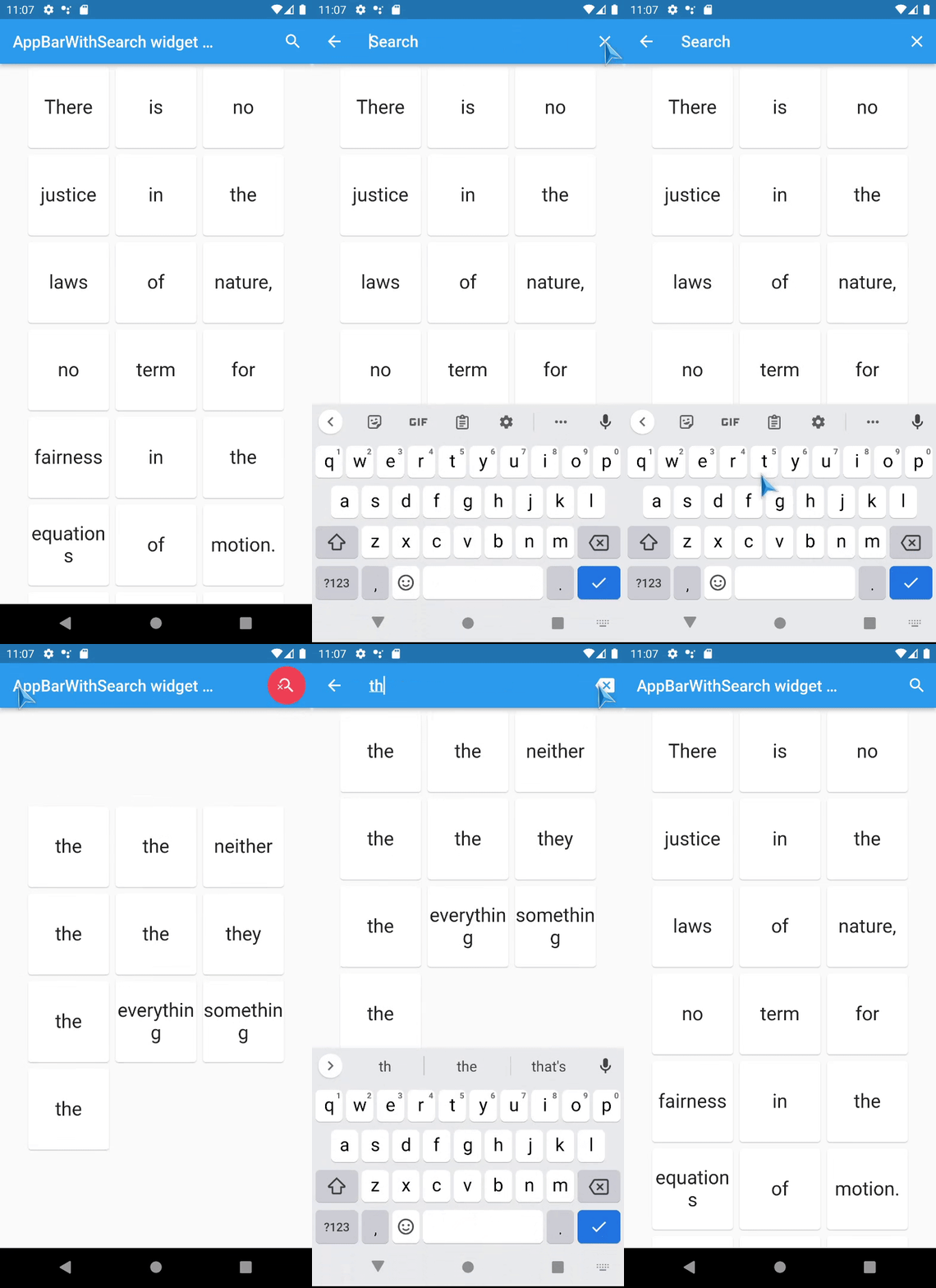
Screenshots

TODO

  • [x] Add speech to text support - done in version 2.0+,
  • [x] Animation for Search app bar activation - done in versions 1.5+
  • [ ] don't use shared default ValueNotifier and TextEditingController ?

FAQ

How to activate search field (isSearchMode=true) of AppBarWithSearchSwitch from somewhere far away?

  • If it is inside the same Scaffold or its children, then:

    1. use AppBarWithSearchFinder,
    2. call AppBarWithSearchFinder.of(context)?.triggerSearch() inside.
  • If it is outside of Scaffold, use customIsSearchModeNotifier,

    1. Initialise variable of type ValueNotifier somewhere up in the widget tree,
    2. Set customIsSearchModeNotifier property of AppBarWithSearchSwitch with this variable,
    3. Set value of this ValueNotifier to true to show Search AppBar,
    4. (Note: currently, if you stop search via this variable(by setting it false), clearOnClose will not work, and callBack onClose will not be called), so use GlobalKey if you need them.

How to make android back button close search? (instead of going to previous screen or exit app)

  1. Initialise variable searchText and isSearchMode of type ValueNotifier somewhere up in the widget tree,
  2. Assign these variables to customIsSearchModeNotifier, customTextNotifier,
  3. Wrap WillPopScope widget over Scaffold, and define parameter onWillPop as in example below:
... // inside a widget
  final isSearchMode = ValueNotifier<bool>(false);
  final searchText = ValueNotifier<String>(''); 

  @override
  Widget build(BuildContext context) {

    return WillPopScope(
      onWillPop: () async { // android back button handler
        if (searchText.value != '') {
          isSearchMode.value = false;
          searchText.value = ''; 
          return false;
        }
        return true;
      },
      child: Scaffold(
        //
        // *** The Widget AppBarWithSearchSwitch
        //
        appBar: AppBarWithSearchSwitch(
          customIsSearchModeNotifier: isSearchMode,
          customTextNotifier: searchText,
          appBarBuilder: (context) {
            return AppBar(
... // you code here

How to add autocompletion to search field?

... // inside a widget
  @override
  Widget build(BuildContext context) {

    return Scaffold(
        appBar: AppBarWithSearchSwitch(
          title:  (context) {
                return Autocomplete<String>(
                  optionsBuilder: (TextEditingValue textEditingValue) {
                    // your code here
                  },
                ); 
          }
          appBarBuilder: (context) {
            return AppBar(
... // you code here

Can it be used with old flutter sdk versions?

The release 1.3.5 is a special release with support of old flutter sdk, it tested with flutter 2.10.0

Known issues

Categorias

Repositório-fonte

Projetos que usam este pacote