Orientação gerada a partir de informações públicas. Apenas para referência.
O pacote assets_audio_player_web é um plugin específico para web que permite aos aplicativos Flutter reproduzir arquivos de áudio armazenados no diretório de recursos do aplicativo diretamente em plataformas web. Ele amplia a funcionalidade do pacote principal assets_audio_player ao fornecer compatibilidade otimizada com web, permitindo que desenvolvedores transmitam e controlem áudio de arquivos locais de recursos sem precisar de servidores externos. Isso garante uma reprodução de áudio contínua em ambientes Android, iOS, macOS e web com comportamento consistente.
Casos de uso
Tocando música de fundo em jogos baseados na web
Transmissão de áudio em streaming a partir de ativos do aplicativo em aplicativos da web
Habilitar reprodução de áudio offline em aplicativos da web do Flutter
Integrando narração de voz em tutoriais da web
Suporte a feedback de áudio em formulários da web
Principais recursos
Reprodução de áudio apenas na web a partir de recursos
Integração contínua com assets_audio_player
Suporta MP3, WAV e outros formatos comuns
Configuração mínima com Flutter pub add
Consistência entre plataformas em dispositivos móveis e na web
Indicado para
Desenvolvedores Flutter construindo aplicativos de áudio para web
Aplicativos que exigem reprodução de áudio offline
Conteúdo web educacional ou interativo
Jogos com efeitos sonoros embutidos
Projetos usando assets_audio_player em múltiplas plataformas
Considerações
Funciona apenas na plataforma web
Requer ativos declarados corretamente no pubspec.yaml
Limitado a arquivos de áudio armazenados em assets
Sem suporte para streaming de URLs
Depende do pacote parente assets_audio_player
README original
Snapshot do README original do repositório-fonte vinculado. Consulte o repositório para o conteúdo mais recente.
🎧 assets_audio_player 🔊
Play music/audio stored in assets files (simultaneously) directly from Flutter (android / ios / web / macos).
You can also use play audio files from network using their url, radios/livestream and local files
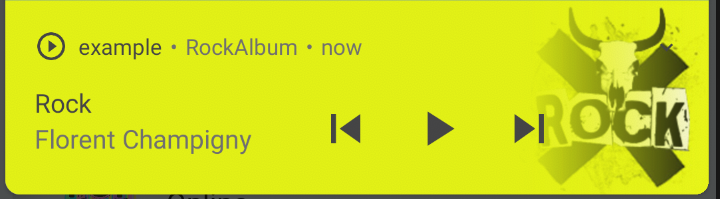
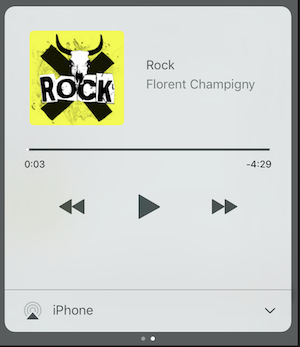
Notification can be displayed on Android & iOS, and bluetooth actions are handled
AssetsAudioPlayer.setupNotificationsOpenAction((notification) {
//custom actionreturntrue; //true : handled, does not notify others listeners//false : enable others listeners to handle it
});
Then if you want a custom action on widget
AssetsAudioPlayer.addNotificationOpenAction((notification) {
//custom actionreturnfalse; //true : handled, does not notify others listeners//false : enable others listeners to handle it
});
Custom actions
You can enable/disable a notification action
open(AUDIO,
showNotification: true,
notificationSettings: NotificationSettings(
prevEnabled: false, //disable the previous button//and have a custom next action (will disable the default action)
customNextAction: (player) {
print("next");
}
)
)
Update audio's metas / notification content
After your audio creation, just call
audio.updateMetas(
       player: _assetsAudioPlayer, //add the player if the audio is actually played
       title: "My new title",
       artist: "My new artist",
       //if I not provide a new album, it keep the old one
       image: MetasImage.network(
         //my new image url
       ),
);
You can create new AssetsAudioPlayer using AssetsAudioPlayer.newPlayer(),
which will play songs in a different native Media Player
This will enable to play two songs simultaneously
You can have as many player as you want !
///play 3 songs in parallelAssetsAudioPlayer.newPlayer().open(
Audio("assets/audios/song1.mp3")
);
AssetsAudioPlayer.newPlayer().open(
Audio("assets/audios/song2.mp3")
);
//another way, with create, open, play & dispose the player on finishAssetsAudioPlayer.playAndForget(
Audio("assets/audios/song3.mp3")
);
Each player has an unique generated id, you can retrieve or create them manually using
final player = AssetsAudioPlayer.withId(id: "MY_UNIQUE_ID");
🗄️ Playlist
assetsAudioPlayer.open(
  Playlist(
    audios: [
      Audio("assets/audios/song1.mp3"),
      Audio("assets/audios/song2.mp3")
    ]
  ),
  loopMode: LoopMode.playlist //loop the full playlist
);

assetsAudioPlayer.next();
assetsAudioPlayer.prev();
assetsAudioPlayer.playlistPlayAtIndex(1);
Audio Widget
If you want a more flutter way to play audio, try the AudioWidget !
Just remove the Audio from the tree !
Or simply keep play: false
🎧 Listeners
All listeners exposes Streams
Using RxDart, AssetsAudioPlayer exposes some listeners as ValueObservable (Observable that provides synchronous access to the last emitted item);
🎵 Current song
//The current playing audio, filled with the total song duration
assetsAudioPlayer.current //ValueObservable<PlayingAudio>//Retrieve directly the current played assetfinalPlayingAudio playing = assetsAudioPlayer.current.value;
//Listen to the current playing song
assetsAudioPlayer.current.listen((playingAudio){
final asset = playingAudio.assetAudio;
final songDuration = playingAudio.duration;
})
⌛ Current song duration
//Listen to the current playing songfinal duration = assetsAudioPlayer.current.value.duration;
⏳ Current position (in seconds)
assetsAudioPlayer.currentPosition //ValueObservable<Duration>//retrieve directly the current song positionfinalDuration position = assetsAudioPlayer.currentPosition.value;
returnStreamBuilder(
stream: assetsAudioPlayer.currentPosition,
builder: (context, asyncSnapshot) {
finalDuration duration = asyncSnapshot.data;
returnText(duration.toString());
}),
finalLoopMode loopMode = assetsAudioPlayer.loop;
// possible values// LoopMode.none : not looping// LoopMode.single : looping a single audio// LoopMode.playlist : looping the fyll playlist
assetsAudioPlayer.setLoopMode(LoopMode.single);
assetsAudioPlayer.loopMode.listen((loopMode){
//listen to loop
})
assetsAudioPlayer.toggleLoop(); //toggle the value of looping
🏃 Play Speed
assetsAudioPlayer.setPlaySpeed(1.5);
assetsAudioPlayer.playSpeed.listen((playSpeed){
//listen to playSpeed
})
//change play speed for a particular AudioAudio audio = Audio.network(
url,
playSpeed: 1.5
);
assetsAudioPlayer.open(audio);
🎙️ Pitch
assetsAudioPlayer.setPitch(1.2);
assetsAudioPlayer.pitch.listen((pitch){
//listen to pitch
})
//change pitch for a particular AudioAudio audio = Audio.network(
url,
pitch: 1.2
);
assetsAudioPlayer.open(audio);
Android only allow HTTPS calls, you will have an error if you're using HTTP,
don't forget to add INTERNET permission and seet usesCleartextTraffic="true" in your AndroidManifest.xml
iOS only allow HTTPS calls, you will have an error if you're using HTTP,
don't forget to edit your info.plist and set NSAppTransportSecurity to NSAllowsArbitraryLoads