
Buscar pacotes, repositórios e categorias de apps

Capa de auto_size_widget
Detalhes do pacotev0.0.4

auto_size_widget

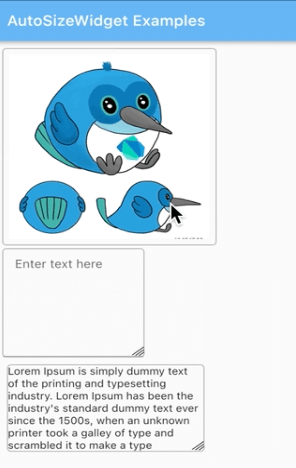
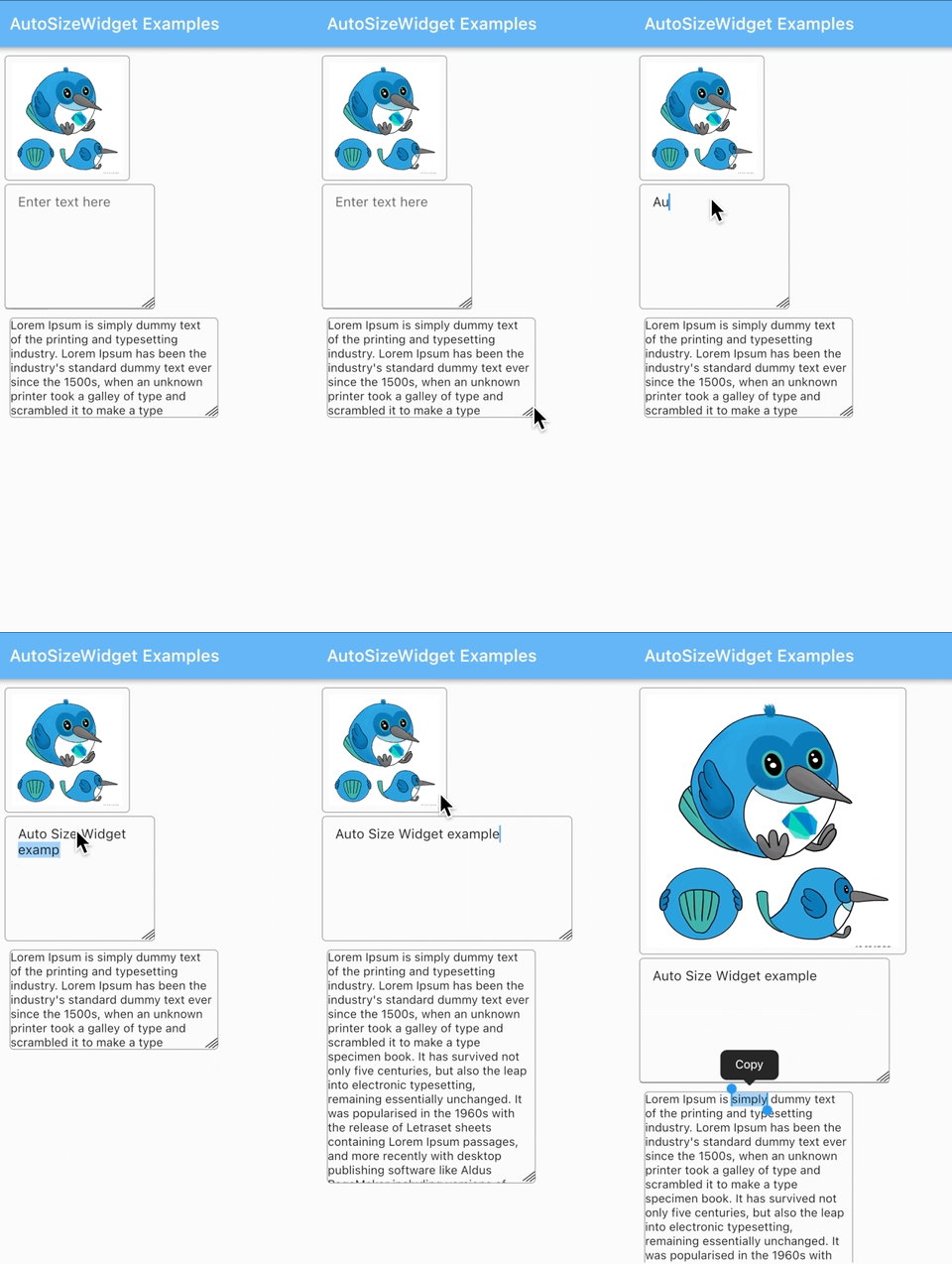
Um widget do Flutter que pode redimensionar o widget filho arrastando o canto do widget.

AndroidiOSWebmacOSWindowsLinux
Downloads em 30 dias
153
Curtidas
38
Pontos Pub
130

Instalar pacote

flutter pub add auto_size_widget

Visão geral do pacote

Orientação gerada a partir de informações públicas. Apenas para referência.

O pacote auto_size_widget fornece um widget Flutter que permite o redimensionamento dinâmico de seu filho ao arrastar a borda, permitindo ajustes intuitivos de layout. Foi projetado para interfaces interativas onde os usuários precisam redimensionar elementos manualmente dentro do aplicativo. O pacote é compatível com múltiplas plataformas, incluindo Android, iOS, Web, macOS, Windows e Linux, tornando-o versátil para desenvolvimento multiplataforma. Integra-se perfeitamente com layouts existentes do Flutter e melhora a experiência do usuário por meio de manipulação direta.

Casos de uso

  • Design de interface do usuário interativa
  • Ajuste dinâmico de layout
  • redimensionamento de widget controlado pelo usuário
  • Interfaces responsivas multiplataforma
  • Prototipagem de layouts interativos
  • Personalização de UI em tempo real

Principais recursos

  • Funcionalidade de redimensionamento por arrasto no canto
  • Compatibilidade multiplataforma
  • Integração fácil com widgets do Flutter
  • Suporta todas as principais plataformas
  • Configuração mínima necessária
  • comportamento de layout responsivo

Indicado para

  • Designers de UI prototipando layouts interativos
  • Desenvolvedores criando painéis personalizáveis
  • Aplicativos que exigem redimensionamento manual do widget
  • Aplicações multiplataforma com interfaces dinâmicas
  • Ferramentas educacionais ou criativas com elementos interativos

Considerações

  • Pode entrar em conflito com outros detectores de gestos
  • Impacto no desempenho com filhos complexos
  • Requer manuseio cuidadoso em layouts aninhados
  • Não adequado para interfaces estáticas ou somente leitura
  • Limitado a redimensionamento de único filho sem lógica adicional
  • Desafios potenciais de acessibilidade com gestos de toque
README original

Snapshot do README original do repositório-fonte vinculado. Consulte o repositório para o conteúdo mais recente.

Auto Size Widget

A Flutter widget that can resize the child widget by dragging the widget corner.

Installation

  1. Add the latest version of the package to your pubspec.yaml (and run 'dart pub get'):
dependencies:
    auto_size_widget: ^0.0.3
  1. Import the package and use it in your Flutter app.
import 'package:auto_size_widget/auto_size_widget.dart';

Example

  1. To resize both the height and the width of the widget

initialWidth and initialHeight should be different from maxWidth and maxHeight respectively.

AutoSizeWidget(
  initialWidth: 120,
  initialHeight: 120,
  maxWidth: 320,
  maxHeight: 320,
  boxDecoration: BoxDecoration(
    border: Border.all(width: 1, color: Colors.grey),
    borderRadius: BorderRadius.circular(5)),
  child: Image.network(
    'https://docs.flutter.dev/assets/images/dash/early-dash-sketches2.jpg',
    fit: BoxFit.fill,
  ),
),
  1. To resize the height of the widget

initialWidth and maxWidth should be same to ensure that the width does not change on resize.

AutoSizeWidget(
  initialWidth: 250,
  initialHeight: 120,
  maxWidth: 250,
  maxHeight: 280,
  boxDecoration: BoxDecoration(
    border: Border.all(width: 1, color: Colors.grey),
    borderRadius: BorderRadius.circular(5),
  ),
  child: const SelectableText(
    "Lorem Ipsum is simply dummy text of the printing and typesetting industry. Lorem Ipsum has been the industry's standard dummy text ever since the 1500s, when an unknown printer took a galley of type and scrambled it to make a type specimen book. It has survived not only five centuries, but also the leap into electronic typesetting, remaining essentially unchanged. It was popularised in the 1960s with the release of Letraset sheets containing Lorem Ipsum passages, and more recently with desktop publishing software like Aldus PageMaker including versions of Lorem Ipsum."
  ),
),           
  1. To resize the width of the widget

initialHeight and maxHeight should be same to ensure that the height does not change on resize.

AutoSizeWidget(
  initialWidth: 150,
  initialHeight: 200,
  maxWidth: 300,
  maxHeight: 200,
  boxDecoration: BoxDecoration(
    border: Border.all(width: 1, color: Colors.grey),
    borderRadius: BorderRadius.circular(5)),
  child: TextFormField(
    keyboardType: TextInputType.multiline,
    maxLines: 3 * 120,
    textAlign: TextAlign.start,
    decoration: const InputDecoration(
      focusedBorder: InputBorder.none,
      contentPadding:
        EdgeInsets.symmetric(vertical: 11, horizontal: 15),
      hintText: "Enter text here"
    ),
  ),
),                  

Categorias

Repositório-fonte

Projetos que usam este pacote

Ainda não há dados.