Orientação gerada a partir de informações públicas. Apenas para referência.
Um pacote Flutter projetado para criar layouts interativos de reserva de assentos para transporte e locais de eventos, como ônibus, teatros e aviões. Ele fornece componentes de interface personalizáveis para representar assentos, permitindo que os usuários selecionem, destaquem e gerenciem reservas com facilidade. O pacote suporta múltiplas plataformas, incluindo Android, iOS, Web, macOS, Windows e Linux, tornando-o ideal para aplicativos multiplataforma que exigem interfaces intuitivas de seleção de assentos.
Casos de uso
Reserva de passagem de ônibus
Reserva de assento de teatro
Layout de assentos de avião
Sistemas de venda de ingressos
Aplicativos de reserva multi-local
Mapas interativos de assentos
Principais recursos
Estilo de assento personalizável
Seleção de assento em tempo real
Suporte para múltiplas disposições de assentos
Compatibilidade multiplataforma
Gerenciamento de estado de assento embutido
Design responsivo para todos os dispositivos
Indicado para
Aplicativos de viagem e transporte
Software de gerenciamento de eventos e locais
Plataformas de bilhetagem
Interfaces de reserva móvel e web
Desenvolvedores que precisam de componentes UI de assento reutilizáveis
Considerações
Requer integração manual da lógica de reserva
Validação interna limitada para conflitos de assento
Mais adequado para layouts de assentos estáticos ou semi-dinâmicos
Pode ser necessário gerenciamento de estado adicional para fluxos de trabalho complexos
Depende de dados externos para disponibilidade de assentos
README original
Snapshot do README original do repositório-fonte vinculado. Consulte o repositório para o conteúdo mais recente.
book_my_seat
This is a flutter package to create seat booking layout for bus, theatre, aeroplane etc. This gives you facility to select a seat by gestures like zoom-in, zoom-out, pan etc.
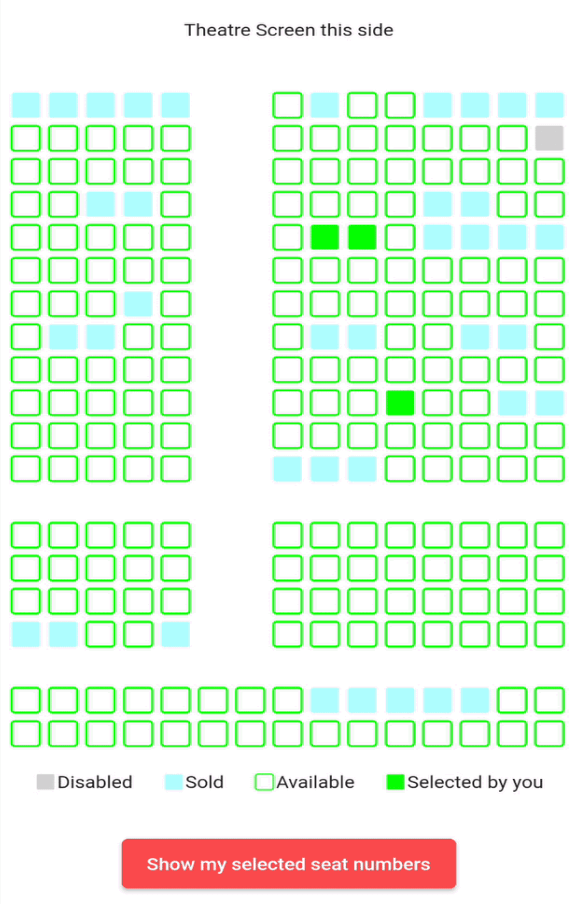
Some examples(below is for theatre but you can implement the package for bus etc also)
" "
Example project and blog for better understanding 🚀
onSeatStateChanged: - This is a callback method which gets called when user clicks on a seat which has current state equals to either SeatState.selected or SeatState.unselected.
The params in this method are: rowIndex - the index of the row where this seat is situated colIndex - the index of the column where this seat is situated updatedSeatState - this is the updated state of the seat after user clicks on the seat. It is an enum of type SeatState
stateModel: - It is an object of class SeatLayoutStateModel which describes the initial state of the whole layout(maybe bus or aeroplane or theatre). The params in this method are: rows - number of rows in the area(I will refer bus/aeroplane/theatre etc as area from now onwards) cols - number of columns in the area. seatSvgSize - size of individual seat pathUnSelectedSeat, pathSelectedSeat, pathSoldSeat, pathDisabledSeat - path of the svg assets you want to show for unselected(available), selected(by you right now), already sold and disabled(non-choosable) seats respectively currentSeatsState - this is the main parameter. It is a 2D list i.e. of type List<List<SeatState>> (SeatState enum is explained below). This describes the initial state of the area i.e. state of each seat whether it is already sold or unselected(available) or selected by you or disabled(non-selectable).
SeatState enum:
It is a dart enum. This describes the current state of individual seat. This currently holds 5 states unselected, selected, sold, disabled and empty.
Brief description of each:
unselected - state when a seat is available and user can select it
selected - state when user has selected an unselected(available) seat (i.e. a seat which had its state == unselected)
sold - state when it is already sold to some other user
disabled - state when a seat is disabled and nobody can select it
empty - state of the cell in 2D area which is an empty place(consider vacant ground) in the bus/theatre/aeroplane etc. This can mimic staircase or aisle or some other place in the area where there are no seats
NOTE: User can only click on seats which have state equals to SeatState.selected or SeatState.unselected.
Example project and blog for better understanding 🚀

 " "